EasyManua.ls Logo

Omron NT20S - User Manual

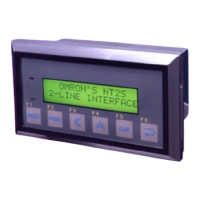
Omron NT20S
308 pages
Print Icon
To Next Page IconTo Next Page
Loading...
Cat No. V020-E1-04
NT20S
Programmable Terminal
OPERATION MANUAL

Table of Contents

Questions and Answers

  • V
    vwhiteAug 19, 2025
    What to do if I cannot communicate with the PC/Host using Omron NT20S Touch terminals?
    • M
      Michael BrownAug 19, 2025
      If your Omron Touch terminal can't communicate with the PC/Host, verify that the memory switch settings match on both devices. Also, ensure that the NT20S and PC are correctly connected using the appropriate connector cable. If you are using NT Link (1:N), make sure there is no unit number duplication. Finally, confirm that power is supplied to the NT20S, PC, or host.
  • P
    Paula WoodsAug 21, 2025
    How to fix communication issues with the support tool for Omron NT20S Touch terminals?
    • A
      Alexandra GardnerAug 21, 2025
      If you are experiencing communication issues with the support tool for your Omron Touch terminal, first display the system menu and select the Transmit Mode. Then, check the connector cable installation. Finally, ensure that the PT type and direct connection settings in the support tool's settings match those of the NT20S.
  • N
    Norma BowmanAug 23, 2025
    Why is the power LED not turning on for my Omron NT20S?
    • M
      Michael StewartAug 23, 2025
      If the POWER LED on your Omron Touch terminal fails to illuminate, first ensure that the device is receiving power by checking all connections. If the connections are correct and the LED still doesn't turn on, it's possible that the power supply fuse has blown, in which case you should contact your OMRON service center.
  • S
    Sean YoungAug 26, 2025
    Why is the touch panel not responding on my Omron NT20S Touch terminals?
    • J
      Joseph CooperAug 26, 2025
      If the Omron Touch panel does not respond to touch, it could be due to malfunction caused by external noise. Try distancing the communication cable from the source of the noise and insert a noise filter in the power supply line. If this does not resolve the issue, the touch panel might be broken. Check the touch panel by performing the touch panel test in the I/O check in the maintenance mode.
  • J
    Javier NguyenAug 27, 2025
    What does 'Time Out' mean on Omron NT20S Touch terminals and how to fix it?
    • A
      Alyssa MartinAug 27, 2025
      If you receive a "Time Out" error on your Omron Touch terminal, first, reconnect the cable to ensure it is properly connected. Next, verify that the PC is running and able to communicate with the NT20S. Lastly, confirm the proper command length, as the error can occur if the transmission time exceeds 55 seconds.
  • I
    izimmermanAug 29, 2025
    How to resolve ACIA Parity Error on Omron Touch terminals?
    • T
      Tracie ReedAug 30, 2025
      If you are experiencing (ACIA) Parity Error, Framing Error, Overflow Error, or Overrun errors with your Omron Touch terminal, first check that the parity bit, frame length, baud rate, stop bit length, and flow control settings of the PC match the settings of the NT20S. If the issue persists, and communication occurs in a noisy environment, use a noise-resistant cable. Also, ensure that the connectors of the connecting cable are correctly connected by reconnecting the cable.
  • N
    Nicole LoveSep 1, 2025
    What to do if the screen is completely white on Omron NT20S?
    • I
      iwellsSep 1, 2025
      If the screen on your Omron Touch terminal is completely white, it indicates that screen #0 has been read at the host side. This is not an error. To resolve this, simply change the screen number.
  • C
    Caleb MartinezSep 3, 2025
    Why is the buzzer sounding and the RUN LED off on my Omron NT20S?
    • R
      Renee TaylorSep 3, 2025
      If the buzzer sounds and the RUN LED is off on your Omron Touch terminal, it is likely due to malfunction caused by external noise. To resolve this, distance the communication cable from the source of the noise and insert a noise filter in the power supply line.
  • D
    Derek WhitneySep 5, 2025
    How to fix a 'Unit No. Error' on Omron NT20S?
    • J
      jnealSep 5, 2025
      If you encounter a "Unit No. Error" on your Omron Touch terminal, first, ensure that the PC unit # is set to “0”. If the issue persists, check PC operation to ensure it is not transmitting incorrect data. Finally, if communication occurs in an environment with high levels of noise, use a noise-resistant cable.
  • J
    Jeffery CooperSep 7, 2025
    What does 'Setting Error' mean on Omron NT20S and how to fix it?
    • L
      Laura SnyderSep 7, 2025
      If you encounter a "Setting Error" on your Omron Touch terminal, it indicates that the bits or words allocated to the PC memory cannot be found in the screen data. To resolve this, check the memory area in the PC used and correct the bit and word allocations in the screen data.

Summary

PRECAUTIONS

Safety Precautions

Provides essential safety guidelines for operating the programmable terminal.

Intended Audience

Identifies the personnel for whom this manual is intended.

General Precautions

Outlines general guidelines for operating the programmable terminal safely.

SECTION 1 Functions of the NT20 S

Role and Operation of NT20 S

General overview of the NT20S's role and basic operations for new users.

Functions of NT20 S

Details the features and capabilities of the NT20S programmable terminal.

System Configuration

Describes the basic configuration of a system utilizing the NT20S.

Direct Connection Function

Explains the direct connection function available with NT20S models.

Communications with PC by Direct Connection

Explains how to establish communication between the NT20S and a PC using direct connection.

Communications by RS-232 C

Provides a description of control commands sent via RS-232C interface.

Before Operating

Outlines the essential steps to follow before starting the NT20S system.

SECTION 2 Hardware Settings and Connections

Description of Parts and Settings

Details the components and settings for the NT20S hardware.

Installation

Covers the procedures for installing the NT20S in an operation panel.

Connecting to the Support Tool

Explains how to connect the NT20S to a computer using a support tool.

Connection to a PC by the Host Link

Describes the process of connecting the NT20S to an OMRON PC using the host link method.

Connection to a PC by the NT Link

Explains how to connect the NT20S to a PC using the NT link communication method.

Connection to a PC by the NT Link (1:N)

Details connecting the NT20S to a PC using the NT link (1:N) method.

Communicating with the PC Using C200 H Direct Communication

Explains how to communicate with a PC using C200H direct communication.

Host Connections by RS-232 C

Describes how to connect the NT20S to a host computer using RS-232C.

SECTION 3 System Menu Operation

Operation Flow by the System Menu

Outlines the procedure for operating the NT20S via the System Menu.

Starting the NT20 S

Details the steps to start up the NT20S and access system settings.

Operation Modes and the System Menu

Explains the different operation modes and their relation to the System Menu.

Initializing Memory

Details the procedure for initializing the NT20S unit memory.

Setting the Conditions of Communications with the PC;Host by Using the Memory Switches

Explains how to configure communication settings using memory switches.

Registering the Screen Data

Describes the procedure to register screen data to the NT20S.

Starting the Operation

Covers connecting to the PC/Host and starting the NT20S operation.

Various System Settings

Details various settings that can be configured via memory switches.

System Maintenance

Covers procedures for maintaining the NT20S system and checking its status.

SECTION 4 NT20 S Functions and Operation

Creating and Transmitting Screen Data

Describes how to create and transmit screen data using the support tool.

Outline of Functions

Provides an overview of the NT20S screen's capabilities and elements.

Screen Display

Explains the types of screens and how they are managed on the NT20S.

Memory Tables

Details the character-string and numeral memory tables used by the NT20S.

Bar Graphs

Describes the functions and attributes of bar graphs that can be displayed.

Lamps

Explains the functions and attributes of lamps used for displaying PC bit status.

Touch Switches

Details the functions and attributes of touch switches on the NT20S screen.

Numeral Setting

Explains the numeral setting function for inputting numerical values.

SECTION 5 How to Use the Host Link;NT Link

Overview of Direct Connection Operations

Provides an overview of operations using host link, NT link, and C200H direct communication.

Memory Tables and Bar Graphs

Details displaying and referencing memory table contents and bar graph functions.

Lamps, Touch Switches, Numeral Setting

Explains the allocation, display, and notification of lamps, touch switches, and numeral setting.

NT20 S Status Control

Explains how to control NT20S functions from the PC via PT status control bits.

Notification of the Operating Status to the PC (Determining the NT20 S Operating Status)

Describes how to determine the NT20S operating status by reading PT status words.

SECTION 6 Using the RS-232 C

Table of Commands

Lists operating and terminal commands for RS-232C communication.

RS-232 C Communications

Details the communication procedure and examples for using the RS-232C interface.

Screen Display

Describes commands for switching and ascertaining NT20S screen numbers.

Memory Tables

Explains commands for operating memory tables like writing and copying.

Lamps, Touch Switches, Numeral Setting

Details commands for operating lamps, touch switches, and numeral setting.

Controlling the NT20 S Status

Describes methods for controlling NT20S status, backlight, and buzzer.

Terminal Commands

Explains commands for displaying text and graphics independently of registered screens.

Key to Programs

Provides information on programs and commands usable with the NT20S.

SECTION 7 Troubleshooting and Maintenance

Hardware Faults

Provides a guide to identifying and resolving hardware faults based on symptoms.

Responding to Displayed Error Messages

Explains how to interpret and address error messages displayed on the NT20S.

Maintenance of the NT20 S

Covers essential maintenance procedures to keep the NT20S in optimal condition.

Inspection and Cleaning

Details regular cleaning and inspection methods for the NT20S.

APPENDICES

APPENDIX A Specifications

Lists the general, performance, display, and communication specifications of the NT20S.

APPENDIX B Dimensions

Provides outside dimensions and installation dimensions for the NT20S.

APPENDIX C Handling the RS-232 C;RS-422 A Converter Unit

Details the dimensions, installation, and removal of the RS-232C/RS-422A converter unit.

APPENDIX D NT20 S Installation Environment

Outlines recommended points and precautions for installing the NT20S.

APPENDIX G Method for Making the Cable for Connection to the Host

Explains how to make connection cables for the NT20S and PC.

APPENDIX J Model List

Lists available NT20S models, host link units, and compatible CPUs.

Revision History

Omron NT20S Specifications

General IconGeneral
BrandOmron
ModelNT20S
CategoryTouch terminals
LanguageEnglish

Related product manuals