Oper at o r Pan el V O L UM E T R I C D O SER M AC H I NE – M o d. DV G 5 00R P – OM R O N N B 5 Q 20/24
TO EDIT RECIPE
The modification of a recipe parameters is possible only in pages protected by
a password, which you can enter by the button ;
this operation can be executed also during the automatic operation of the
machine , as the recipe number in the field ACTUAL RECIPE (the recipe under process) is not
affected.
By pressing the button you enter the specific programming of the machine parameters.
To access these parameters you will be required to provide a password.
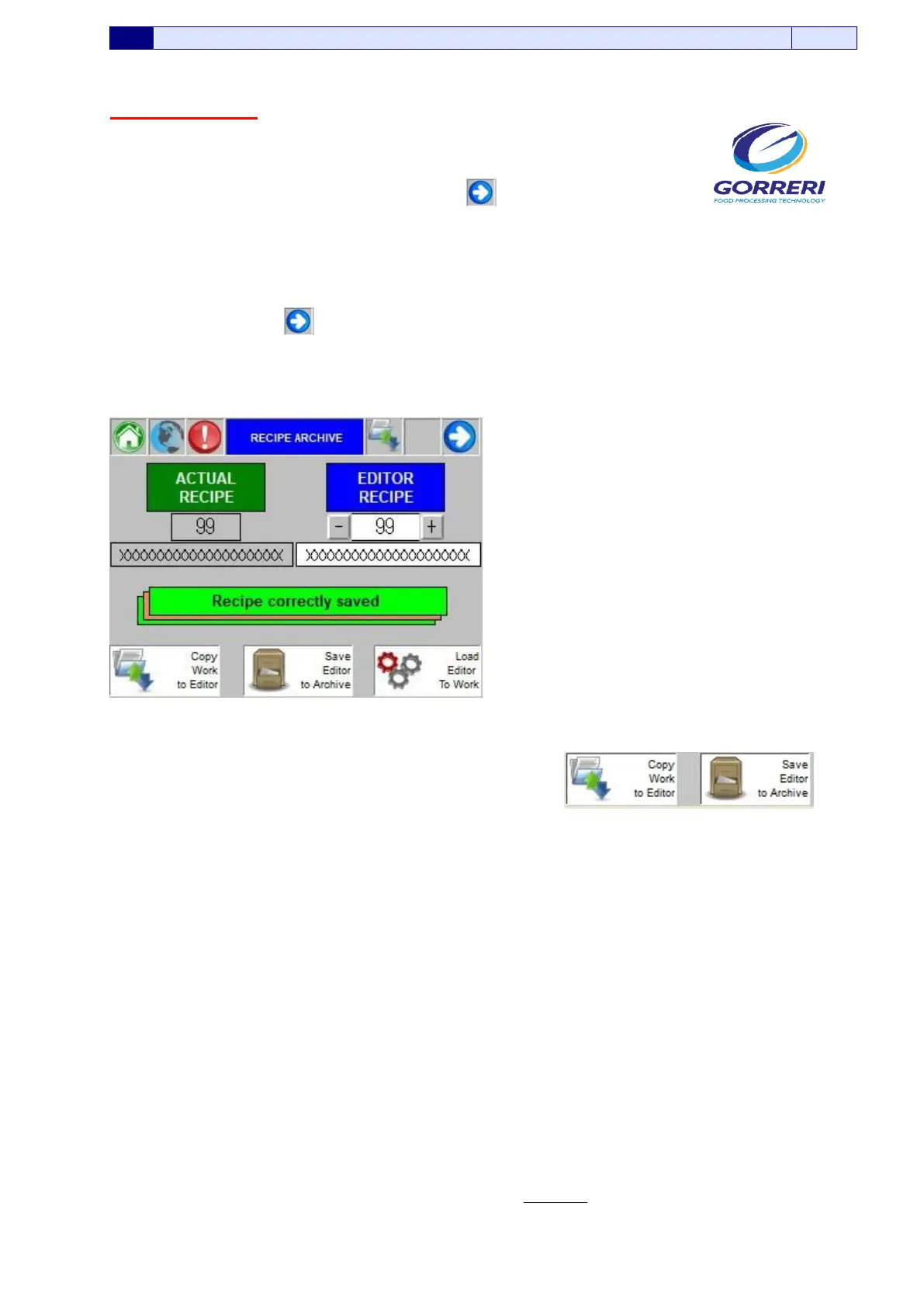
After modifying the parameters, you exit from the parameters programming area and you get the page
here below which is very similar to the one of picture 5.7.1.
Pic. 5.7.2
The substantial differences are the presence of the buttons .
The addition of the above buttons is determined by the fact that, to reach this step the password has
been introduced.
SAVE EDITOR IN ARCHIVE: the parameters of the EDITOR RECIPE can be saved into the plc
memory.
This means that at the next recall of the recipe , the same parameters will be loaded exactly as they
were saved.
If you do not execute this operation, all the modifications will be lost.
COPY ACTUAL RECIPE IN EDITOR: All the parameters of the ACTUAL RECIPE are copied in the
selected EDITOR RECIPE.
This operation can be used to make copies of recipe.
When you want to work on a new product, you load into execution the recipe of the most resembling
product.
So , when you start to try the operation, you will change all the necessary parameters.
When you obtain the optimal working , you can execute the ‘Copy Actual Recipe in Editor’
operation , taking care to select a number of RECIPE EDITOR not used, yet; immediately after, you
will execute ‘Save Editor in Archive’.
In this way, you execute the operation most known as ‘Save As’.






 To Next Page