Oper at o r Pan el V O L UM E T R I C D O SER M AC H I NE – M o d. DV G 5 00R P – OM R O N N B 5 Q 22/24
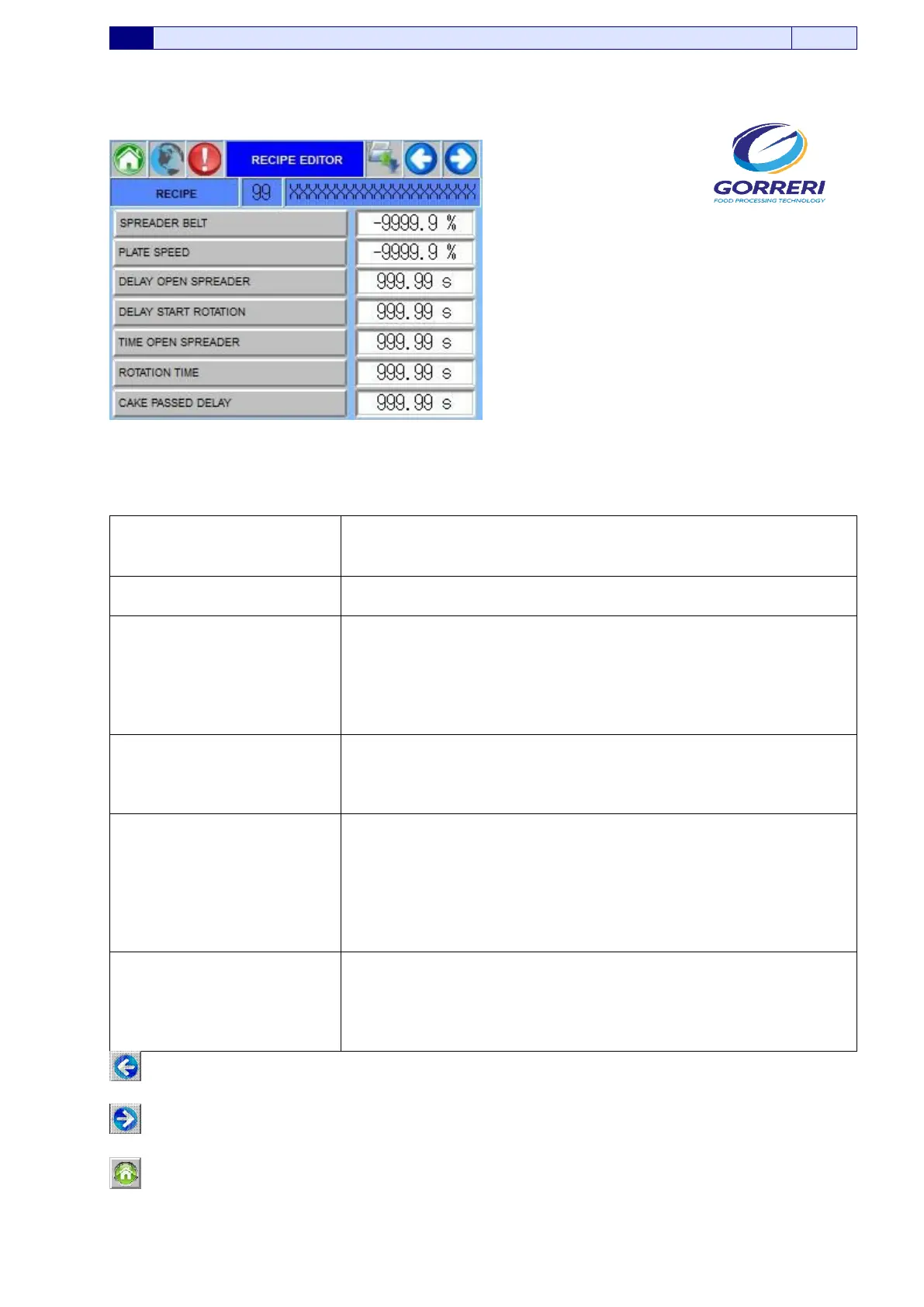
5.8.2 RECIPE EDITOR
Pic. 5.8.2
Information indicated in the Recipe Editor page, are carefully explained as follows:
RECIPE
In this cell, it is possible to visualize the actual recipe activated.
PLATE SPEED
In this line, it is possible to set up the plate rotation speed
(expressed in percentage)
DELAY OPEN SPREADER
In this line, it is possible to set up the operation time delay
(expressed in seconds) of the Nozzle, during the recipe.
It starts when the Cake will activate the micro of the cake
passage.
When this time is finished the nozzle open and goes into working
position.
DELAY START
ROTATION
In this line, it is possible to set up the rotation delay time
(expressed in seconds) of the plate,during the recipe.
It starts when the rotary plate is in up position.
When this time is finished the the plate starts to rotate.
TIME OPEN SPREADER
In this line, it is possible to set up the operation duration time
(expressed in seconds) of the nozzle,during the recipe.
It starts at the end of “DELAY OPEN MOUTH”.
When this time is finished the nozzle close and goes into stop
position.
It is the time when the nozzle is positioned on the cake in dosing
position
ROTATION TIME
In this line, it is possible to set up the rotation duration time
(expressed in seconds) of the plate, during the recipe.
It starts at the end of “DELAY START ROTATION”. When this
time is finished the plate finishes the rotation. It is the rotation
time of the plate
If you press this button, you come back to the previous panel.
If you press this button, you enter the relative panels.
If you press this button, you enter the Main Page.






 To Next Page