Oper at o r Pan el V O L UM E T R I C D O SER M AC H I NE – M o d. DV G 5 00R P – OM R O N N B 5 Q 9/24
5.3 MANI PAGE
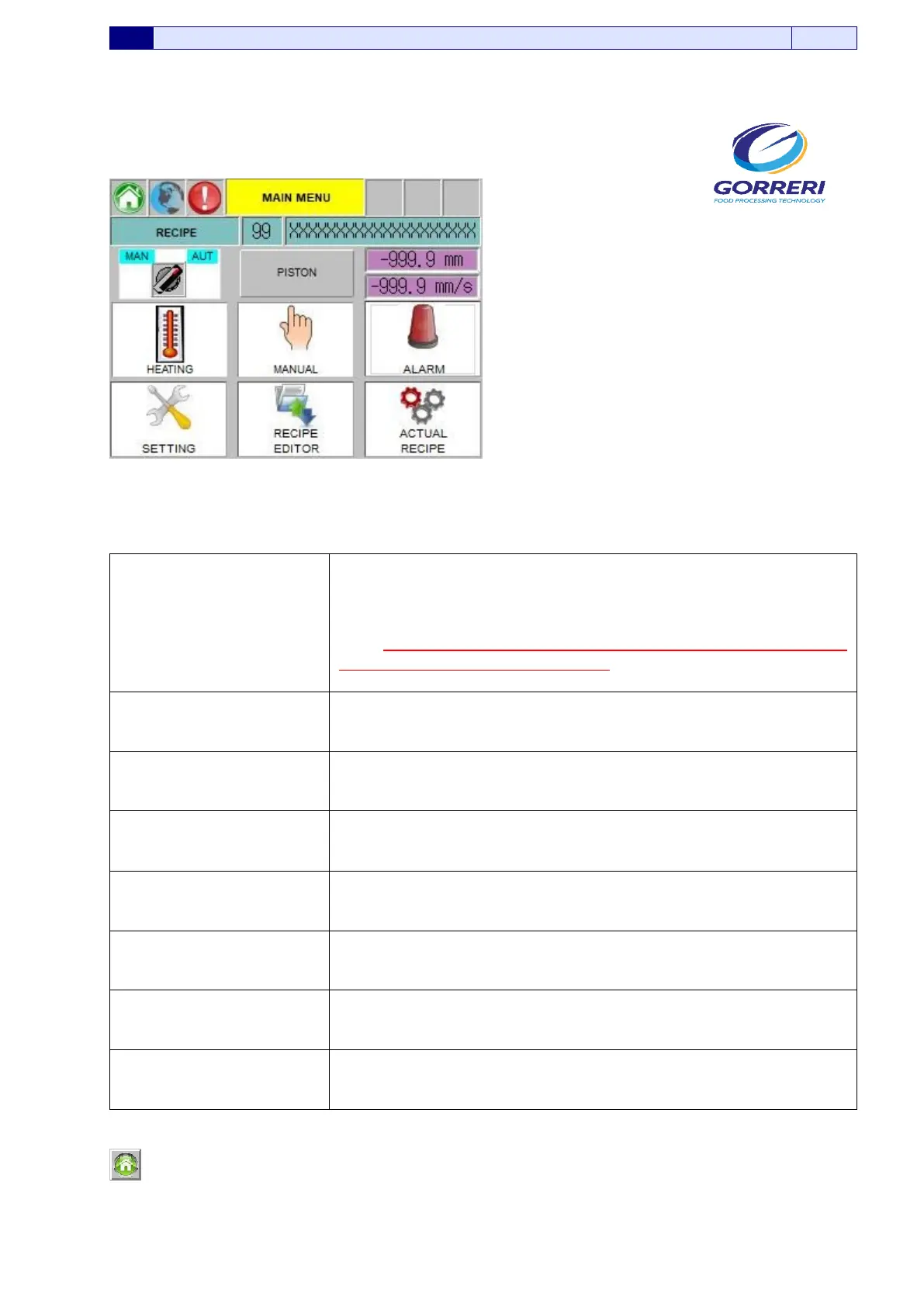
This page shows the access buttons to the different functions menu.
Pic. 5.2
Information indicated in the Main Page are carefully explained as follows:
MACHINE STATE
AUTO – MAN
Selector which allows to choose Man (Manual) or Aut (Automatic)
function of the machine.
N.B.: In order to pass to the production function, the selector has to
be put on AUT function (Automatic).
PISTON
In these lines, it is possible to display the stroke dimension
(expressed in millimeters) and the speed (expressed in millimeters
per second) of the dosing piston
ALARMS
If you press this button, you will enter the Alarms.
MANUAL COMMANDS
If you press this button, you will enter the Manual Commands.
ACTUAL RECIPE
If you press this button, you will enter the Actual Recipe.
EDITOR RECIPE
If you press this button, you will enter the Editor Recipe.
SETTINGS
If you press this button, you will enter the Settings.
HEATING
If you press this button, you will enter the Heating.
If you press this button, you enter the Main Page Menu.






 To Next Page