EasyManua.ls Logo

Omron Step Counter - Troubleshooting Common Issues; Display Not Responding; Incorrect Value Display

Omron Step Counter
14 pages
Print Icon
To Next Page IconTo Next Page
To Previous Page IconTo Previous Page
Loading...
10
9 Trouble shooting
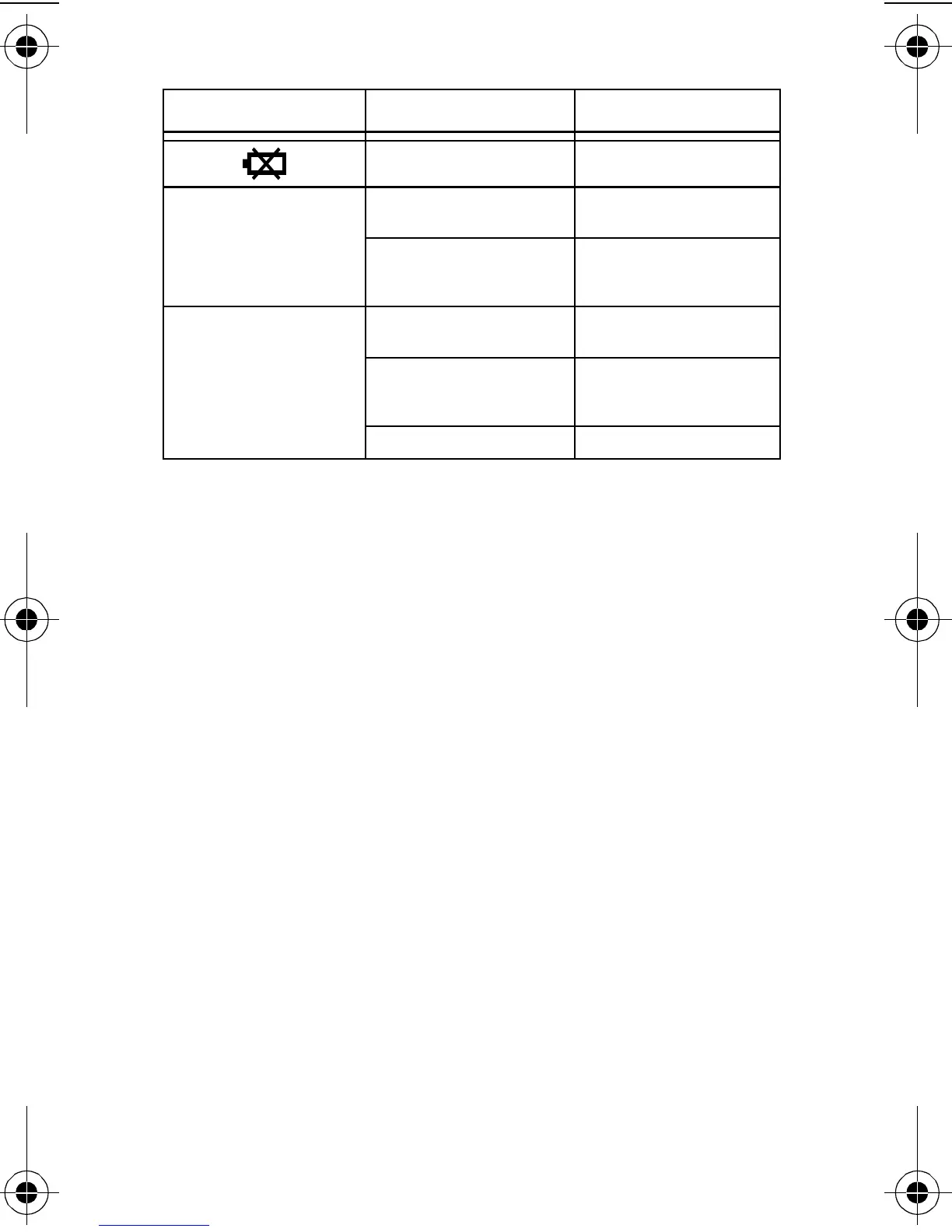
Phenomenon Cause Rectification
Battery weak or
exhausted.
Insert a new 3V lithium
battery type CR2032.
Display remains empty
after pressing MODE or
MEMO.
Battery weak or
exhausted.
Insert a new 3V lithium
battery type CR2032.
Polarities of battery (+
and -) aligned in wrong
directions.
Insert battery in correct
alignment.
Displayed values are
incorrect.
The unit is attached
incorrectly.
Follow instructions (refer
to Chapter 4.1).
You are walking at
inconsistent pace.
Walk at consistent pace
all the time (refer to
Chapter 4.1).
Settings are wrong. Change settings.
HJ-152-E2.book Page 10 Friday, October 10, 2008 11:52 AM

Related product manuals