EasyManua.ls Logo

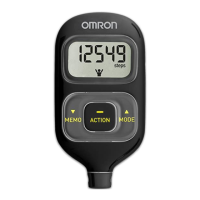
Omron Walking style III - User Manual

Omron Walking style III
17 pages
Print Icon
To Next Page IconTo Next Page
Loading...
Step counter
Walking style
• Instruction Manual 1
• Mode d’emploi 17
• Gebrauchsanweisung 33
• Manuale di istruzioni 49
IM-HJ-203-E-02-10/2011
9062598-0B
EN
FR
DE
IT
HJ-203-E_A_M.book 1 ペー 2011年12月19日 月曜日 午後3時40分

Questions and Answers

  • D
    Dustin PorterAug 2, 2025
    Why is nothing displayed on my Omron Walking style III?
    • T
      Timothy GordonAug 2, 2025
      If nothing is displayed on your Omron Pedometer, there might be a few reasons: 1. The battery polarities (+ and -) might be aligned incorrectly. Ensure you insert the battery in the correct alignment. 2. The battery could be weak or exhausted. Try inserting a new 3V lithium battery type CR2032. 3. The energy-saving function might be active. Press any button to deactivate it.
  • S
    Steven TaylorAug 8, 2025
    What to do if my Omron Walking style III display blinks continuously?
    • M
      melissa26Aug 9, 2025
      If your Omron Pedometer display blinks or appears continuously, it's likely due to a weak or exhausted battery. You should insert a new 3V lithium battery type CR2032.
  • B
    Brian HancockAug 16, 2025
    How to fix incorrect displayed values on Omron Pedometer?
    • J
      John CarrollAug 16, 2025
      If the displayed values on your Omron Pedometer are incorrect, consider the following: * Ensure the unit is attached correctly. * Be aware that walking at an inconsistent pace might affect accuracy. * Verify that your settings are correct and change them if necessary.
  • C
    christopher58Aug 23, 2025
    What to do if Omron Pedometer buttons do not operate normally?
    • J
      Jamie MccormickAug 23, 2025
      If the display of your Omron Pedometer is unusual or the buttons aren't working normally, try removing the battery and then reinserting it.

Summary

Introduction

Features of OMRON Walking style III

Details the product's features like calories burned and activity mode.

Use of the OMRON Walking style III

Cautions and Safety

Provides important safety warnings and precautions for using the device.

Overview

Unit Components

Identifies the main unit, strap, clip, and battery for user reference.

Know Your Unit

Main Unit Description

Explains the components and display elements of the main unit.

Settings

Initial Device Setup

Guides users through initial setup of time, weight, height, and stride length.

Adjusting Device Settings

Details how to re-adjust settings like time after the initial setup.

Using the OMRON Walking style III

Assembly and Attachment

Instructions on how to attach the strap and clip to the unit.

Carrying Methods

Details on carrying the unit in a pocket, bag, or around the neck.

Starting and Recording Walks

Explains how to start walking and check data after use.

Activity Mode Operation

Describes how to use the activity mode to store measurement values for a session.

Checking the Display

Viewing Daily Data

Explains how to cycle through and view daily step count, distance, calories, and time.

Viewing Activity Mode Data

Shows how to view data recorded specifically during the activity mode.

Device Operation and Accuracy

Energy Saving and Step Counting Accuracy

Covers energy saving features and scenarios affecting step counting accuracy.

Memory Function

Recalling Stored Data

Instructions on how to access stored measurement data from previous days.

Battery Life and Replacement

Battery Replacement Procedure

Step-by-step guide on how to replace the unit's battery.

Maintenance and Storage

Cleaning and Storage Precautions

Guidelines for cleaning the unit and precautions for storage.

Troubleshooting

Technical Data

Omron Walking style III Specifications

General IconGeneral
BrandOmron
ModelWalking style III
CategoryPedometer
LanguageEnglish

Related product manuals