11
EN
9 Battery life and replacement
If the symbol blinks or appears on the display, replace the
battery with a new (CR2032) battery.
If the battery is removed, the settings and all measurement
values will be deleted. Please reset the settings (refer to
Chapter 5.1).
Notes:
• If you want to keep any of the measurement values, make a note of
them before removing the battery.
• The supplied battery is for trial use. This battery can run out within
1.5 years.
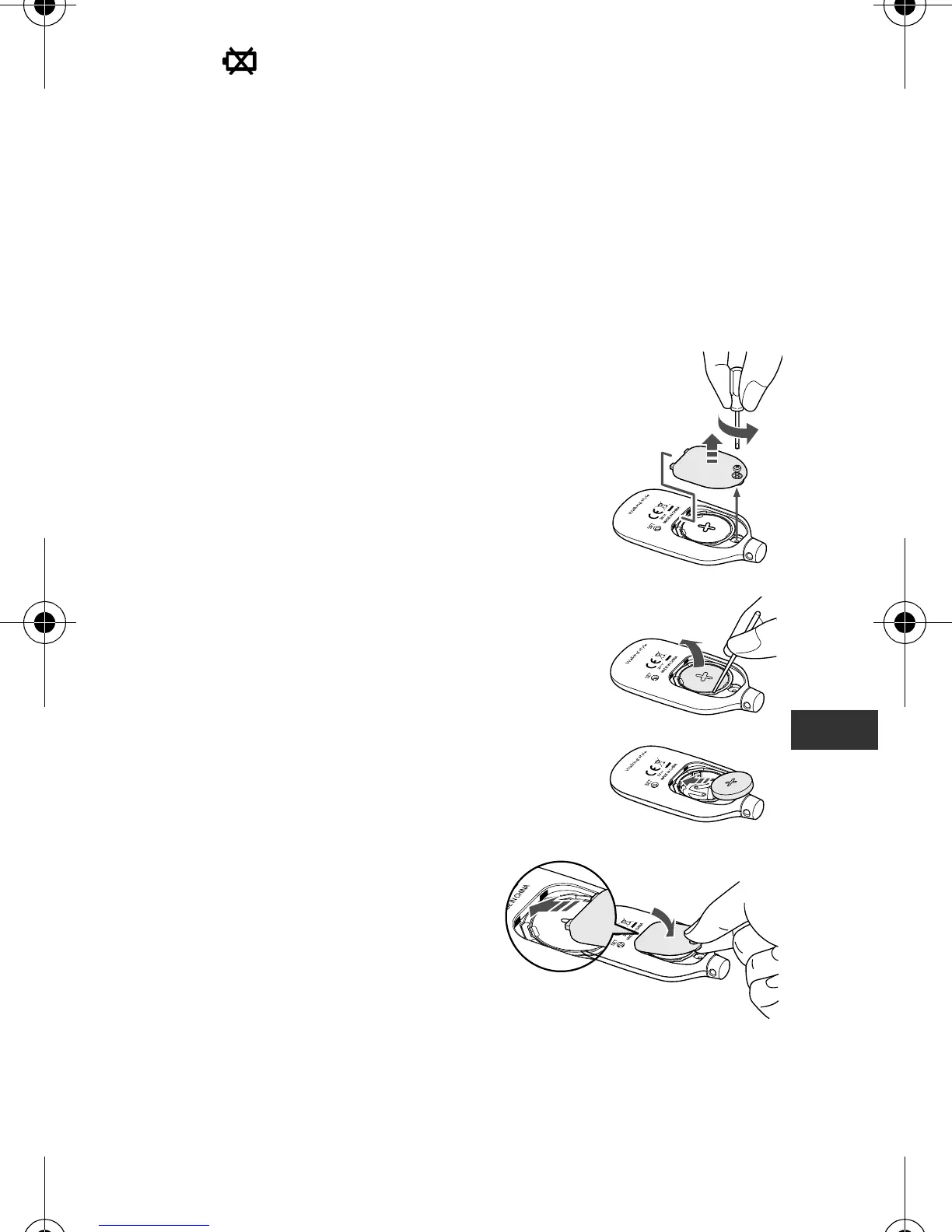
9.1 Replacing the battery
1
Loosen the screw of the battery cover
on the back of the unit, and remove the
battery cover by pulling it off in the
direction of the arrow.
Use a small screwdriver to loosen the
screw on the battery cover.
2
Remove the battery with a thin, sturdy,
stick that will not break easily.
Note:
Do not use a pair of metal tweezers or
a screwdriver.
3
Insert the battery (CR2032) with the
positive (+) side face up.
4
Replace the battery cover by
sliding the catch in first, then
tighten the screw.
HJ-203-E_A_M.book 11 ページ 2011年12月19日 月曜日 午後3時40分


 To Next Page
 Loading...