OMS ARCADIA EXT S.T.01/3R ED.0 REV.8 09/2020
26
3.4.1.2. VERSION WITH 3 MEMORY OPTION AND LAST-POSITION
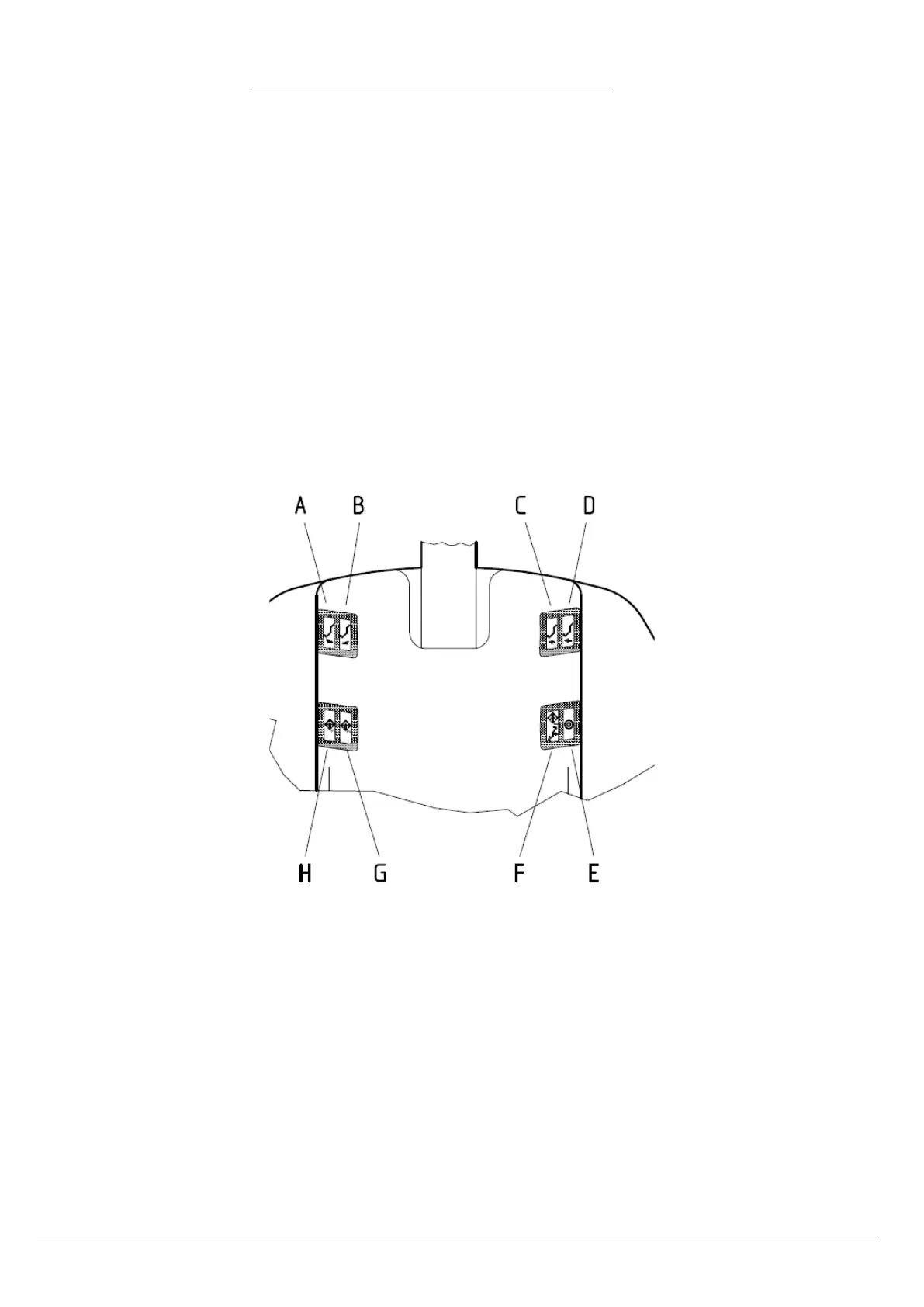
The operation of the controls is as follows:
E. Rinse command /last position (push the button towards the outside): starting from any position, this
command activates the ascent of the backrest to the maximum of its stoke to allow the patient to
enter the glass rinsing; If the command is pressed again the backrest returns to its previous position in
the rinse cycle.
F. Reset command/memory recall 1 (push the button towards the inside): starting from any location
other than the one reset, this command activates the descent of the patient chair pantograph in the
minimum position of the backrest simultaneously up to the maximum of its stroke; When the Chair is
in the zero position, pressing the button activates the memory recall 1 of the chair.
G. Recall memory command 2 (push the button towards the inside): the pressure of the botton activates
the recall of memory 2 of the chair.
H. Recall memory command 3 (push the button towards the outside): the pressure of the botton
activates the recall of memory 3 of the chair.
PROGRAM STORAGE
To store the channel position simply manually move the chair to the desired position (using the manual
controls) and then press and hold the button for the program that you want to memorize (F, G or H) until you
hear the beep confirming.


 To Next Page