Need help?
Do you have a question about the on stage LPT6000 and is the answer not in the manual?
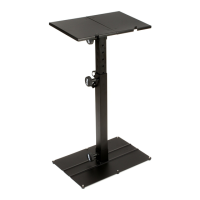
The LPT6000 Multi-Purpose Laptop Stand is a versatile and adjustable accessory designed to elevate and secure laptops, DJ equipment, or other devices in various settings. Its primary function is to provide a stable and ergonomic platform, enhancing user comfort and optimizing workspace organization. The stand is engineered for easy assembly and customization, allowing users to adapt it to their specific needs and preferences.
The core function of the LPT6000 is to lift a laptop or similar device to an optimal viewing and operating height, which can help reduce strain on the neck, back, and wrists. By elevating the device, it also creates valuable space underneath, which can be utilized for other equipment, cables, or accessories, contributing to a tidier and more efficient workspace. The stand's multi-purpose design means it can be used in a variety of environments, from home offices and recording studios to live performance venues for DJs. Its robust construction ensures that it can securely hold the intended devices, providing peace of mind during use. The modular nature of the stand allows for different configurations, catering to various setup requirements and user preferences.
The LPT6000 offers several key usage features that highlight its adaptability and user-friendliness:
Adjustable Height and Width: The stand is designed with adjustable components, specifically the Upper and Lower Supports, which can be configured to achieve the desired height. This adjustability is crucial for ergonomic setup, allowing users to align their screen with eye level. Furthermore, the inclusion of 1-inch spacers on the Stabilizer Bars enables users to increase the stand's width, accommodating a wider range of devices or providing more stability. This flexibility ensures that the stand can be tailored to individual ergonomic needs and the dimensions of the equipment being supported.
Multiple Mounting Options: The LPT6000 provides diverse mounting solutions to suit different environments and preferences:
Secure Device Placement: The design incorporates knobs and screws to firmly secure the various components, minimizing wobble and ensuring the stability of the supported device. The instruction to "secure all knobs tight to minimize stand wobble" emphasizes the importance of a stable setup for safe and effective use. The spacing requirement for the knobs (at least 2 holes apart) further contributes to the structural integrity of the assembled stand.
Easy Assembly and Disassembly: The stand is designed for straightforward assembly using common tools, specifically a Philips head screwdriver. The step-by-step instructions, accompanied by clear figures, guide users through the process, making it accessible even for those with minimal technical experience. This ease of assembly also implies ease of disassembly, which is beneficial for transport and storage.
Durable Construction: While specific materials are not detailed, the use of screws, washers, and robust support components suggests a durable construction intended to withstand regular use and support the weight of laptops and other equipment. The emphasis on tightening knobs securely indicates a design focused on long-term stability.
The LPT6000 is designed with simplicity in mind, which translates to minimal maintenance requirements:
Simple Cleaning: The stand's components are likely made of materials that can be easily wiped clean with a damp cloth to remove dust or smudges. Regular cleaning helps maintain its appearance and prevents the accumulation of debris that could potentially affect the smooth operation of adjustable parts.
Tightening of Fasteners: The instructions explicitly mention securing all knobs tight to minimize stand wobble. This implies that periodic checks and re-tightening of all screws and knobs may be necessary, especially after moving the stand or if it experiences heavy use. This simple maintenance step ensures the stand remains stable and safe over time.
Component Replacement (if necessary): While not explicitly stated as a maintenance feature, the modular design suggests that individual components, such as knobs, screws, or even support bars, could potentially be replaced if damaged or lost. This modularity extends the lifespan of the product by allowing for repair rather than full replacement.
In summary, the LPT6000 Multi-Purpose Laptop Stand is a highly functional and adaptable accessory that prioritizes user comfort, workspace efficiency, and device security. Its adjustable nature, multiple mounting options, and straightforward assembly make it a practical choice for a wide range of users, from students and office workers to professional DJs. The design emphasizes ease of use and stability, with minimal maintenance needed to ensure its continued performance.
 General
| Material | Aluminum |
|---|---|
| Height Adjustment | Yes |
| Foldable | Yes |
| Color | Black |
| Maximum Height | 45" (1143 mm) |
| Minimum Height | 29" (737 mm) |
| Height | Adjustable |


 To Next Page