38
EN
TROUBLESHOOTING
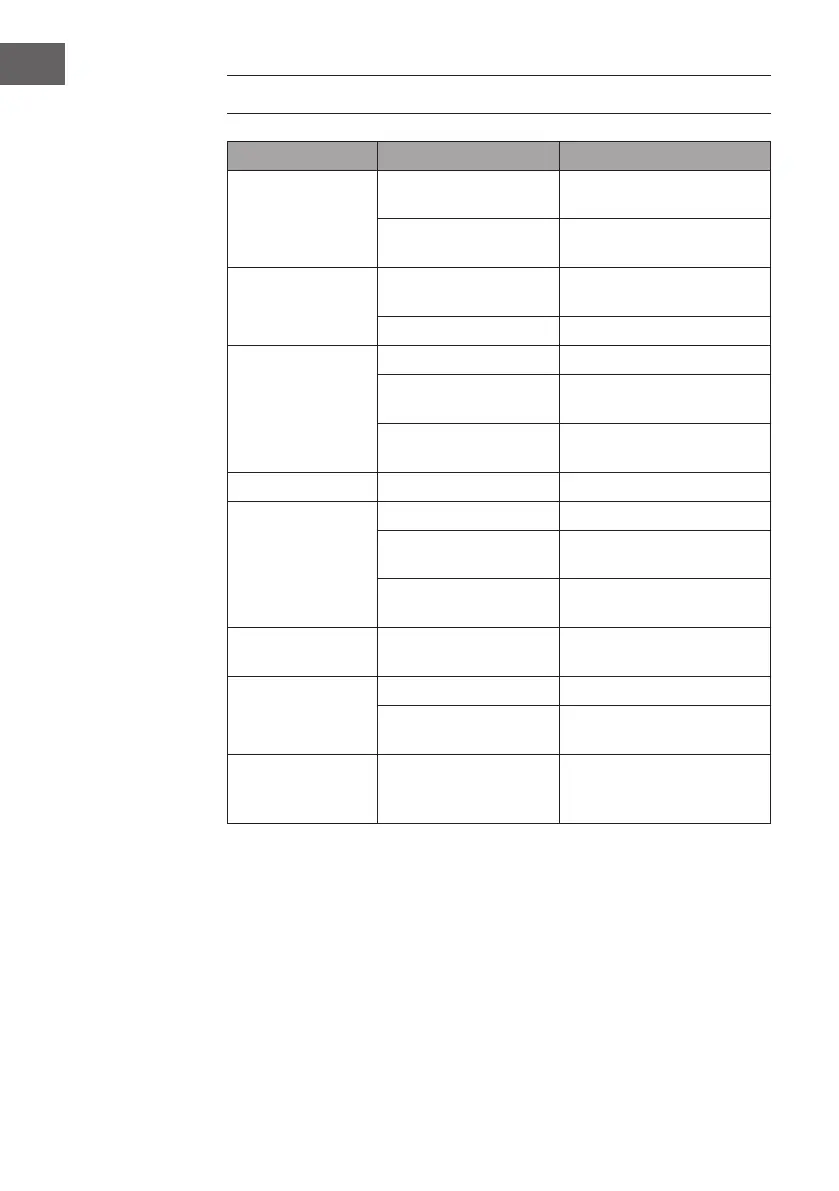
Problem Possible cause Approach
The radio signal
roars.
Radio station not
correctly set.
Readjust the radio station.
Radio antenna not
developed.
Develop radio antenna
No radio reception. Device not in RADIO
mode.
Select the RADIO mode.
Volume too low Increase the volume.
CD drive is not
running.
CD mode not active Select the CD mode.
CD is not properly
seated in the drive.
Insert the CD correctly.
CD contains
unreadable data.
Check the contents of the
CD.
CD jumps. CD is scratched. Clean the CD or replace it.
Unwanted noise
when playing the
CD.
CD is dirty. Clean the CD.
Lens is dirty. Clean the lens with a
cleaning CD.
External physical
inuences.
Move the machine.
Distorted sound at
high volume.
Volume control set to
maximum setting.
Reduce the volume.
No wake-up alarm. Alarm not active. Activate the alarm.
Wrong alarm time. Make sure that AM/PM is
set correctly.
No BT connection
is established.
The system memory
is full.
Press and hold the PLAY /
PAUSE key for 2 seconds to
clear the memory.


 To Next Page