9 8
OPERATIONS
Turbo MODE:
Energy Saver MODE:
Pressing Turbo key on remote activates the Turbo function and air conditioner goes to
powerful cooling. During this Mode temperature and fan speed cannot be changed.
In this mode the AC works on a preset temperature of 18 degree centigrade at high fan
speed. Compressor will start immediately in this mode and will continue to operate till set
temperature is achieved .Thereafter it will work in cyclical ON/OFF mode to keep the room
temperature within 2 degree of set temperature. Press again to cancel this operation. The unit
will run in COOL Mode. ( symbol will appear on remote control display).
Pressing Energy Saver key on remote activates Energy Saver function to keep room normal
temperature by reducing compressor run hours to get more savings.
In this mode the AC works on a preset temperature of 25 degree centigrade at selectable fan
speed. Compressor will work in cyclical ON/OFF mode to keep the room temperature within 2
degree of set temperature. ( symbol will appear on remote control display).
In this mode temperature cannot be changed & Fan speed can be changed.
Press again to cancel this operation. The unit will run in COOL Mode
.
Ceiling Fan Manual Operation – only when optional i-cool ceiling fan
controller is installed:
Ceiling fan speed can be controlled only through AC remote control as all other manual
controllers are bypassed while installing i-cool fan controller.
When AC is in any mode other then i-cool mode, Ceiling fan speed can be controlled using
remote control. To enable this Ceiling fan mains have to be in ON position. Press C.F. ON key
on remote to start ceiling fan. Ceiling fan speeds can be changed by pressing C.F. + key on
remote to increase and C.F . – key on remote to decrease. The speeds can be varied by 5
steps by pressing C.F. + and C.F. – keys on remote. Press C.F. OFF key on remote to switch
off ceiling fan. ( symbol will appear on remote control display).
SMART-SLEEP MODE: 123
3 Stage Smart-Sleep with 4 personal preference modes,
To switch on Smart-Sleep operation, press “SLEEP” button on remote and the indoor fan
will run at low speed. Press the same button four times to quit the Smart-Sleep mode.
OPERATIONS
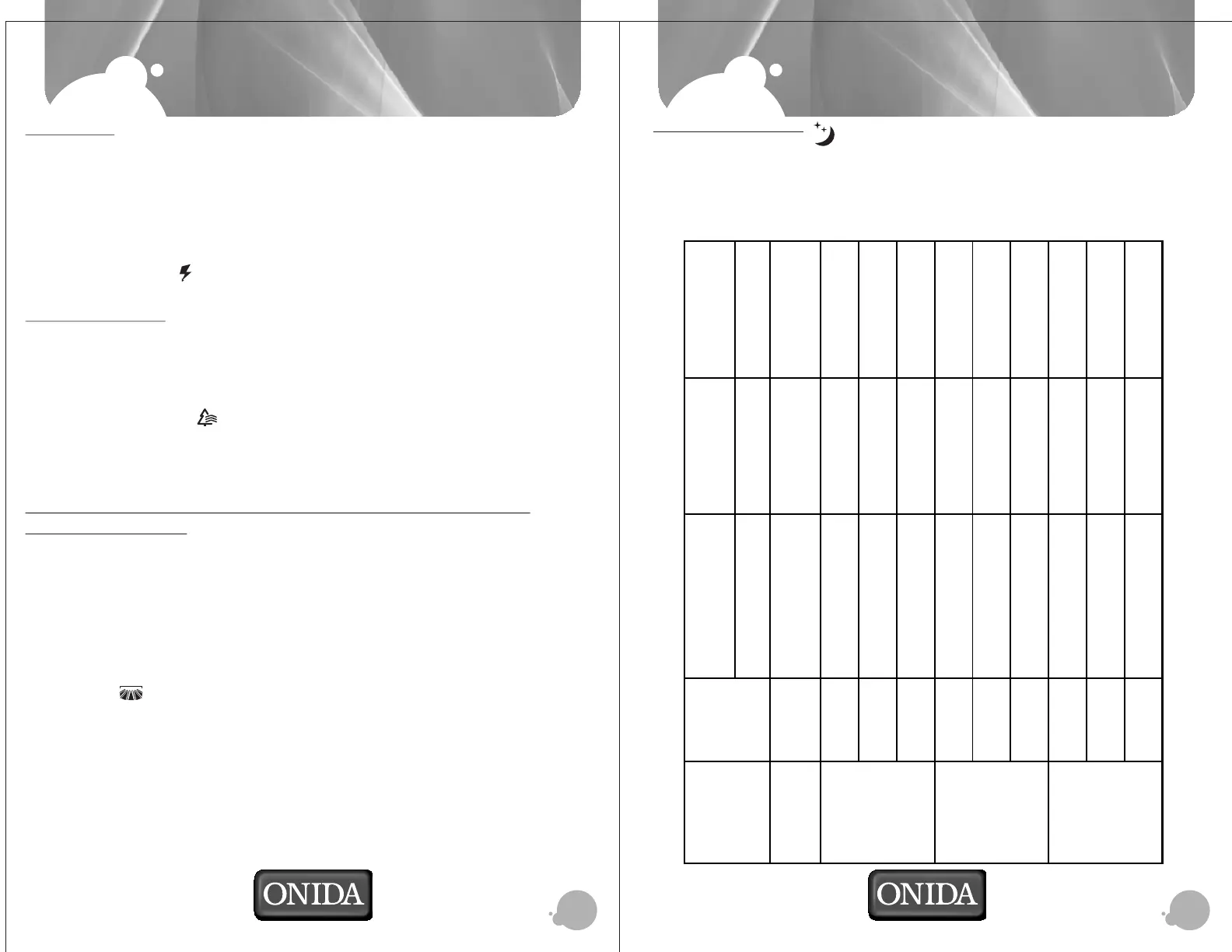
Initial Sleep Stage Deep Sleep Stage Wake Up stage
Stage 1
Stage 2 Stage 3
Smart Sleep -Personal
Preference mode
Normal
Set Temperature -
31ºC - 16ºC
Cools at Set Temp + 1ºC / hour for
next 2 hours.
Cools at Set Temp + 2ºC after 2
hours
Cools at Set Temp + 2ºC after 2
hours
Set Temperature -
23ºC - 16ºC
Cools at Set Temp + 1ºC / hour for
next 3 hours.
Cools at Set Temp + 3ºC for
next 5 hours
Cools at Set Temp + 1ºC after 8
hrs
Set Temperature -
24ºC - 27ºC
Cools at Set Temp + 1ºC / hour for
next 2 hours.
Cools at Set Temp + 2ºC for
next 6 hours
Cools at Set Temp after 8 hrs
Set Temperature -
28ºC - 31ºC
Cools at Set Temp all along Cools at Set Temp all along Cools at Set Temp all along
Set Temperature -
23ºC - 16ºC
Cools at Set Temp + 1ºC / hour for
next 3 hours.
Cools at Set Temp + 3ºC for
next 4 hours
Cools at Set Temp + 2ºC after 7
hrs
Set Temperature -
24ºC - 27ºC
Cools at Set Temp + 1ºC / hour for
next 2 hours.
Cools at Set Temp + 2ºC for
next 5 hours
Cools at Set Temp + 1ºC after 7
hrs
Set Temperature -
28ºC - 31ºC
Cools at Set Temp all along
Cools at Set Temp all along Cools at Set Temp all along
Set Temperature -
23ºC - 16ºC
Cools at Set Temp + 1ºC / hour for
next 3 hours.
Cools at Set Temp + 3ºC after
3 Hours
Cools at Set Temp + 3ºC after
3 Hours
Set Temperature -
24ºC - 27ºC
Cools at Set Temp + 1ºC / hour for
next 2 hours.
Cools at Set Temp + 2ºC after 2
hours
Cools at Set Temp + 2ºC after 2
hours
Set Temperature -
28ºC - 31ºC
Cools at Set Temp all along Cools at Set Temp all along Cools at Set Temp all along
Bio Sleep -Personal
Preference mode 2
Smart Sleep Personal
Preference modes
Temperature Set
Condition
Bio Sleep -Personal
Preference mode 1
Bio Sleep -Personal
Preference mode 3


 To Next Page