Instructions (Cont.)
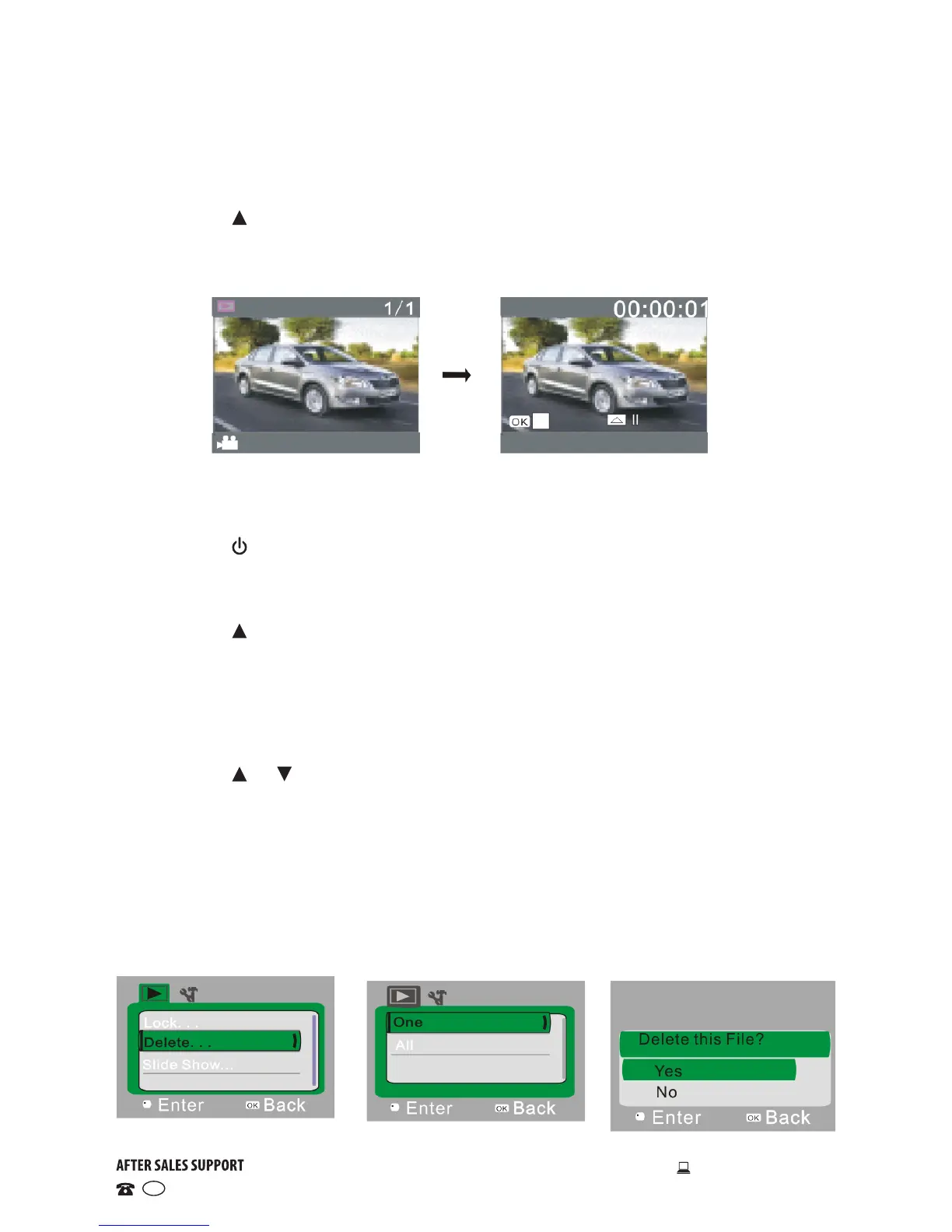
Playing a movie clip
• Press the SHUTTER button to start playback.
• Press the button to pause playback.
• Press the OK button to stop playback.
Deleting a file
• After selecting the file to be deleted, open the menu.
• Press the or buttons to select “Delete”.
• Press the OK button to enter.
• After selecting “One”, press the OK button to confirm (alternatively, select
“All” to delete all files). You will be prompted to confirm whether you want
to delete this file.
• After selecting “Yes”, press the OK button to delete the file.
• When the file is deleted, press the SHUTTER button to exit from the menu.
Playing a timed video recording
• Press the ON/OFF switch to change to playback mode for timed video
recordings. The icon at the bottom of the screen will change to a ‘car’ icon.
• Press the SHUTTER button to start playback.
• Press the button to pause playback.
• Press the OK button to stop playback.


 To Next Page