37
→
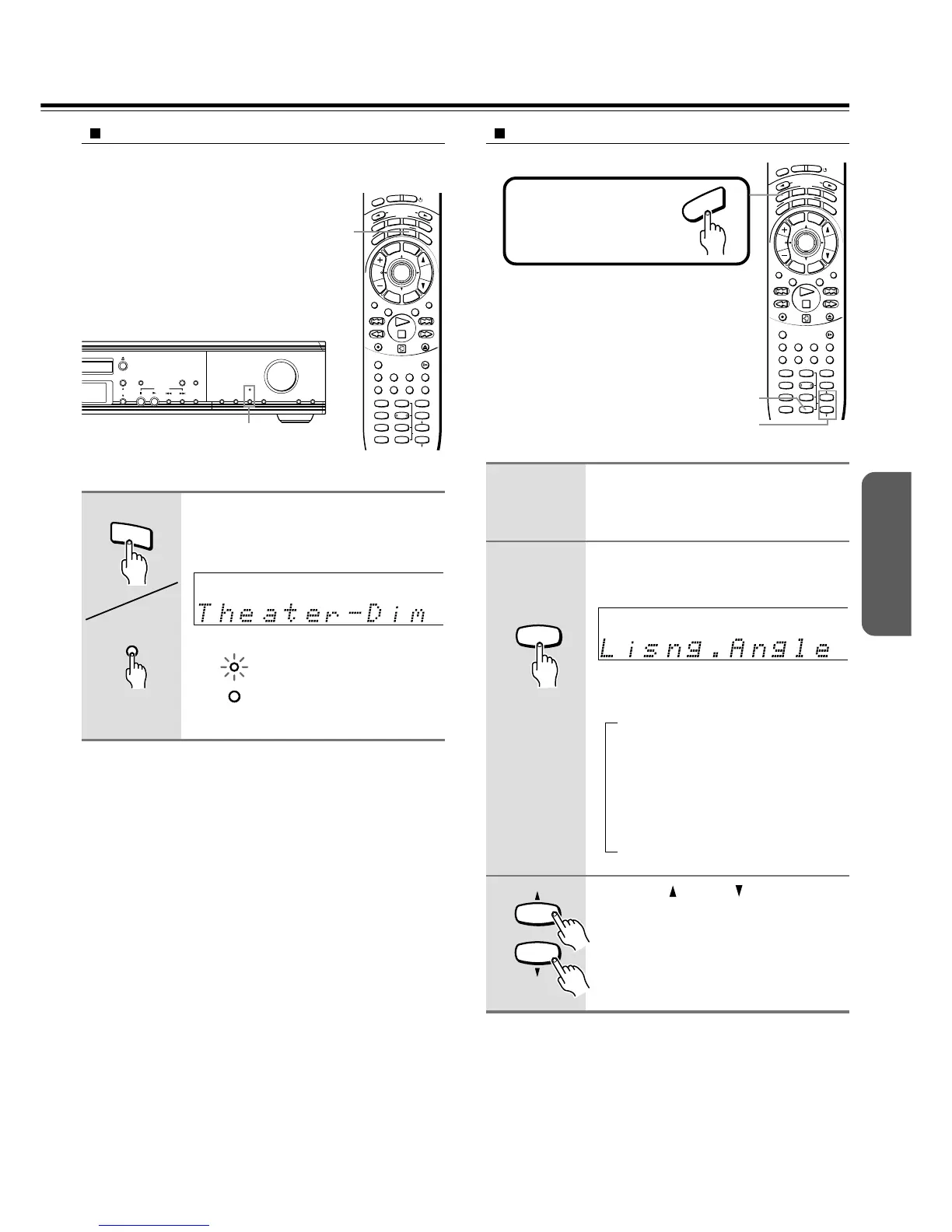
Activating Theater-Dimensional mode
See “The Input Sources and Available Listening Modes” on
page 35.
1
2
Adjusting Theater-Dimensional mode
Press T-D.
“Theater-Dimensional” scrolls across in
the display and the Theater-Dimensional
indicator on the unit lights.
Unit
Remote controller
T– D SETUP
0
T – D
T
–
D
T – D
Activate Theater-Dimensional (see
the steps in the left column of this
page).
Press T-D SETUP repeatedly to
select the Theater-Dimensional
item (see on the previous page).
Each press of the button changes the item
as follows:
Lisng. Angle
↓
Corner
↓
Balance
↓
Dialog Mode
↓
The normal display resumes.
Press UP /DOWN to select the
setting of the item.
• To change the setting of another item,
repeat steps 2 and 3.
• To end the Theater-Dimensional setup,
press T-D SETUP repeatedly until the
normal display resumes.
I
N
P
U
T
S
E
L
E
C
T
O
R
M
O
D
E
A
U
D
I
O
D
V
D
T
V
T
A
/
M
D
L
I
S
T
E
N
I
N
G
M
O
D
E
A
.
C
T
R
L
T
–
D
S
T
E
R
E
O
S
U
R
R
T
I
T
L
E
M
E
N
U
S
E
T
U
P
T
V
/
V
C
R
R
E
T
U
R
N
CH
TUN
VOLENTER
REPEAT MUTING
A – B
REC
DIMMER
OPEN/CLOSE
RANDOM SLOW
SUBTITLE – ON / OFF
ANGLE ZOOM
MEMORY CLEAR AUDIO DISPLAY
--
/
---
SW MODE
LATE NIGHT DISTANCE
CH SEL
T– D SETUP
UP/ DOWN
TEST TONE
SP A
SP B
123
456
789
+
10 0
SEARCH
S
T
N
B
Y
O
N
S
L
E
E
P
T-D
I
N
P
U
T
S
E
L
E
C
T
O
R
M
O
D
E
A
U
D
I
O
D
V
D
T
V
T
A
/
M
D
L
I
S
T
E
N
I
N
G
M
O
D
E
A
.
C
T
R
L
T
–
D
S
T
E
R
E
O
S
U
R
R
T
I
T
L
E
M
E
N
U
S
E
T
U
P
T
V
/
V
C
R
R
E
T
U
R
N
CH
TUN
VOLENTER
REPEAT MUTING
A – B
REC
DIMMER
OPEN/CLOSE
RANDOM SLOW
SUBTITLE – ON / OFF
ANGLE ZOOM
MEMORY CLEAR AUDIO DISPLAY
--
/
---
SW MODE
LATE NIGHT DISTANCE
CH SEL
T– D SETUP
UP/ DOWN
TEST TONE
SP A
SP B
123
456
789
+
10 0
SEARCH
S
T
N
B
Y
O
N
S
L
E
E
P
3
2
Press MODE AUDIO first.
A
U
D
I
O
FM MODE
TUNING/PRESET
SURROUND STEREO
T – D
DISPLAY
DVD / CD
PRESET
MEMORY
SUBWOOFER
MODE
SPEAKER
SETUP
SPEAKER
A / B
ACOUSTIC
CONTROL
INPUT
MASTER VOLUME
T- D
(Indicator and button)
Remote controller
only
3
UP/ DOWN
9
SEARCH
Notes
• Theater-Dimensional mode cannot be activated if;
– The sound is muted (see page 32),
– Headphones are connected (see page 33),
– SPEAKERS B system is On (see page 32), or
– The source is PCM sound with a sampling frequency higher than
48kHz.
• Theater-Dimensional mode will be canceled and the Theater-
Dimensional indicator goes off when:
– Another listening mode is chosen (see page 38), or
– The input source is switched to a type of source which Theater-
Dimensional mode cannot process.


 To Next Page
 Loading...