17
1
46
8
2 3 5 7
FG9 H I
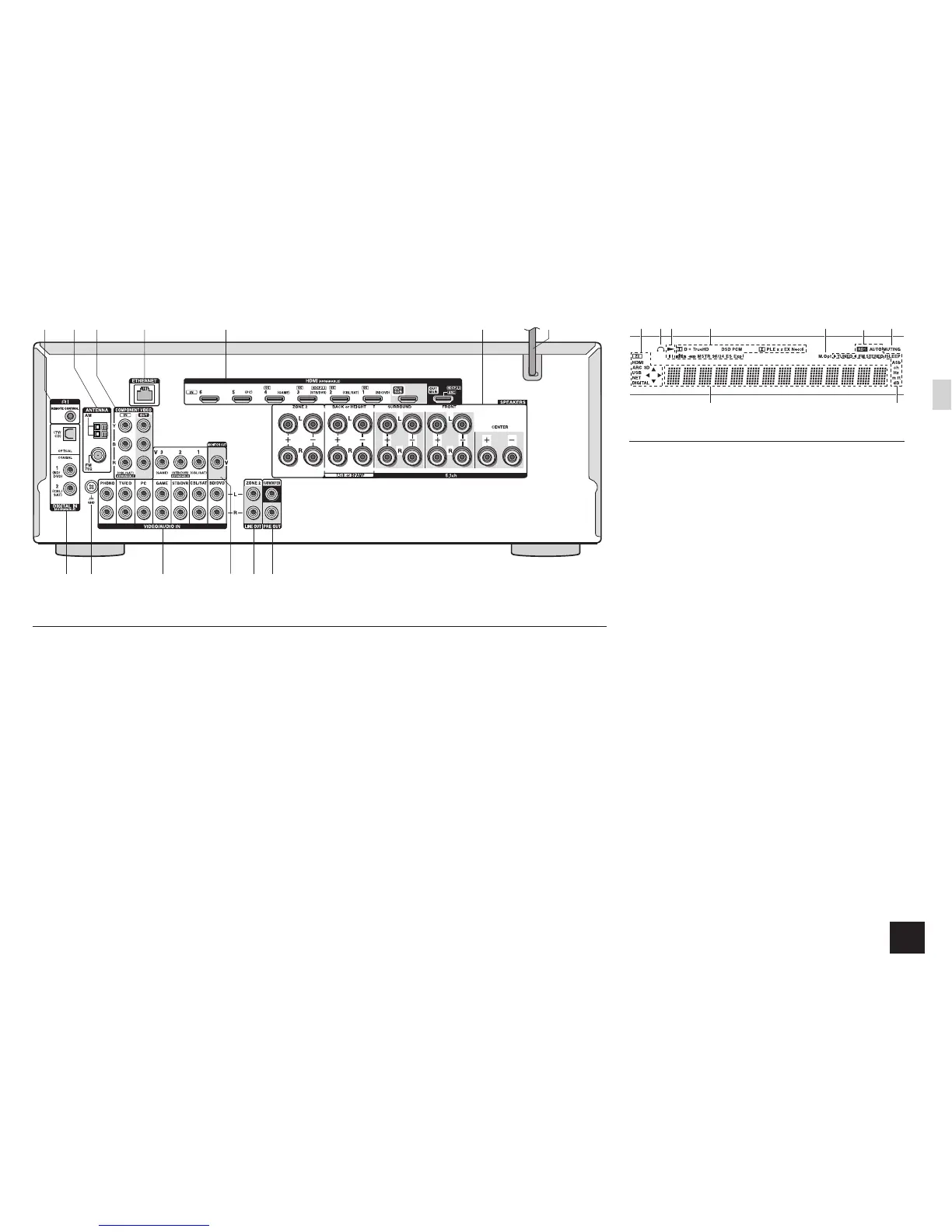
Rear Panel
1
RI REMOTE CONTROL jack: An Onkyo product with RI
jack can be connected and synchronized with this unit.
2
(/#06'00#LCEMŝCPF#/#06'00#
terminal: The supplied antennas are connected.
3
COMPONENT VIDEO IN and OUT jacks: Component
video input/output jacks
4
ETHERNET port: Used for LAN connection
5
HDMI IN/OUT jacks: Digital video signals and audio
signals are transmitted between the unit and the
connected devices.
6
SPEAKERS terminals: Speakers are connected. To use
the Zone function, connect the speakers in the separate
room to the ZONE2 speaker terminals.
7
Power cord
8
DIGITAL IN COAXIAL/OPTICAL jacks: Digital audio
signals are input.
9
GND terminal: The ground wire of the turntable is
connected.
F
Composite video and analog audio jacks: Analog
video signals and audio signals are input.
G
MONITOR OUT V jack: Video signals are output to the
connected monitor or TV.
H
ZONE 2 LINE OUT jacks: Analog audio signals are
output to the connected amplifier to be used in ZONE 2.
I
SUBWOOFER PRE OUT jacks: A subwoofer with built-
in amplifier is connected.
14 623 75
Display
1
Lights in the following conditions. "Z2": ZONE 2 output is
on. / "HDMI": HDMI signals are input and
HDMI input selector is selected. / "ARC": Audio signals
are input from ARC compatible TV and TV/CD input
selector is selected. / "3D": Input signals are 3D. /
"USB" (
¼
): "USB" input is selected and USB storage
device is connected. / "NET" (
¼
): "NET" input is
selected and the unit is connected to the network. /
"DIGITAL": Digital signals are input and the digital input
selector is selected. / Cursor indicators: NET or USB is
controlled.
¼
"USB" and "NET" will flash if the connection is not correct.
2
Lights when headphones are connected.
3
Lights when NET or USB is controlled.
4
Lights according to the type of input digital signals and
the listening mode.
5
Lights when Music Optimizer is enabled.
6
Lights in the following conditions. "AUTO": Tuning mode
is auto. / "
f
TUNED
e
": Receiving AM/FM radio.
fe
HNCUJGUYJKNGVWPKPIKUCWVQOCVKECNN[RGTHQTOGF|(/
STEREO": Receiving FM stereo. / "RDS" (European
model): Receiving RDS broadcasting.
7
"MUTING": Flashes when muting is on.
8
Lights in the following conditions. "SLEEP": Sleep timer
has been set. / "ASb" (Auto Standby): Auto Standby
is on. / "ch": Channel is being set. / "Hz": Crossover
frequencies are being set. / "m/ft": Speaker distances
are being set. / "dB": Speaker volume is being set.
9
Displays various information of the input signals.
Pressing DISPLAY displays the type of input digital
signals and the listening mode.


 To Next Page
 Loading...