19
Using the program function (memory play)
• You can program up to 25 tracks.
• If the total playing time of the programmed tracks exceeds 1000 minutes, the MD-2321 displays “---m--s”.
• Too short a song cannot be programmed. (“Too Short” appears.)
POWER
REMOTE CONTROL RC-339MD
CONTINUE
PLAY MODE
RANDOM MEMORY
REPEAT
>25
M.SCAN
CLEAR
ENTER
NAME
SCROLL DISPLAY
1
A
2345
678910
11 12 13 14 15
16 17 18 19 20
21 22 23 24 25
BCDE
FGHI J
KLMNO
PQRST
UVWX Y
Z
.,
/?!
()
REC
A-B A-SPACE
RC-339MD
3
1CONTINUE
2
2
1
3
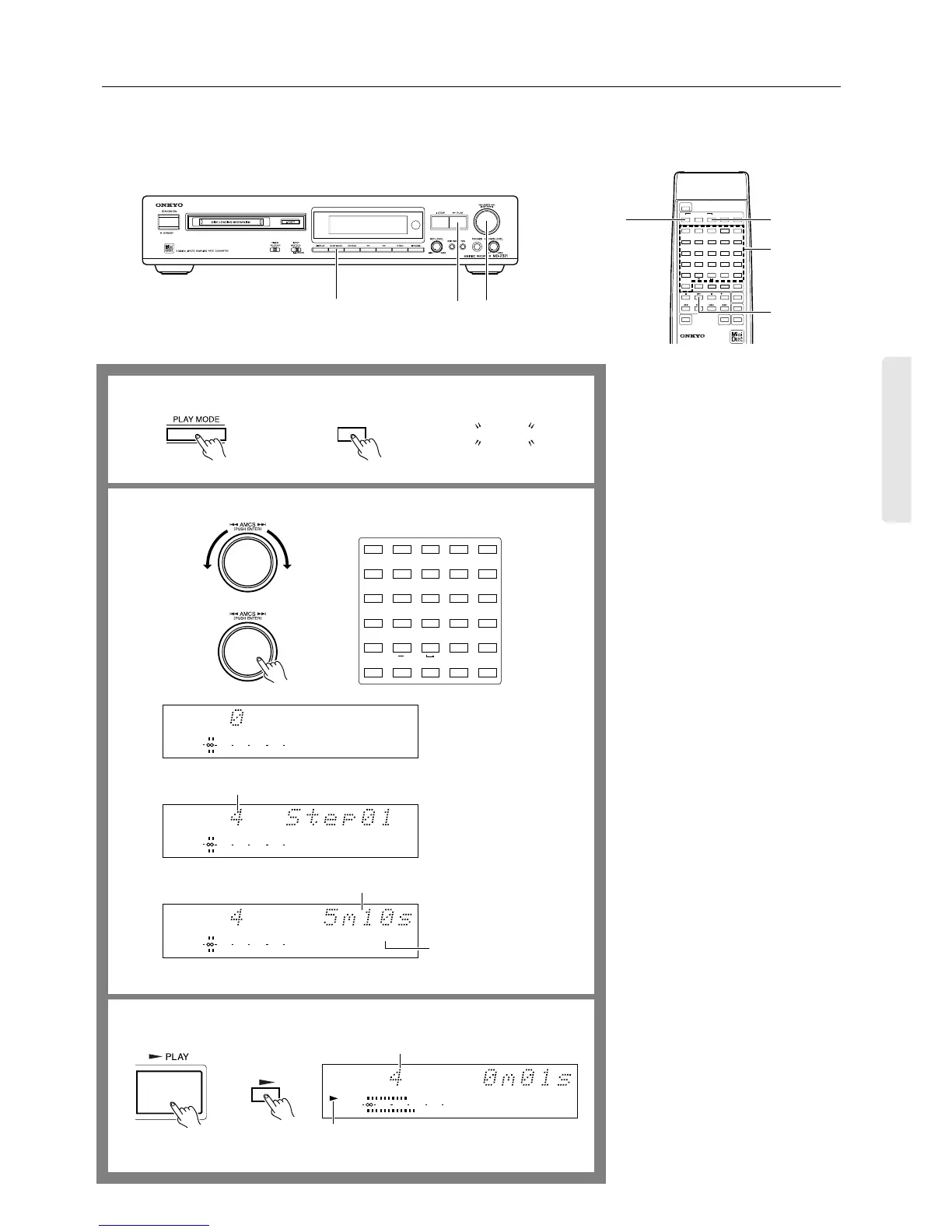
1. When the MD recorder is stopped,
press the PLAY MODE button sev-
eral times until “MEMORY” appears
on the display,
Alternatively, press the MEMORY but-
ton on the remote controller.
2. Using the AMCS knob, select the
tracks in the order you want to play.
Turn the AMCS knob until the track
number you want to program appears
(the track playing time is displayed).
Press the AMCS knob to program the
track.
To play a track numbered 26 or
higher...
Press the [>25] button first. Use the
numeric buttons to set a value for the
10th place, then the 1st place. (Press the
[10] button to enter “0”.)
E.x.,
To select the 30th track
[>25] + [3] + [10]
To select the 100th track
[>25] + [>25] + [1] + [10] + [10]
3. Press the ® PLAY button (or the
®button on the remote controller) to
start Memory playback.
When the playback of all programmed
tracks concludes, the MD recorder
stops. The programmed tracks are
retained in memory.
To exit Memory playback mode:
When the MD recorder is stopped, press
the PLAY MODE button several times
until “MEMORY” disappears from the dis-
play. (Or, press the CONTINUE button on
the remote controller.)
All data in the memory will be erased.
Clearing the last track stored:
Press the ■ or CLEAR button on the
remote controller.
The last track programmed in memory is
cleared.
Re-programming:
Cancel the program setting, then repeat the
procedure from Step 2.
1
2
3
MEMORY
MEMORY
Remote controller
REPEAT
>25
M.SCAN
12345
678910
11 12 13 14 15
16 17 18 19 20
21 22 23 24 25
FGHI J
KLMNO
PQRST
UVWXY
Z
.,
/?!
()
A-B A-SPACE
TRACK
4
DIGITAL IN
MEMORY
010 22040
R
6
L
1
TRACK
4
DIGITAL IN
MEMORY
010 22040
R
6
L
1
10 22040
R
6
L
TRACK
DIGITAL IN
MEMORY
1
Remote controller
Total playing time of programmed tracks
Programmed track number
Programmed track
TRACK
4
DIGITAL IN
MEMORY
010 22040
R
6
L
1
Remote controller
Playing track number
PLAY indicator


 To Next Page