24
Naming a track or disc
POWER
REMOTE CONTROL RC-339MD
CONTINUE
PLAY MODE
RANDOM MEMORY
REPEAT
>25
M.SCAN
CLEAR
ENTER
NAME
SCROLL DISPLAY
1
A
2345
678910
11 12 13 14 15
16 17 18 19 20
21 22 23 24 25
BCDE
FGHI J
KLMNO
PQRST
UVWXY
Z
.,
/?!
()
REC
A-B A-SPACE
RC-339MD
2, 6
,
5
CLEAR
4
ENTER
1, 5
2
3, 64
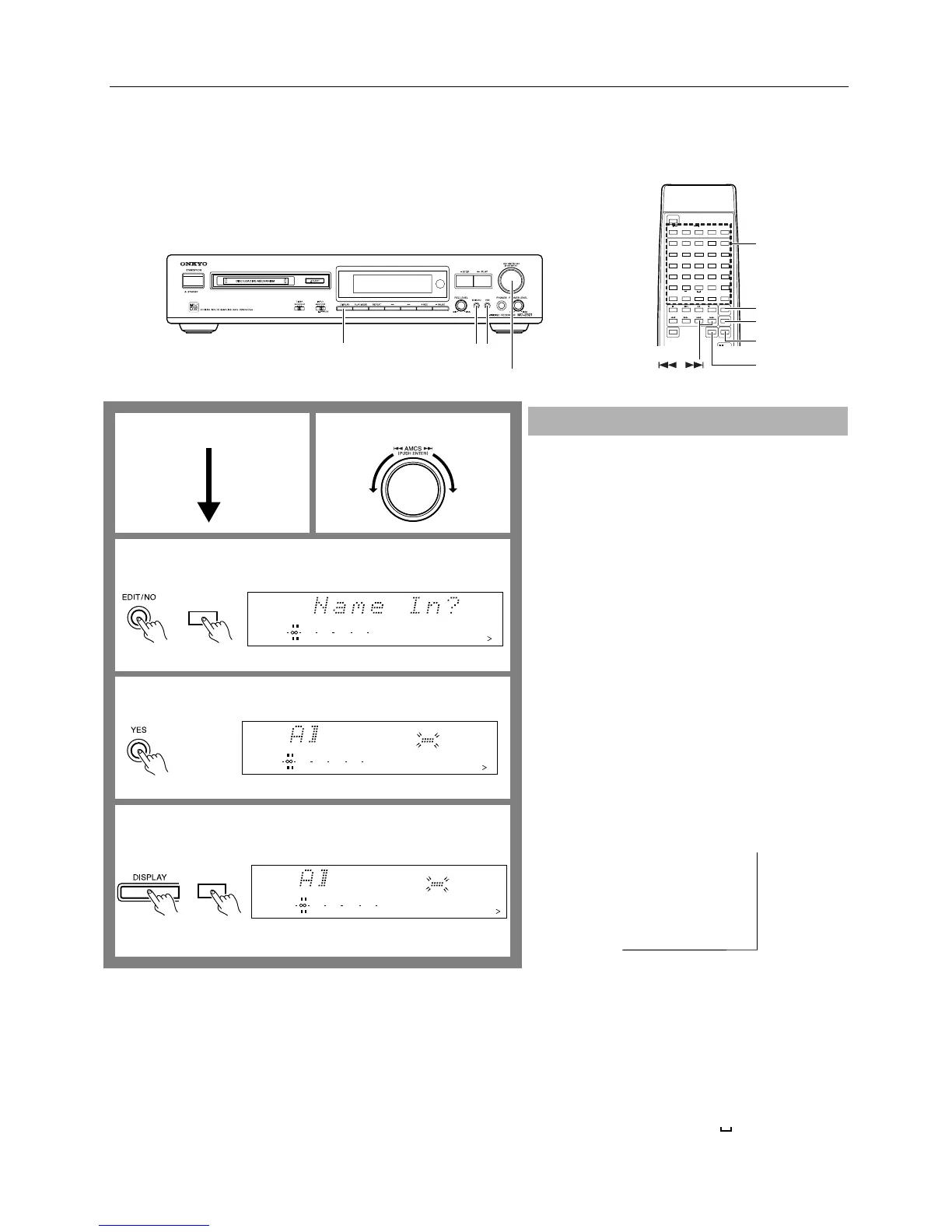
You can name tracks and discs using the AMCS knob on the front panel or the
character buttons on the remote controller. You may name tracks at any time.
However, the MD-2321 must be stopped when you name a disc.
You can enter up to 100 characters for each track name and a disc title.
The characters being entered are cancelled if the playing or recording track is
changed.
1. Turn the AMCS knob to select a track you wish to
name.
• To name a disc, skip step 1 and go to step 2.
Note:
If you wish to name a track while recording or playing it,
start with Step 2 below during recording or playback.
Note that if recording or playback is complete before you
finish entering the entire name, the characters you input
so far will be cancelled.
2. Press the EDIT/NO button several times until “Name
In?” appears on the display.
Alternatively, press the NAME button on the remote con-
troller. (In this case, the “Name In?” display will be
skipped.)
When you name a track, the TRACK indicator will turn on.
To cancel the operation...
Press the ■ STOP, or press the YES button while pressing
and holding down the EDIT/NO button.
3. Press the YES button.
A blinking cursor appears.
4. Press the DISPLAY button repeatedly to select a char-
acter input mode.
You can enter upper case letters, lower case letters, and
numbers and symbols. Each press of the DISPLAY button
changes the type of character you can enter as follows:
Upper case letters (A, B, C...)
↓
Lower case letters (a, b, c...)
↓
Numbers and symbols (1, 2, 3...)
↓
Easy title ( ; )
(Refer to the table below.)
Naming a track or disc
1
2
3
4
To name a trackTo name a disc
Remote controller
DISC
12345
678910
11 12 13 14 15
DIGITAL IN
010 22040
R
6
L
15
1
NAME
DISC
12345
678910
11 12 13 14 15
DIGITAL IN
010 22040
R
6
L
15
1
DISC
123 45
678 910
11 12 13 14 15
DIGITAL IN
010 22040
R
6
L
15
1
DISPLAY
Remote controller
Preset titles for easy titling
In Easy Titling mode, you can enter the following titles by simply choosing one.
BALLAD
BLUES
CLASSIC
DANCE
FUSION
JAZZ
LIVE
POPS
REGGAE
ROCK
SOUL
TECHNO
VOCAL
African
American
Asian
British
Euro
German
Japanese
Anthology
Best of
(One space will be added
following “of”.)
Collection
Favorite
Happy
Heavy
Hit songs
Omnibus
Selection
Special
Super
Space ( )
←


 To Next Page