25
Naming a track or disc
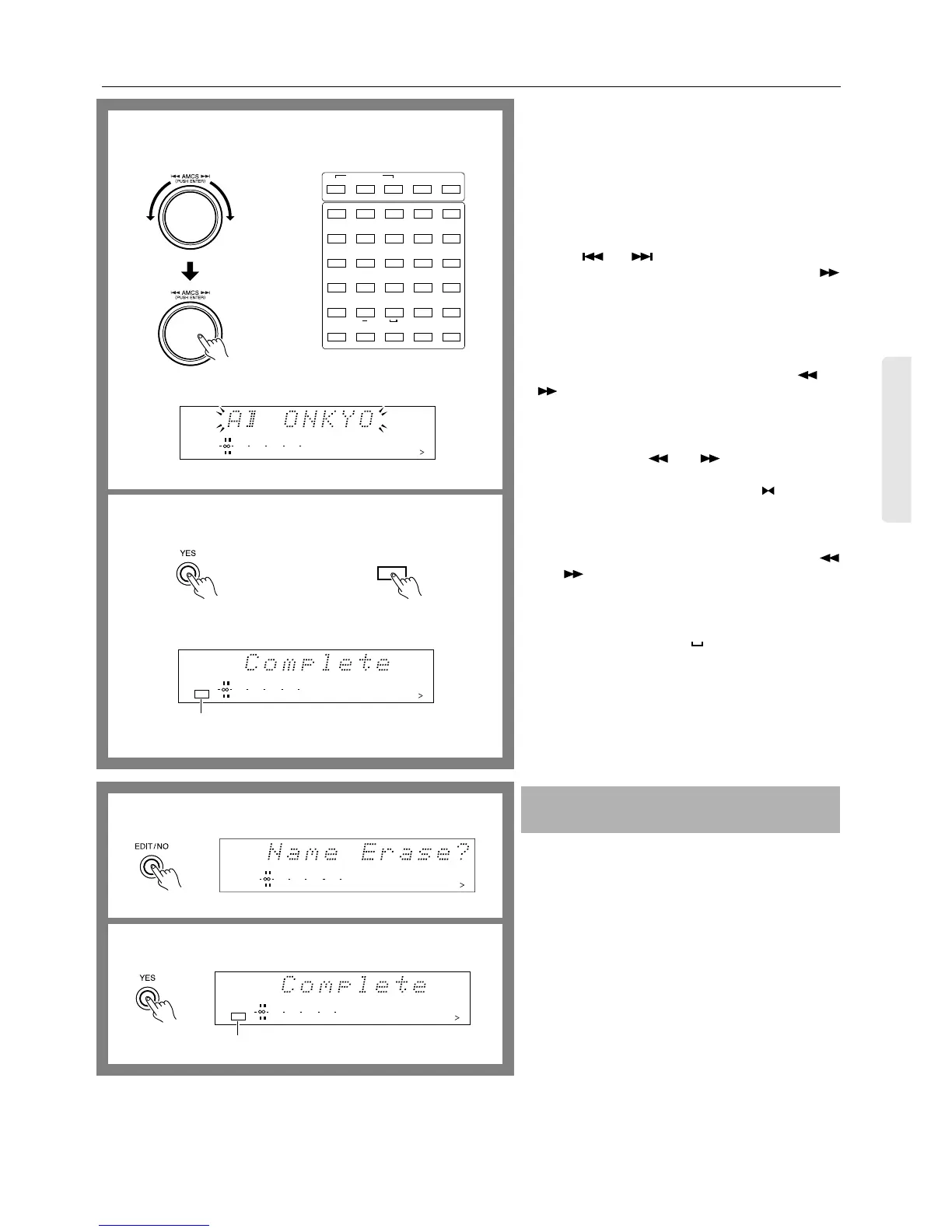
5. Enter a track name or disc name using the AMCS
knob.
Turn the AMCS knob to select a character and press the
AMCS knob to enter it. Follow the same procedure to
enter the entire name.
To enter a name using the remote controller...
You can enter numbers (1 to 9, 0 by the 10 button), upper-
case and lowercase letters, and symbols (only those indi-
cated below the buttons) using the remote controller.
Use the and buttons on the remote controller to
select characters and press the ENTER button or the
button to confirm the entry.
To change the type of characters entered...
Go back to step 4 and change the character input mode.
Then, select and enter characters using the AMCS knob.
To correct the entered character...
Select the character you want to correct using the and
buttons (the selected character blinks), then reenter
the character you want.
To insert a character...
Select the character before which you want to insert a
character using the and buttons (the selected
character blinks).
Turn the AMCS knob counterclockwise ( blinks) and
press the AMCS knob (the cursor blinks). Finally, enter
the character you want.
To erase a character...
Select the character that you want to erase using the
and buttons (the character blinks) and press the
EDIT/NO button on the front panel or CLEAR button on
the remote controller.
To insert a space...
Turn AMCS knob to display ( ) and press the knob to set.
6. Press the YES button.
Alternatively, press the NAME button on the remote con-
troller.
“Complete” appears on the display.
Note:
While the TOC indicator is lit or flashing, do not move or
unplug the MD recorder.
1. Press the EDIT/NO button repeatedly to display
“Name Erase?” while the MD-2321 is stopped.
Note:
Once the disc name and all track names are erased, they
cannot be restored.
2. Press the YES button to erase all track names and the
disc name, or press the ■ STOP button to cancel the
operation.
Erasing the disc name and all track names
at one time
5
6
REPEAT
>25
M.SCAN
12345
678910
11 12 13 14 15
16 17 18 19 20
21 22 23 24 25
FGHI J
KLMNO
PQRST
UVWXY
Z
.,
/?!
()
A-B A-SPACE
Remote controller
DISC
12345
678910
11 12 13 14 15
DIGITAL IN
010 22040
R
6
L
15
1
CONTINUE
PLAY MODE
RANDOM MEMORY
ABCDE
Remote controller
12345
678910
11 12 13 14 15
DIGITAL IN
TOC
010 22040
R
6
L
15
1
Lights when completed.
NAME
1
2
DISC
12345
678910
11 12 13 14 15
DIGITAL IN
010 22040
R
6
L
15
1
12345
678910
11 12 13 14 15
DIGITAL IN
TOC
010 22040
R
6
L
15
1
Lights when completed.


 To Next Page