23
Editing the contents of an MD
1, 4
3, 5
2
This function is available while the unit is
stopped or paused.
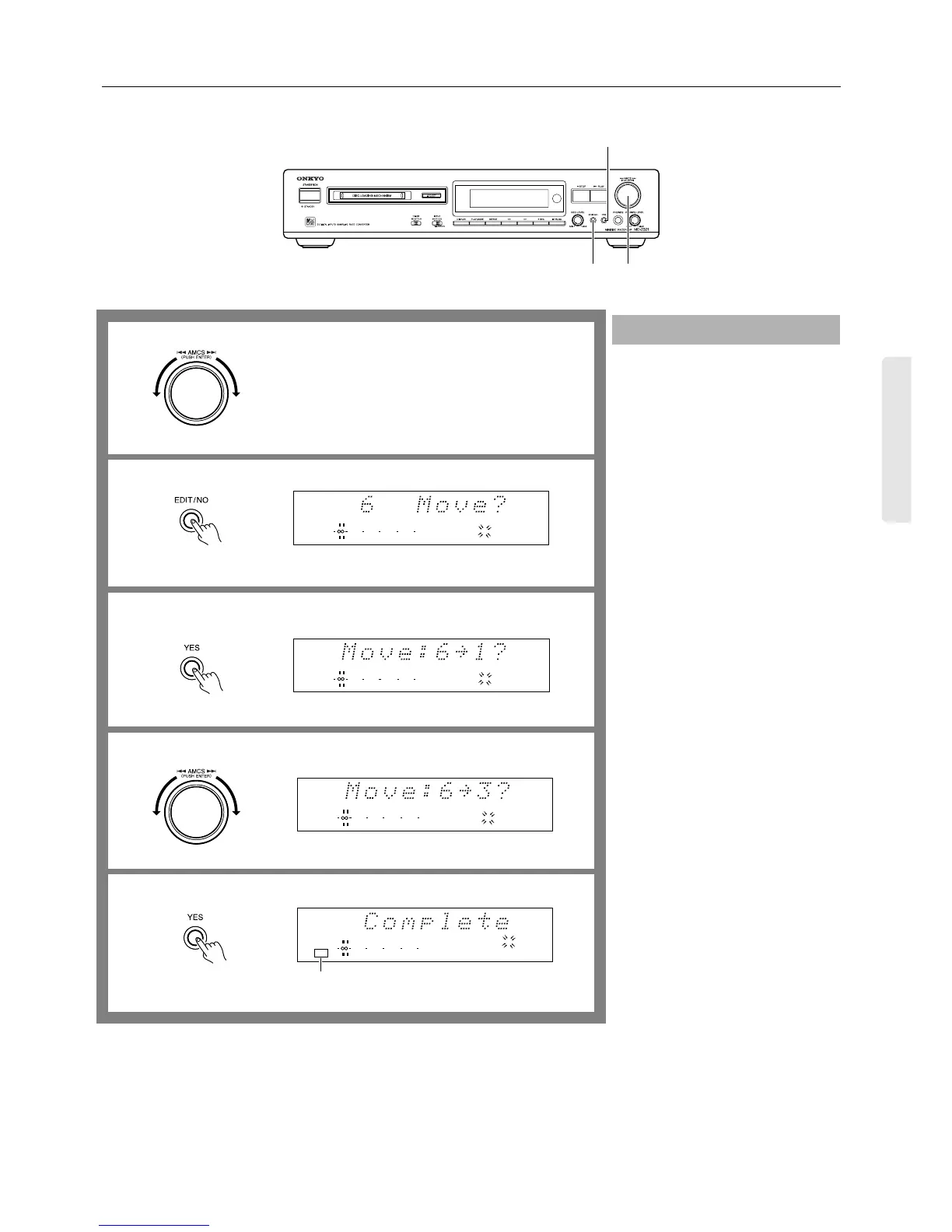
1. Turn the AMCS knob until the track
number you want to move appears on
the display.
2. Press the EDIT/NO button several
times until “Move?” appears on the
display.
To cancel the operation...
Press the EDIT/NO button again, or
press the ■ STOP button.
3. Press the YES button.
The selected track number and the
default destination track number (#1)
appear on the display.
4. Turn the AMCS knob to select the
desired destination track number.
5. Press the YES button or AMCS knob
to execute the operation.
When the track is moved, “Complete”
appears on the display, and the tracks
are renumbered accordingly. For exam-
ple, if you move track 3 to track 1, the
original track 1 is renumbered as track
2; track 2 is renumbered as track 3, and
so on.
Note:
While the TOC indicator is lit or flashing,
do not move or unplug the MD recorder.
Moving a track
1
2
3
5
910
11 12 13
8
14
DIGITAL IN
TOC
010 22040
R
6
L
1
Lights when completed.
12345
67
4
TRACK
12345
678910
11 12 13 14
DIGITAL IN
010 22040
R
6
L
1
TRACK
12345
678910
11 12 13 14
DIGITAL IN
010 22040
R
6
L
1
TRACK
12345
678910
11 12 13 14
DIGITAL IN
010 22040
R
6
L
1


 To Next Page