21
Editing the contents of an MD
4
3, 5
21
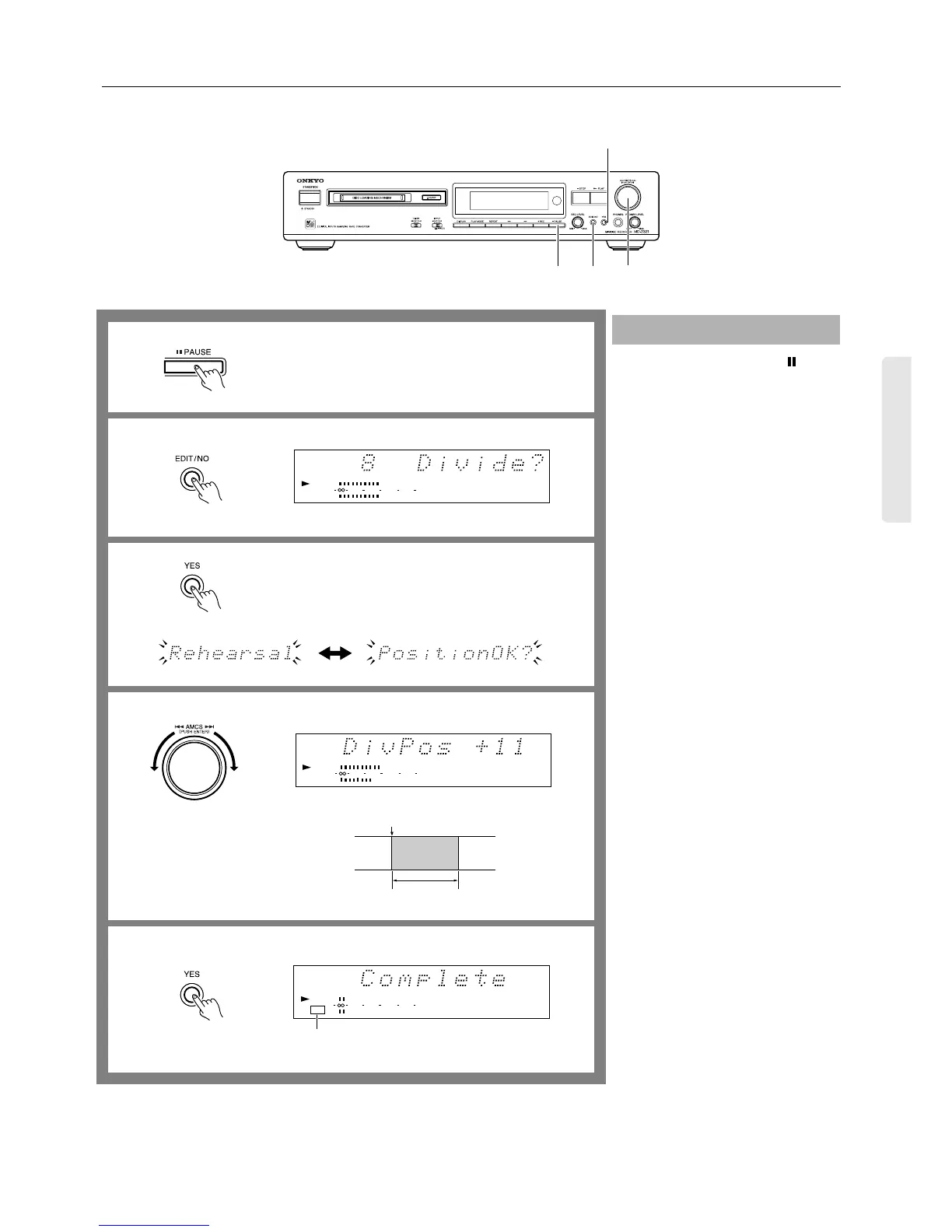
1. During playback, press the PAUSE
button at the point where you wish to
divide the track.
2. Press the EDIT/NO button several
times until “Divide?” appears on the
display.
• To cancel the operation...
Press the EDIT/NO button again, or
press the ■ STOP button.
3. Press the YES button.
The MD recorder repeatedly plays a
part approximately four seconds before
and after the dividing point.
“Rehearsal” and “Position OK?” alter-
nately flash on the display.
4. Turn the AMCS knob while listening
to the part being played to fine-adjust
the point where you wish to divide the
track.
The dividing point is represented by 0.5
seconds of silence.
You can move the dividing point in the
range of –128 to +127. (One step corre-
sponds to approximately 0.06 seconds.)
5. Press the YES button or AMCS knob
to execute the operation.
After the track is divided, “Complete”
appears on the display.
• When a track is divided, the subsequent
tracks are renumbered accordingly. For
example, if you divide track 2 into two
parts, the latter part is renumbered as
track 3; track 3 is renumbered as track
4; track 4 is renumbered as track 5, and
so on.
Note:
While the TOC indicator is lit or flashing,
do not move or unplug the MD recorder.
Dividing a track
1
3
4
5
TRACK
8910
11 12
010 22040
R
6
L
DIGITAL IN 1
TRACK
8910
11 12
DIGITAL IN
010 22040
R
6
L
1
Play
Dividing point
910
11 12 13
DIGITAL IN
TOC
010 22040
R
6
L
1
Lights when completed.
2


 To Next Page