EasyManua.ls Logo

Onkyo TX-27 - Page 6

Onkyo TX-27
24 pages
Print Icon
To Next Page IconTo Next Page
To Previous Page IconTo Previous Page
Loading...
Genera!
On
each
pair
of
input
and
output
jacks,
the
right
jack
(marked
R)
corresponds
to
the
right
channel,
and
the
left
jack
(marked
L)
to
the
left
channel.
When
jacks
on
other
components
or
connection
cables
are
color-coded,
red
usually
corresponds
to
the
right
channel
(Red
=
Right).
AC
Outlet
(UNSWITCHED)
(USA
&
Canadian
models
only)
This
outlet
is
not
switched
on
and
off
by
the
power
switch
on
the
front
panel.
Capacity
is
100
watts.
AC
Outlet
(SWITCHED)
(USA
&
Canadian
models
only)
This
outlet
is
switched
on
and
off
by
the
power
switch
on
the
front
panel.
Capacity
is
100
watts.
Only
the
TX-37
is
equipped
with
a
SWITCHED
outlet.
There
are
no
AC
outlets
at
all
on
models
(TX-37
and
TX-27)
made
for
some
areas.
FM
antennas
Depending
on
the
strength
and
quality
of
FM
signals
in
your
area,
the
accessory
T-shaped
antenna
may
give
satisfactory
reception
or
you
may
need
an
external
FM
antenna.
Spread
the
T-sharped
antenna
on
a
wall,
preferably
outside
or
on
the
ceiling
and
try
several
positions
to
determine
which
gives
the
best
reception.
If
reception
with
the
T-shaped
antenna
is
unsatisfactory,
install
a
multi-element
external
FM
antenna.
Consult
your
Onkyo
dealer
about
the
right
type
for
you
area.
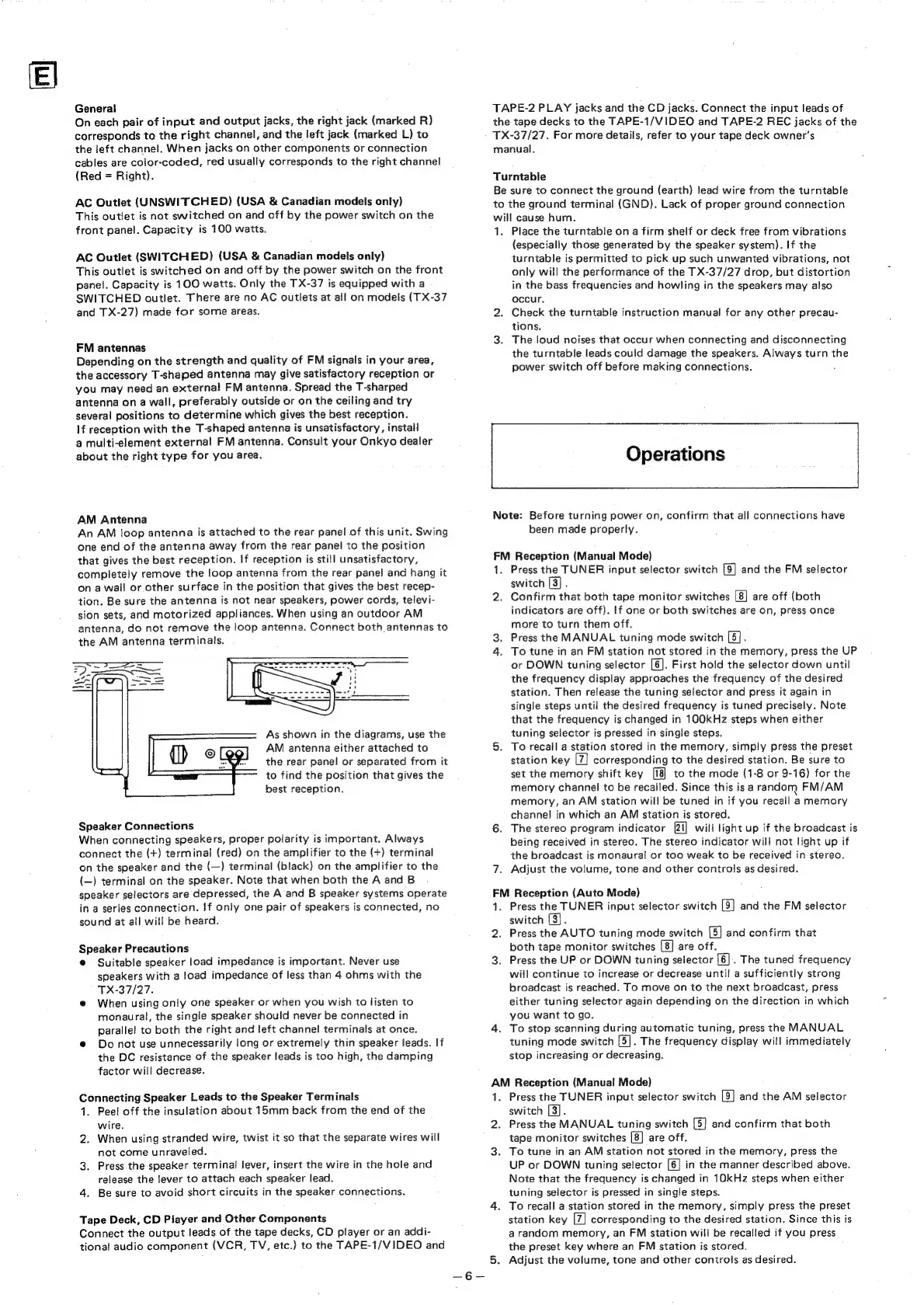
AM
Antenna
An
AM
loop
antenna
is
attached
to
the
rear
panel
of
this
unit.
Swing
one
end
of
the
antenna
away
from
the
rear
panel
to
the
position
that
gives
the
best
reception.
If
reception
is
still
unsatisfactory,
completely
remove
the
loop
antenna
from
the
rear
panel
and
hang
it
on
a
wall
or
other
surface
in
the
position
that
gives
the
best
recep-
tion.
Be
sure
the
antenna
is
not
near
speakers,
power
cords,
televi-
sion
sets,
and
motorized
appliances.
When
using
an
outdoor
AM
antenna,
do
not
remove
the
loop
antenna.
Connect
both
antennas
to
the
AM
antenna
terminals.
As
shown
in
the
diagrams,
use
the
AM
antenna
either
attached
to
the
rear
panel
or
separated
from
it
to
find
the
position
that
gives
the
best
reception.
Speaker
Connections
When
connecting
speakers,
proper
polarity
is
important.
Always
connect
the
(+)
terminal
(red)
on
the
amplifier
to
the
(+)
terminal
on
the
speaker
and
the
(—)
terminal
(black)
on
the
amplifier
to
the
(—)
terminal
on
the
speaker.
Note
that
when
both
the
A
and
B
speaker
selectors
are
depressed,
the
A
and
B
speaker
systems
operate
in
a
series
connection.
!f
only
one
pair
of
speakers
is
connected,
no
sound
at
all
will
be
heard.
Speaker
Precautions
@
Suitable
speaker
load
impedance
is
important.
Never
use
speakers
with
a
load
impedance
of
less
than
4
ohms
with
the
TX-37/27.
@
When
using
only
one
speaker
or
when
you
wish
to
listen
to
monaural,
the
single
speaker
should
never
be
connected
in
parallel
to
both
the
right
and
left
channel
terminals
at
once.
@
Do
not
use
unnecessarily
long
or
extremely
thin
speaker
leads.
If
the
DC
resistance
of
the
speaker
leads
is
too
high,
the
damping
factor
will
decrease.
Connecting
Speaker
Leads
to
the
Speaker
Terminals
1.
Peel
off
the
insulation
about
15mm
back
from
the
end
of
the
wire.
2.
When
using
stranded
wire,
twist
it
so
that
the
separate
wires
will
not
come
unraveled.
3.
Press
the
speaker
terminal
lever,
insert
the
wire
in
the
hole
and
release
the
Jever
to
attach
each
speaker
lead.
4,
Be
sure
to
avoid short
circuits
in
the
speaker
connections.
Tape
Deck,
CD
Piayer
and
Other
Components
Connect
the
output
leads
of
the
tape
decks,
CD
player
or
an
addi-
tional
audio
component
(VCR,
TV,
etc.)
to
the
TAPE-1/VIDEO
and
TAPE-2
PLAY
jacks
and
the
CD
jacks.
Connect
the
input
leads
of
the
tape
decks
to
the
TAPE-1/VIDEO
and
TAPE-2
REC
jacks
of
the
TX-37/27.
For
more
details,
refer
to
your
tape
deck
owner’s
manual.
Turntable
Be
sure
to
connect
the
ground
(earth)
lead
wire
from
the
turntable
to
the
ground
terminal
(GND).
Lack
of
proper
ground
connection
will
cause
hum.
1.
Place
the
turntable
on
a
firm
shelf
or
deck
free
from
vibrations
(especially
those
generated
by
the
speaker
system).
If
the
turntable
is
permitted
to
pick
up
such
unwanted
vibrations,
not
only
will
the
performance
of
the
TX-37/27
drop,
but
distortion
in
the
bass
frequencies
and
howling
in
the
speakers
may
also
occur.
2.
Check
the
turntable
instruction
manual
for
any
other
precau-
tions.
3.
The
loud
noises
that
occur
when
connecting
and
disconnecting
the
turntable
leads
could
damage
the
speakers.
Always
turn
the
power
switch
off
before
making
connections.
Â¥
Operations
Note:
Before
turning
power
on,
confirm
that
all
connections
have
been
made
properly.
FM
Reception
(Manual
Mode)
1.
Press
the
TUNER
input
selector
switch
[9]
and
the
FM
selector
switch
[3]
2.
Confirm
that
both
tape
monitor
switches
are
off
(both
indicators
are
off).
If
one
or
both
switches
are
on,
press
once
more
to
turn
them
off.
3.
Press
the
MANUAL
tuning
mode
switch
[5].
4.
To
tune
in
an
FM
station
not
stored
in
the
memory,
press
the
UP
or
DOWN
tuning
selector
[6].
First
hold
the
selector
down
until
the
frequency
display
approaches
the
frequency
of
the
desired
station.
Then
release
the
tuning
selector
and
press
it
again
in
single
steps
until
the
desired
frequency
is
tuned
precisely.
Note
that
the
frequency
is
changed
in
100kHz
steps
when
either
tuning
selector
is
pressed
in
single
steps.
5.
To
recall
a
station
stored
in
the
memory,
simply
press
the
preset
station
key
|7}
corresponding
to
the
desired
station.
Be
sure
to
set
the
memory
shift
key
to
the
mode
(1-8
or
9-16)
for
the
memory
channel
to
be
recalled.
Since
this
is
a
random
FM/AM
memory,
an
AM
station
will
be
tuned
in
if
you
recail
a
memory
channel
in
which
an
AM
station
is
stored.
6.
The
stereo
program
indicator
21]
will
light
up
if
the
broadcast
is
being
received
in
stereo.
The
stereo
indicator
will
not
light
up
if
the
broadcast
is
monaural
or
too
weak
to
be
received
in
stereo.
7.
Adjust
the
volume,
tone
and
other
controls
as
desired.
FM
Reception
(Auto
Mode)
1.
Press
the
TUNER
input
selector
switch
[9
switch
[3].
2.
Press
the
AUTO
tuning
mode
switch
(5]
both
tape
monitor
switches
(8]
are
off.
3.
Press
the
UP
or
DOWN
tuning
selector
[6].
The
tuned
frequency
will
continue
to
increase
or
decrease
until
a
sufficiently
strong
broadcast
is
reached.
To
move
on
to
the
next
broadcast,
press
either
tuning
selector
again
depending
on
the
direction
in
which
you
want
to
go.
4.
To
stop
scanning
during
automatic
tuning,
press
the
MANUAL
tuning
mode
switch
[5].
The
frequency
display
will
immediately
stop
increasing
or
decreasing.
and
the
FM
selector
and
confirm
that
AM
Reception
(Manual
Mode)
1.
Press
the
TUNER
input
selector
switch
[9]
and
the
AM
selector
switch
[3].
2.
Press
the
MANUAL
tuning
switch
[5]
tape
monitor
switches
[8]
are
off.
3.
To
tune
in
an
AM
station
not
stored
in
the
memory,
press
the
UP
or
DOWN
tuning
selector
[6]
in
the
manner
described
above.
Note
that
the
frequency
is
changed
in
10kHz
steps
when
either
tuning
selector
is
pressed
in
single
steps.
4.
To
recall
a
station
stored
in
the
memory,
simply
press
the
preset
station
key
[7]
corresponding
to
the
desired
station.
Since
this
is
a
random
memory,
an
FM
station
will
be
recalled
if
you
press
the
preset
key
where
an
FM
station
is
stored.
5.
Adjust
the
volume,
tone
and
other
controls
as
desired.
and
confirm
that
both

Related product manuals