Connections
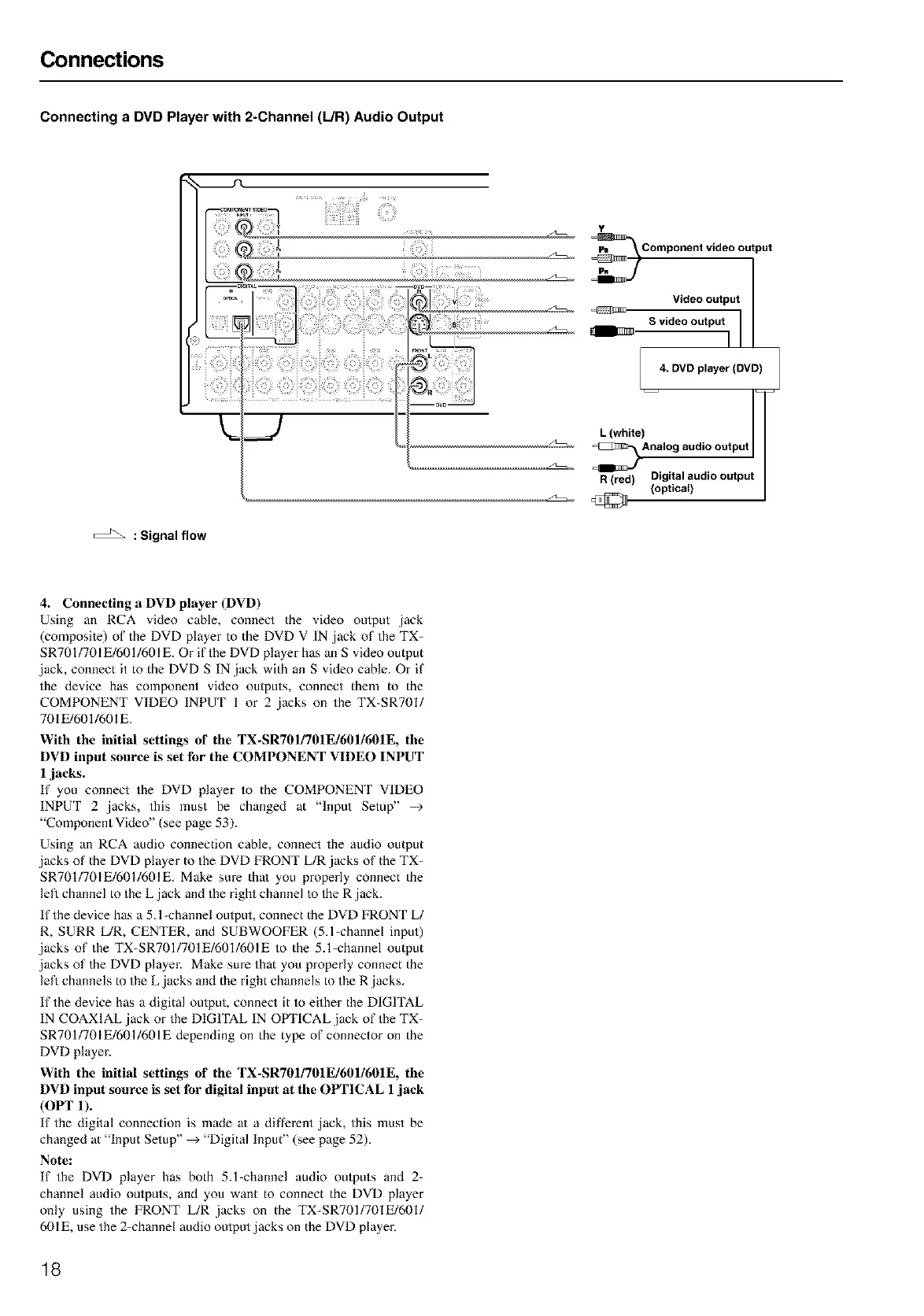
Connecting a DVD Player with 2-Channel (L/R) Audio Output
¥
Component video output
Video output
S video output I 1
4. DVD player (DVD)
L (white) /
_ Analog audio output
R (red) Digital audio output
(optical)
: Signal flow
4. Connecting a DVD player (DVD)
Using an RCA video cable, connect the video output .jack
(composile) of the DVD player to the DVD V IN jack of the TX-
SR701/701E/601/601E Or if the DVD player has an S video output
.jack, connect it to the DVD S IN .jack with an S video cable Or if
the device has component video outputs, connect them to the
COMPONENT VIDEO INPUT I or 2 .jacks on the TX-SR701/
701E/601/601E
With the initial settings o1' the TX-SR7OI/701E/6OI/601E, the
DVD input source is set tbr the COMPONENT VIDE() INPUT
I jacks.
If you connect the DVD player to the COMPONENT VIDEO
INPUT 2 jacks, this must be changed at "Input Setup" -+
"Component Video" (see page 53).
Using an RCA audio connection cable, connect the audio output
,jacks of the DVD player to the DVD FRONT L/R,jacks of the TX-
SR701/701E/601/601E. Make sure thai you properly connect the
left channel to the L,jack and the right channel to the R jack.
If the device has a 5.1-channel output, connect the DVD FRONT L/
R, SURR L/R, CENTER, and SUBWOOFER (5A-channel input)
,jacks of the TX-SR701/701E/601/601E to the 5.1-channel output
,jacks of the DVD player. Make sure that you properly connect the
left channels to the L,jacks and the right channels to the R,jacks.
If the device has a digital output, connect it to either the DIGITAL
IN COAXIAL,jack or the DIGITAL IN OPTICAL,jack of the TX-
SR701/701E/601/601E depending on the type of connector on the
DVD player.
With the initial settings o1' the TX-SR701/701E/6OI/601E, the
DVD input source is set for digital input at the OPTICAL I jack
(OPT 1).
If the digital connection is made a/ a different ,jack, this must be
changed at "Input Setup" -+ "Digital Input" (see page 52).
Note:
If the DVD player has both 5.1-channel audio outputs and 2-
channel audio outputs, and you want to connect the DVD player
only using the FRONT L/R ,jacks on the TX-SR701/701E/601/
601E, use the 2-channel audio output ,jacks on the DVD player.
18



 To Next Page