EasyManua.ls Logo

OnStar FMV Mirror - Troubleshooting Common Issues; Power and Connectivity Problems; Configuration and Signal Issues; Audio and Mirror Display Problems

OnStar FMV Mirror
12 pages
Print Icon
To Next Page IconTo Next Page
To Previous Page IconTo Previous Page
Loading...
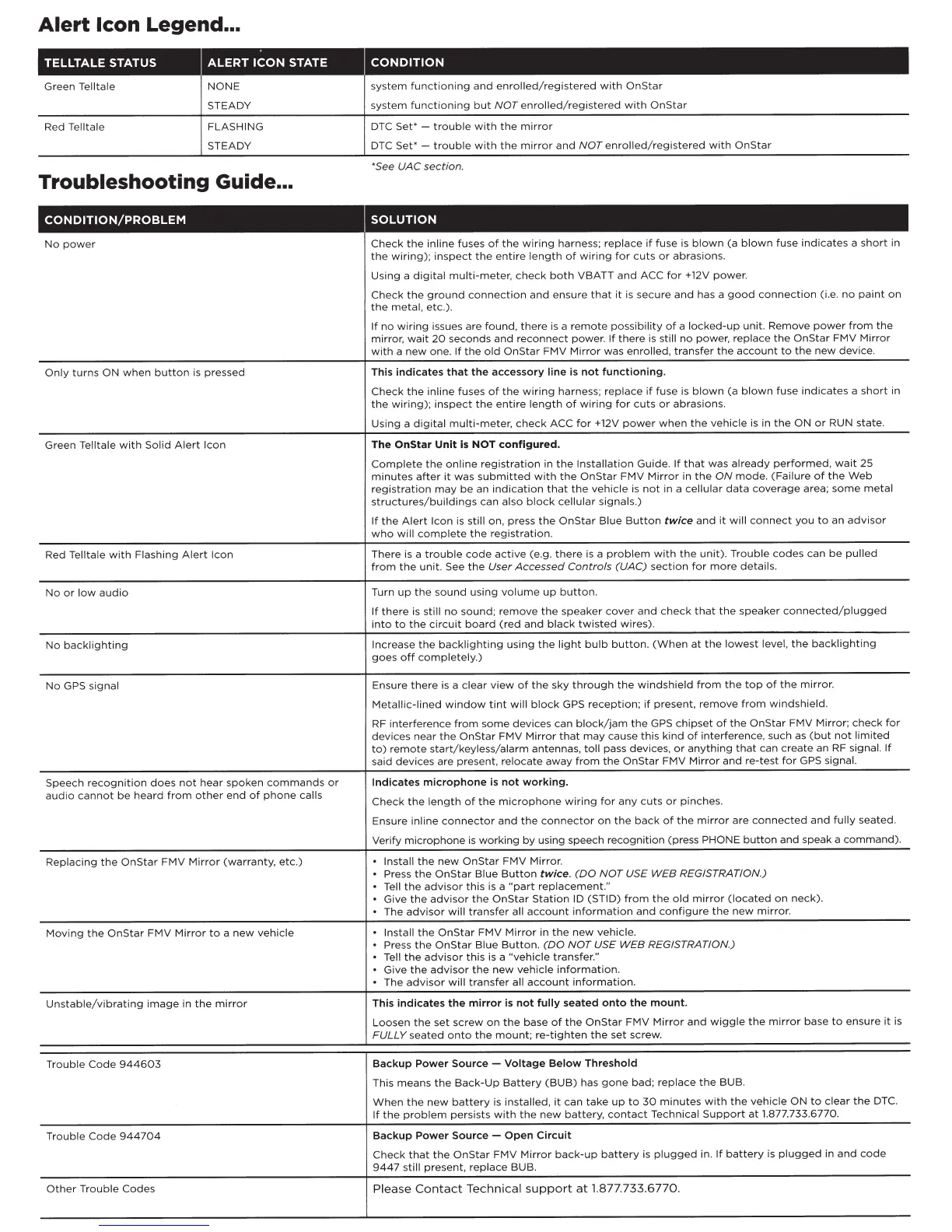
Alert
Icon Legend ...
TELLTALE
STATUS
ALERT
ICON
STATE
CONDITION
Green
Telltale
Red Telltale
NONE
STEADY
FLASHING
STEADY
Troubleshooting Guide ...
CONDITION/PROBLEM
No
power
Only
turns
ON
when
button
is pressed
Green
T
elltale
with
Solid
Alert
Icon
Red Telltale
with
Flas
hing
Alert
Icon
No
or
low
audio
No
backlighting
No
GPS
signal
Speec
h
r
ecog
niti
on
does
not
hear
spoken
commands
or
audio
cannot
be
heard
from
other
end
of
phone
calls
Replacing
the
OnStar
FMV
Mirror
(warranty,
etc.)
Movin
g
the
OnStar
FMV
Mi
rror
to
a
new
vehicle
Unst
ab
le/vibrating
image
in
th
e
mirror
Trouble
Cod
e
944603
Trouble
Code
944704
O
ther
Tr
oub
le C
odes
system
funct
i
oning
and
enrolled
/ regi
stered
with
OnStar
system
functioning
but
NOT
enrolled
/
registered
with
OnStar
DTC
Set•
-
trouble
with
the
mirror
DTC
Set•
-
trouble
with
the
mirror
and
NOT
enrolled/registered
with
On
Star
•see
UAC
section.
•
•
Check
the
in line fuses
of
the
wiring
harness;
replace
if
fuse
is
blown
(a
blown
fuse
ind
ica
tes
a
short
in
the
wiring);
inspect
the
entire
length
of
wiring
for
cuts
or
abrasions.
Using
a
digital
multi-meter,
check
both
VBATT
and
ACC
for
+1
2V
power.
Check
the
ground
connection
and
ensure
that
it
is
secure
and
has a
good
connection
(i.e.
no
paint
on
the
metal,
etc.).
If
no
wiring
issues
are
found,
there
is a
remote
possibility
of
a l
ocked-up
unit.
Remove
power
from
the
mirror
,
wait
20
seconds
and
reconnect
power.
If
there
is
still
no
power,
replace
the
On
Star
FMV
Mirror
with
a
new
one.
If
the
old
OnStar
FMV
Mirror
was
enrolled
,
tr
ansfer
the
account
to
t
he
new
device
.
This
indicates
that
the
accessory
line
is
not
functioning,
Check
the
inline
fuses
of
the
wiring
harness;
replace
if
fuse
is
blown
(a
blown
fuse
ind
icates
a
short
in
th
e
wiring);
inspect
th
e
entire
length
of
wiring
for
cu
ts
or
abrasions.
Using
a
digital
multi-m
ete
r,
ch
ec
k ACC
for
+12V
power
when
the
vehicle
is
in
the
ON
or
RUN
state
.
The
OnStar
Unit
is
NOT
configured.
Complete
the
online
registration
in
the
Installation
Guide.
If
that
was
already
performed,
wait
2S
minutes
after
it
was
submitted
with
the
OnStar
FMV
Mirror
in
the
ON
mode.
(Failure
of
the
Web
registration
may
be
an
indication
that
the
vehicle
is
not
in a
ce
l
lular
data
coverage
area;
some
metal
structures/buildings
can
also
block
cellular
signals.)
If
the
Alert
Icon
is
sti
ll on, press
the
OnStar
Blue
B
utton
twice
and
it
will
connect
you
to
an
advisor
who
will
comp
let
e
the
r
eg
i
strat
ion.
There is a
trouble
code
ac
tiv
e
(e
.g .
ther
e is a
problem
with
t he
unit)
. Tro
ubl
e
codes
can
be
pulled
from
th
e
uni
t.
See
the
User
Accessed
Controls
(UAC)
sect
i
on
for
more
details.
Turn
up
the
sound
using
volume
up
button.
If
there
is
st
ill
no
so
und
;
remove
the
speaker
cover
and
c
he
ck
t
hat
the
speaker
connected/plugged
into
to
the
circuit
board
(red
and
black
twisted
wires).
Increase
the
backlighting
using
the
l
ig
ht
bulb
button.
(When
at
the
lowe
st
l
eve
l,
the
backlighting
goes
off
comp
letely.)
Ensure
ther
e is a
clear
view
of
the
sky
through
the
windshi
eld f
rom
the
top
of
the
mi
rr
o
r.
Metallic-lined
window
tint
will
block
GPS
reception;
if
present
,
remove
from
windshield.
RF
interference
from
some
devices
can
block/jam
the
GPS
ch
i
pset
of
the
OnStar
FMV
Mirr
or;
check
for
devices
near
the
On
Star
FMV
Mirror
that
may
cause
this
kind
of
interference,
such as
(b
ut
not
limited
to)
remote
s
tart/keyle
ss/a
larm
antennas,
toll
pass
devices
,
or
a
nything
that
can
create
an RF signal.
If
sa
id
devices
are present,
relocate
away
from
the
OnStar
FMV
Mi
rror
and
re-te
st
for
GPS
signal.
Indicates
microphone
is
not
working
.
C
he
ck
the
length
of
the
mi
cr
op
h
one
wiring
for
any c
ut
s
or
pinches.
Ensure
inlin
e
co
nne
cto
r a
nd
th
e
co
nn
ecto
r on
th
e
back
of
the
mirror
are
co
nn
ected
and
fully
seated
.
Verify
microphone
is
working
by
using speech
recognition
(press
PHONE
button
and
speak a
command)
.
In
sta
ll
th
e
new
OnStar
F
MV
Mirro
r.
.
Press
the
OnStar
Blue
Button
twice
.
(DO
NOT
USE
WEB
REGISTRATIO
N)
.
Tell
the
advisor
this
is a
"
part
rep
l
ace
me
nt
."
.
Give
the
advisor
the
OnStar
S
tati
on
ID
(STID)
from
the
old
mirror
(located
on
n
eck)
.
.
The
advisor
will
tr
an
sfer
all
ac
c
ou
nt
inf
or
m
at
ion
and
c
onf
ig
ur
e
the
new
mirr
or
.
In
sta
ll
the
OnStar
FMV
Mirror
in
t he
new
vehicle.
Press
th
e
OnS
tar
Blu
e
Button.
(DO
NOT
U
SE
WEB
REGISTRATIO
N)
Tell
the
adv
i
sor
this
is a
"vehicle
transfer."
Give
the
advisor
the
new
vehicle
information.
The
advisor
will
tr
an
sfe
r all
account
inf
o
rmation
.
This
indicates
the
mirror
is
not
fully
seated
onto
the
mount.
Loo
sen
th
e set sc
rew
on
the
base
of
the
OnStar
FMV
Mirror
and
wiggle
the
mirror
ba
se
to
ensure
it
is
FULLY
s
eated
onto
th
e
mount;
re-tighten
the
set
scr
ew
.
Backup
Power
Sourc
e
-
Voltage
Below
Threshold
Thi
s
means
the
Back-Up
Ba
ttery
(BUB)
has
gone
b
ad;
r
ep
l
ace
the
BUB
.
When
t he
new
battery
is
installed
,
it
can
tak
e
up
to
30
minu
te
s
with
the
vehicle
ON
to
clear
the
DTC.
If
the
problem
persists
with
th
e n
ew
batt
e
ry
,
co
nt
ac
t T
echn
ical
Support
at
1.877.733.6
77
0.
Backup
Power
Source-
Open
Circuit
Check
th
at t
he
OnS
t
ar
FMV
Mirror
back-up
battery
is
plugged
in.
If
battery
is
plugged
in
and
code
944
7
s
till
prese
nt,
repla
ce
BUB
.
Please
Contac
t
Te
c
hni
cal su
pport
at 1.
877
.733.
677
0.

Related product manuals