EasyManua.ls Logo

OnStar FMV Mirror - Registering the OnStar FMV Mirror; Post-Connection Power Checks; Online and Button-Press Registration; Final Installation Steps and Customer Handover

OnStar FMV Mirror
12 pages
Print Icon
To Next Page IconTo Next Page
To Previous Page IconTo Previous Page
Loading...
Q
Mounting
the
external
microphone ...
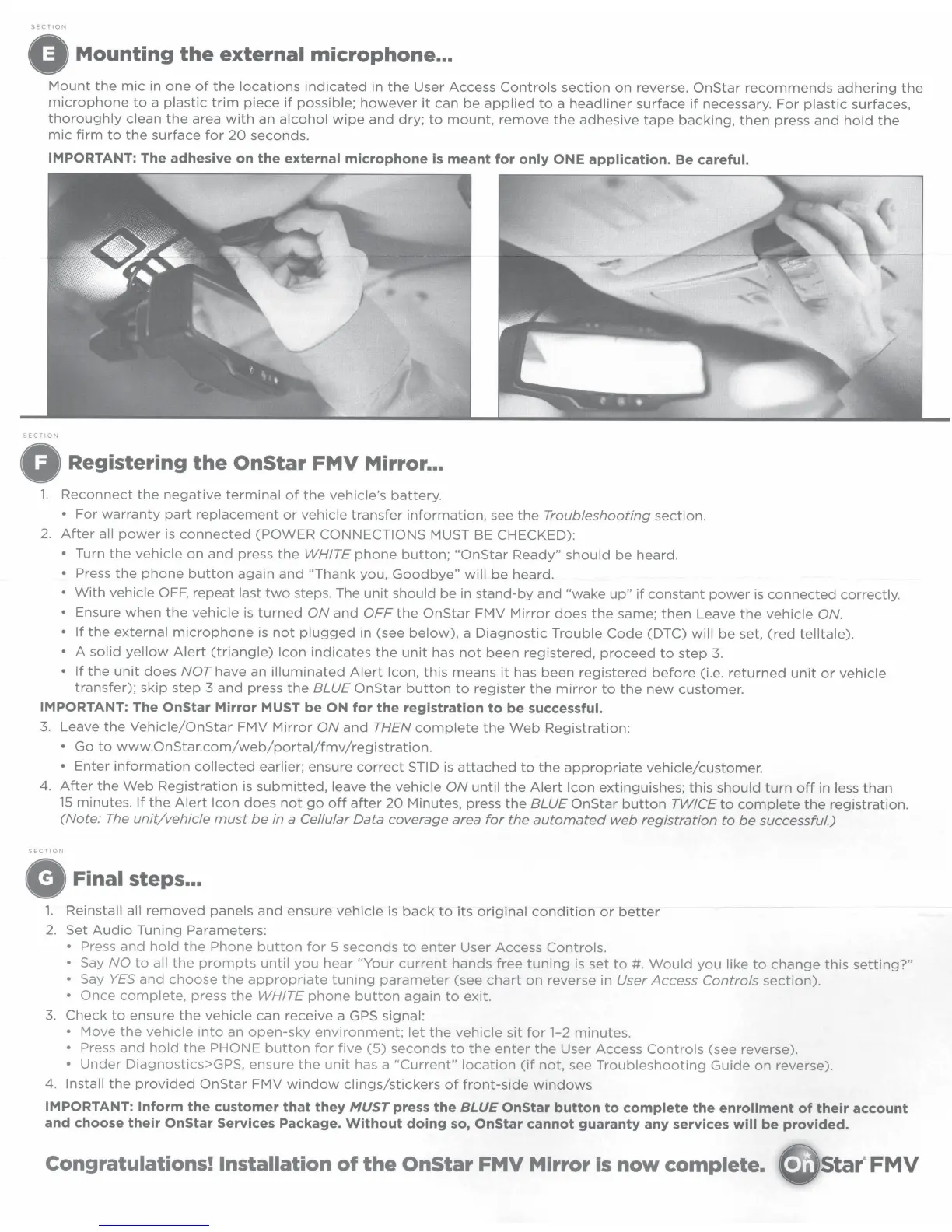
Mount
the
mic
in
one
of
the
locations
indicated
in
the
User
Access
Controls
section
on
reverse.
OnStar
recommends
adhering
the
microphone
to
a
plastic
trim
piece
if
possible;
however
it
can
be
applied
to
a
headliner
surface
if
necessary.
For
plastic
surfaces,
thoroughly
clean
the
area
with
an
alcohol
wipe
and
dry;
to
mount,
remove
the
adhesive
tape
backing,
then
press
and
hold
the
mic
firm
to
the
surface
for
20
seconds.
IMPORTANT:
The adhesive on
the
external microphone
is
meant
for only
ONE
application.
Be
careful.
SECTION
0
Registering
the
OnStar
FMV
Mirror ...
1.
Reconnect
the
negative
terminal
of
the
vehicle's
battery.
For
warranty
part
replacement
or
vehicle
transfer
information,
see
the
Troubleshooting
section.
2.
After
all
power
is
connected
(POWER
CONNECTIONS
MUST
BE CHECKED):
Turn
the
vehicle
on
and
press
the
WHITE
phone
button;
"OnStar
Ready"
should
be
heard.
Press
the
phone
button
again
and
"Thank
you,
Goodbye"
will
be
heard.
With
vehicle
OFF,
repeat
last
two
steps. The
unit
should
be
in
stand-by
and
"wake
up"
if
constant
power
is
connected
correctly.
Ensure
when
the
vehicle
is
turned
ON
and
OFF
the
OnStar
FMV
Mirror
does
the
same;
then
Leave
the
vehicle
ON.
If
the
external
microphone
is
not
plugged
in
(see
below),
a
Diagnostic
Trouble
Code
(DTC)
will
be
set,
(red
telltale).
A
solid
yellow
Alert
(triangle)
Icon
indicates
the
unit
has
not
been
registered,
proceed
to
step
3.
If
the
unit
does
NOT
have an
illuminated
Alert
Icon,
this
means
it
has
been
registered
before
(i.e.
returned
unit
or
vehicle
transfer);
skip
step
3
and
press
the
BLUE
OnStar
button
to
register
the
mirror
to
the
new
customer.
IMPORTANT:
The
OnStar
Mirror MUST
be
ON
for
the
registration
to
be
successful.
3.
Leave
the
Vehicle/OnStar
FMV
Mirror
ON
and
THEN
complete
the
Web
Registration:
Go
to
www.OnStar.com/web/portal/fmv/registration.
Enter
information
collected
earlier; ensure
correct
STID
is
attached
to
the
appropriate
vehicle/customer.
4.
After
the
Web
Registration
is
submitted,
leave
the
vehicle
ON
until
the
Alert
Icon
extinguishes;
this
should
turn
off
in less
than
15
minutes.
If
the
Alert
Icon
does
not
go
off
after
20
Minutes, press
the
BLUE
OnStar
button
TWICE
to
complete
the
registration.
(Note:
The
unit/vehicle
must
be
in a
Cellular
Data
coverage
area
for
the
automated
web
registration
to
be
successful.)
SECTION
G
Final steps ...
1.
Reinstall all
removed
panels
and
ensure
vehicle
is
back
to
its
original
condition
or
better
2.
Set
Audio
Tuning
Parameters:
Press
and
hold
the
Phone
button
for
5
seconds
to
enter
User
Access
Controls.
Say
NO
to
all
the
prompts
until
you
hear
"Your
current
hands
free
tuning
is
set
to
#.
Would
you
like
to
change
this
setting?"
Say
YES
and
choose
the
appropriate
tuning
parameter
(see
chart
on
reverse in
User
Access
Controls
section).
Once
complete,
press
the
WHITE
phone
button
again
to
exit.
3.
Check
to
ensure
the
vehicle
can
receive
a GPS
signal:
Move
the
vehicle
into
an
open-sky
environment;
let
the
vehicle
sit
for
1-2
minutes.
Press
and
hold
the
PHONE
button
for
five
(5)
seconds
to
the
enter
the
User
Access
Controls
(see reverse).
Under
Diagnostics>GPS,
ensure
the
unit
has a
"Current"
location
(if
not,
see
Troubleshooting
Guide
on
reverse).
4.
Install
the
provided
OnStar
FMV
window
clings/stickers
of
front-side
windows
IMPORTANT: Inform
the
customer
that
they
MUST
press
the
BLUE
OnStar
button
to
complete
the
enrollment
of
their account
and choose their
OnStar
Services Package.
Without
doing so,
OnStar
cannot guaranty any services
will
be provided.
Congratulations!
Installation
of
the
OnStar
FMV
Mirror
is
now
complete.
Star"FMV

Related product manuals