EasyManua.ls Logo

OnStar FMV Mirror - User Accessed Controls (UAC) Menu; Diagnostic Information Categories

OnStar FMV Mirror
12 pages
Print Icon
To Next Page IconTo Next Page
To Previous Page IconTo Previous Page
Loading...
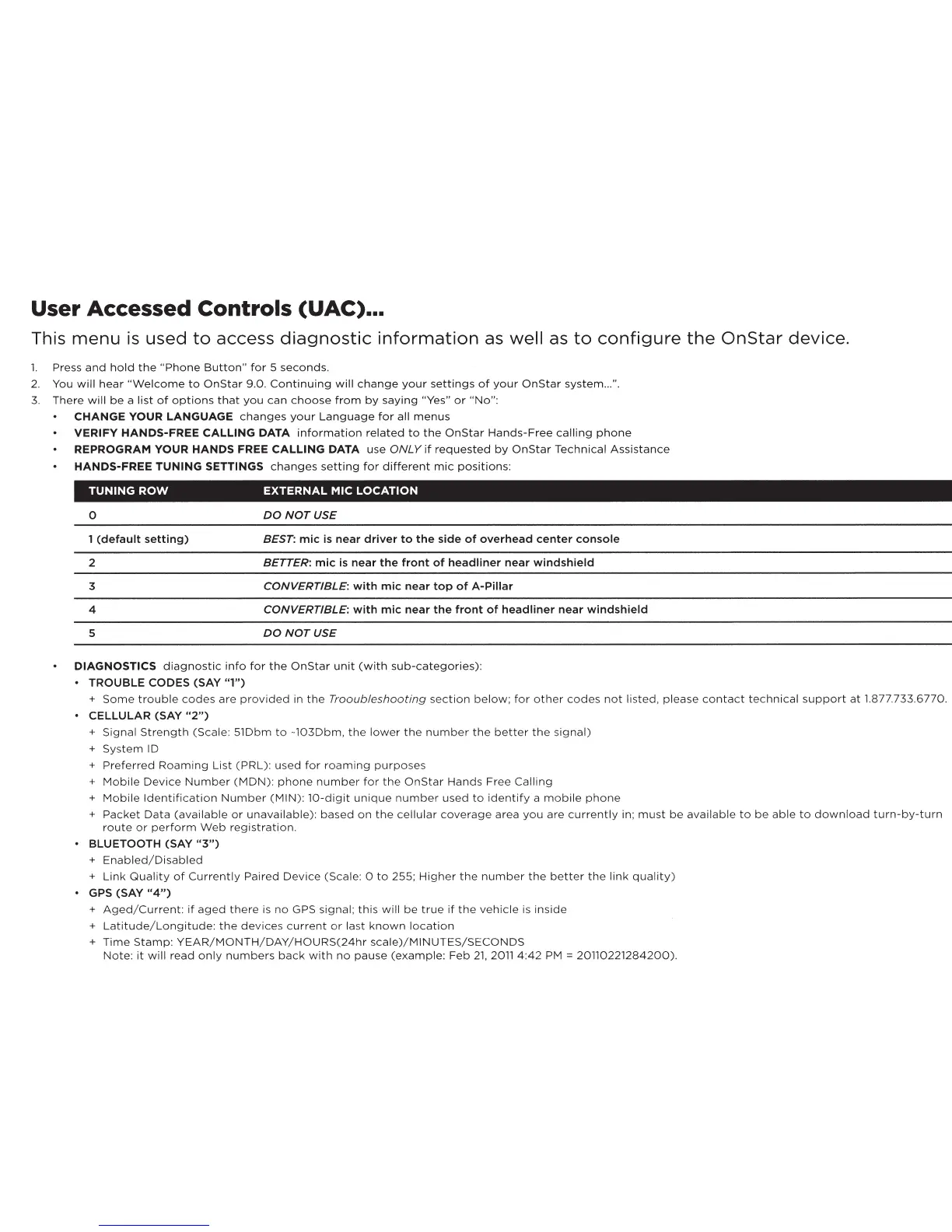
User Accessed Controls
(UAC)
...
This
menu
is
used
to
access
diagnostic
information
as
well
as
to
configure
the
OnStar
device.
1.
Press
and
hold
the
"Phone
Button"
for
5
seconds.
2.
You
will
hear
"Welcome
to
OnStar
9.0.
Continuing
will
change
your
settings
of
your
OnStar
system
...
".
3.
There
will
be
a
list
of
options
that
you
can
choose
from
by
saying
"Yes"
or
"No":
CHANGE
YOUR
LANGUAGE
changes
your
Language
for
all
menus
VERIFY
HANDS-FREE
CALLING
DATA
information
related
to
the
OnStar
Hands-Free
calling
phone
REPROGRAM
YOUR
HANDS
FREE
CALLING
DATA
use
ONLY
if
requested
by
OnStar
Technical
Assistance
HANDS-FREE
TUNING
SETTINGS
changes
setting
for
different
mic
positions:
TUNING
ROW
EXTERNAL
MIC
LOCATION
0
DO
NOT
USE
1 (default setting) BEST: mic
is
near driver to the side
of
overhead center console
2
BETTER: mic
is
near the front
of
headliner near windshield
3
CONVERTIBLE: with mic near
top
of
A-Pillar
4
CONVERTIBLE: with mic near the front
of
headliner near windshield
5
DO
NOT
USE
DIAGNOSTICS
diagnostic
info
for
the
OnStar
unit
(with
sub-categories):
TROUBLE
CODES
(SAY "1")
+
Some
trouble
codes
are
provided
in
the
Trooubleshooting
section
below;
for
other
codes
not
listed,
please
contact
technical
support
at
1.877.733.6770.
CELLULAR (SAY
"2")
+
Signal
Strength
(Scale:
51Dbm
to
-103Dbm,
the
lower
the
number
the
better
the
signal)
+
System
ID
+
Preferred
Roaming
List
(PRL):
used
for
roaming
purposes
+
Mobile
Device
Number
(MDN):
phone
number
for
the
OnStar
Hands
Free
Calling
+
Mobile
Identification
Number
(MIN):
10-digit
unique
number
used
to
identify
a
mobile
phone
+
Packet
Data
(available
or
unavailable):
based
on
the
cellular
coverage
area
you
are
currently
in;
must
be
available
to
be
able
to
download
turn-by-turn
route
or
perform
Web
registration.
BLUETOOTH
(SAY
"3")
+
Enabled/Disabled
+
Link
Quality
of
Currently
Paired
Device
(Scale: 0
to
255;
Higher
the
number
the
better
the
link
quality)
GPS
(SAY
"4")
+
Aged/Current:
if
aged
there
is
no
GPS signal;
this
will
be
true
if
the
vehicle
is
inside
+
Latitude/Longitude:
the
devices
current
or
last
known
location
+
Time
Stamp:
YEAR/MONTH/DAY/HOURS(24hr
scale)/MINUTES/SECONDS
Note:
it
will
read
only
numbers
back
with
no
pause
(example:
Feb
21,
2011
4:42
PM
=
20110221284200).

Related product manuals