
 Need help?
Do you have a question about the ooznest WorkBee CNC and is the answer not in the manual?
Key considerations and precautions for assembling the WorkBee CNC machine.
Detailed guide for mounting X, Y, and Z axis limit switches on the WorkBee CNC.
Procedure for attaching the Z-axis limit switch to the X-Plate-Front.
Instructions for routing wires for limit switches and motors on the CNC.
Guide for routing wires on the gantry for screw-driven WorkBee CNC.
Guide for routing wires on the gantry for belt-driven WorkBee CNC.
Part 1 of wire routing for the Y-axis on screw-driven WorkBee CNC.
Part 2 of wire routing for the Y-axis on screw-driven WorkBee CNC.
Guide for routing wires on the Y-axis for belt-driven WorkBee CNC.
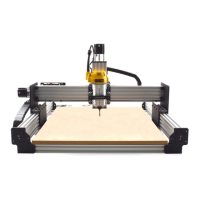
The WorkBee CNC is a versatile machine designed for precision machining and fabrication tasks, offering users the ability to create intricate designs and components from various materials. This manual focuses specifically on the installation and routing of limit switches and associated wiring, crucial elements for the safe and accurate operation of the CNC machine.
The WorkBee CNC operates as a computer numerical control machine, meaning it uses computer software to control the movement of its cutting tool. This allows for highly precise and repeatable operations, making it suitable for tasks such as milling, engraving, and carving. The core functionality revolves around its ability to move a cutting tool (often a router or spindle) along three axes (X, Y, and Z) across a workpiece. The X-axis typically controls left-to-right movement, the Y-axis controls front-to-back movement, and the Z-axis controls up-and-down movement, allowing the tool to plunge into and retract from the material.
Limit switches are integral to the safe and reliable operation of the WorkBee CNC. Their primary function is to define the physical boundaries of the machine's movement along each axis. When a moving part of the machine (such as the gantry or the Z-axis carriage) reaches a limit switch, the switch is triggered, sending a signal to the control system. This signal tells the machine to stop movement in that direction, preventing the machine from crashing into its own frame or exceeding its operational limits. This not only protects the machine from damage but also ensures the safety of the operator and the integrity of the workpiece.
The manual details the installation of X, Y, and Z-axis limit switches. The X and Y limit switches are typically mounted on the C-Beam extrusions, positioned to be triggered by the moving gantry or carriage as it approaches the end of its travel. The Z-axis limit switch is mounted on the X-Plate-Front, designed to be triggered by the Z-axis carriage as it moves to its uppermost or lowermost position. These switches are crucial for homing the machine, a process where the machine finds its precise starting point or "home" position, which is essential for accurate machining. Without properly installed and functioning limit switches, the machine cannot accurately determine its position, leading to potential errors and unsafe operation.
Wire routing is another critical aspect covered in this manual. Proper wire routing ensures that all electrical connections, particularly those for the stepper motors and limit switches, are securely in place, protected from damage, and do not interfere with the machine's movement. The wiring needs to be routed in a way that allows for the full travel of all axes without snagging, pinching, or excessive tension on the cables. This is often achieved using drag chains, which are flexible cable carriers designed to guide and protect cables during dynamic movement. The manual provides specific instructions for routing wires along the gantry and Y-axis, differentiating between screw-driven and belt-driven versions of the WorkBee CNC, as their mechanical configurations and thus optimal wire paths may differ slightly.
The WorkBee CNC is designed for users who require precision and repeatability in their fabrication projects. Its open-source nature, often associated with OpenBuilds components, means it benefits from a community of users and developers, potentially offering a wide range of software compatibility and customization options.
Key usage features derived from the manual's focus on limit switches and wire routing include:
While the manual primarily focuses on initial assembly and setup, several aspects related to limit switches and wire routing inherently contribute to the long-term maintenance and reliability of the WorkBee CNC.
In summary, the WorkBee CNC, as described through its limit switch and wire routing manual, is a precision machine designed for safe, accurate, and reliable operation. The detailed instructions for these critical components underscore the importance of careful assembly and proper electrical management, laying the groundwork for a robust and long-lasting tool.
 General
| Machine Type | CNC Router |
|---|---|
| Drive System | Lead Screw |
| Stepper Motors | NEMA 23 |
| Assembly Required | Yes |
| Working Area | 1000 x 1000 mm |
| Frame Material | Aluminum extrusion |
| Max Speed | 5000 mm/min |
| Controller | GRBL |
| Software Compatibility | GRBL compatible software, e.g., OpenBuilds CAM/Control, Fusion 360, Easel |

 To Next Page
