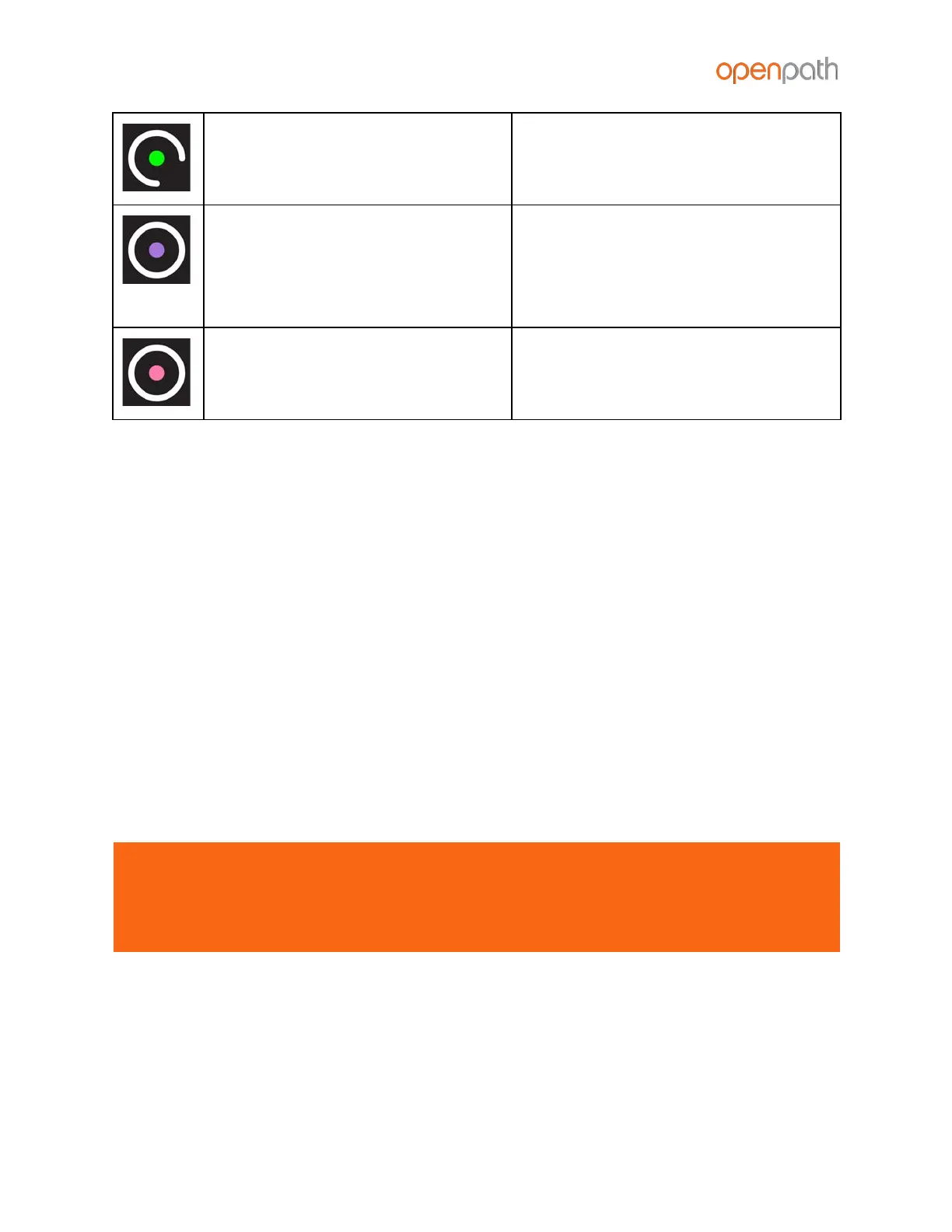
center dot is solid green and the
outer ring lights up and spins
reader has been identified via the
Control Center
center dot is solid purple and the
outer ring is solid white
reader is possibly not receiving
enough voltage or current,
potentially due to a break in wiring –
try connecting the reader directly to
the ACU, bypassing any wire runs
center dot is solid pink and the
outer ring is solid white
check that +12V IN (orange) hasn’t
been swapped with +B (blue) or -A
(violet)
LEGACY WIRING
Sometimes legacy wiring (unshielded and straight through, rather than shielded
twisted pair, often 22-6) results in slower connections and dropped packets between
the Openpath Reader and ACU. To remedy this, you can switch GND and VIN with +B
and -A connections on the ACU and readers to ensure the data pair (+B and -A) are
using the alternate pair of legacy wires.
RESETTING THE ACU
SOFT RESET
To soft reset the ACU, disconnect power from the ACU, wait 10 seconds, then
reconnect the power.
HARD RESET
WARNING: Only hard reset the ACU if absolutely necessary and if instructed by
Openpath. This will clear all of the data off of the ACU and will require
reprovisioning, which requires having a computer on the same network as the
ACU.
To hard reset the ACU:
1. Disconnect power from the ACU
2. Hold down the ADMIN BUTTON for 15 seconds


 To Next Page
 Loading...