8 The Information Company
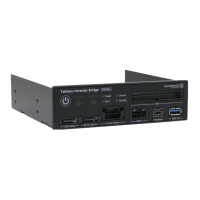
One SATA/SAS data connector capable of the following data
rates:
• SAS Gen 1 (3Gbps)
• SAS Gen 2 (6Gbps) - R2 Version only
• SATA Gen 2 (3Gbps)
• SATA Gen 3 (6Gbps) - R2 version only
One SATA Gen 3 (6 Gbs) data connector (also supports SATA Gen 1
and 2)
One FireWire 800 9-pin connector (also supports FireWire 400, with
adapter)
One USB 3.0 Type A 9-pin connector (also supports USB 2.0/1.1)
One IDE 40-pin data connector
4.2 Further product specifications
This section provides details about USB host controller and host OS compatibility with
this release of T356789iu.
Most USB 3.0 controllers should be compatible.
Notes:
For the best USB 3.0 performance, ensure the latest host controller
driver and BIOS update are applied.
For best imaging performance, ensure no other devices share the
USB 3.0 controller channel in use by the Universal Bridge.
This product does not support UASP; however, enabling USB 3.0
controller Turbo (or equivalent) mode may still improve performance
with certain OS and controller/driver combinations.
Windows 7, 8, 10, 11
macOS versions
Modern Linux distributions
4.3 Indicator lights
The device power switch is located to the left of the Write Block indicator. Data and
power ports are clearly labeled.


 To Next Page