-8-
1
2
3
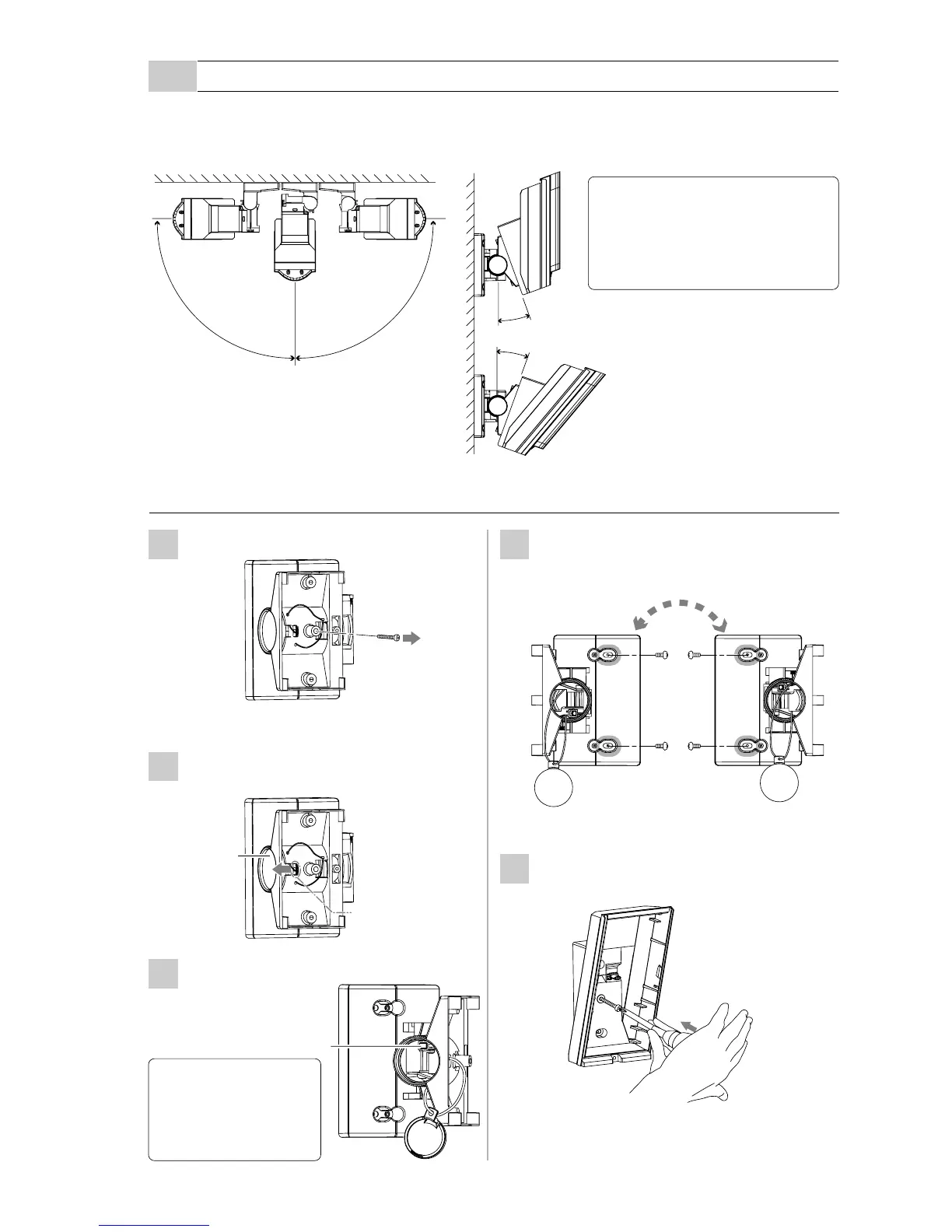
Remove the up-down lock screw.
Push the shaft cover clip outwards to
remove the shaft cover.
Loosen the adjustment screw two turns.
Adjustment screw
20°
20°
90°
90°
Using the bracket makes it possible to adjust the unit horizontally by ± 90 degrees.
In cases where the ground is uneven and therefore not parallel with the base of the unit, it is
possible to adjust the unit vertically by ± 20 degree (refer to 3-5)
Do not change the detection
length with bracket.
Use the masking seal to
adjust the detection length.
Caution>>
Do not loosen the
screw too much.
The screw separates
from the unit.
Caution>>
Shaft cover
Press with suitable tool.
e.g. small screwdriver
5
4
Fasten the bracket to the wall.
Change the bracket direction according
to whether the Main unit is to face left
or right.
Open the up-down lock screw knockout
for bracket.
-Bracket installation
3-4
MOUNTING THE BRACKET



 To Next Page