5
Assembly Instructions
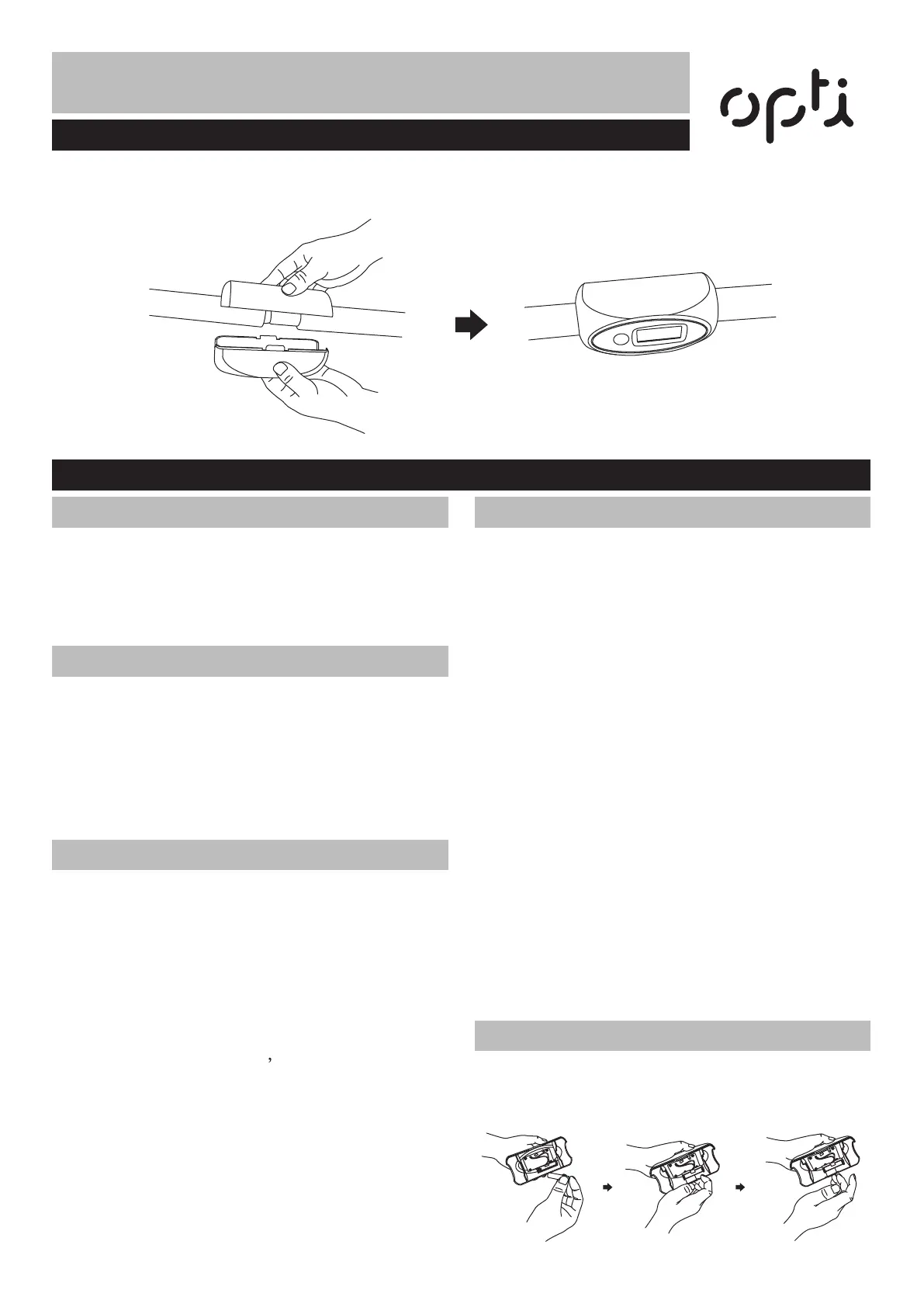
Please separate the upper and lower computer console, and then install batteries onto the upper computer
sole. Finally clam the upper console with lower console on the Overhead Bar as shown on the diagram below.
• TIME(TMR): 0:00-99:59
• COUNT(CNT):0-9999
• TOTAL COUNT(T.CNT):0-9999
• CALORIE(CAL):0.0-999.8 (0-9999KCAL )
Mode: This key lets you select and lock onto a
particular Function you want. Long press 'MODE'
key more than four seconds for reset.Press the
MODE key to move the pointer onto the function
you want to use until it begins flashing.To choose
the SCAN or Lock.
Key Function
1. Auto ON/OFF:
The system turns on when the key is depressed or
its sensor receives an input from the speed sensor.
The system turns off automatically when the speed
sensor has no signal input or no key are pressed for
approximately 4minutes.
2. Scan:
When the pointer is blinking
automatic display of
the following functions in the Order Shown:
TIME---COUNT---TOTAL COUNT
--CALORIES(repeat).
3. Reset:
The unit can be reset by either changing battery or
pressing the RESET (or MODE) key for 3 seconds.
Operation Procedures
1. Time
Press the MODE key until pointer lock on to
TIME.The total working time will be shown since
starting exercise.
2. Count
Press the MODE key until pointer lock on to
COUNT.Automatically accumulates workout count
since starting exercise.
3. Calorie
Press the MODE key until pointer lock on to
CALORIE.The calorie burned will be displayed since
starting exercise.
4. Total Count
Press the MODE key until pointer lock on to TOTAL
COUNT.Automatically accumulates workout count
since starting exercise for the first time.
5. Scan
Automatically display changes every 4 seconds.
NOTE: Battery not included
This monitor uses one “AAA” or GA76 battery, You
can replace the battery through the back of the unit.
Battery
Computer Assembly
Exercise Computer
Specification
Functions


 To Next Page