APPLICATIONS AND CONNECTIONS
APPLICATIONS EXAMPLES
Please see below some typical Application Examples:
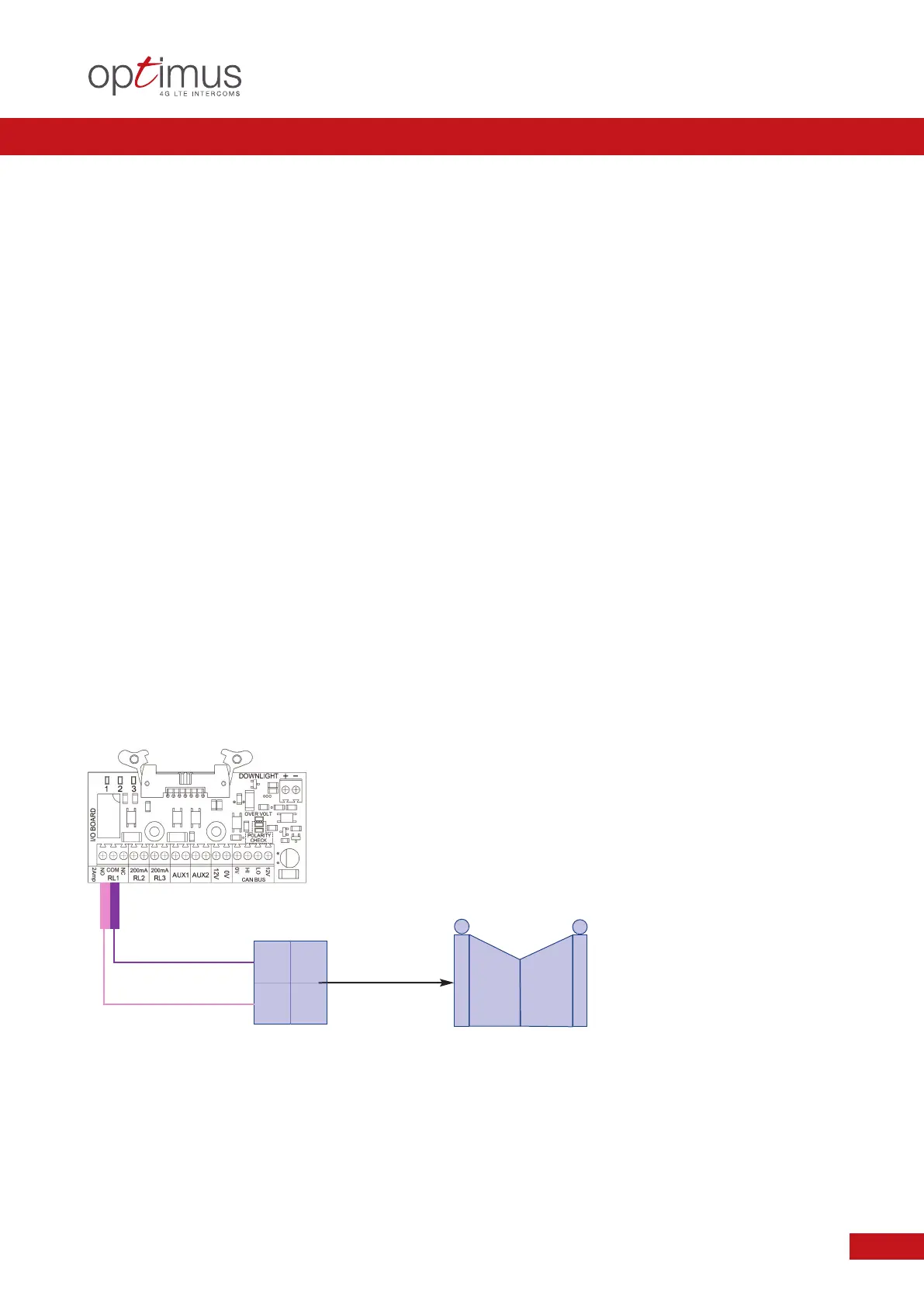
Example 1.0: Optimus to Gate or Barriers System, where Controller requires a Simple Command to operate
Example 2.0: Optimus to Gate or Barrier System, where Controller requires a Constant Command for
the duration of Hold or Stay Open
Example 3.0: Optimus to Gate or Barrier System, where Controller requires both Command and a
Simultaneous Hold Open Switch
Example 4.0: Optimus to an Electric Lock or Latch Release were the Lock Power Supply Unit requires a
Pulse to Release or Unlock
Example 5.0: Optimus to a Magnetic Lock or Permanently Energised Lock where the Lock Power Unit
requires to be Un-Switched to Release the Lock ~ subject to Type and Failure Status
Example 6.0: Alternative Exit Control using Auxiliary Input. Auxiliary Input to activate Set Relay. e.g. Push to Exit
11
I
NSTALLATION MANUAL FOR OPTIMUS 4G LTE RANGE OF INTERCOM UNITS
Application: OPTIMUS TO GATE OR BARRIER SYSTEM
Condition: THE CONTROLLER REQUIRES A SIMPLE COMMAND TO OPERATE
RELAY ACTION RESULT
RL1 NO Pulse Closed Operate Gate / Barrier
z
Relay RL1 operation via Programmed Settings and Methods available,
subject to Gate / Barrier Control Board type.
z
Methods of Relay Operation can include: DTMF Tone / Facia PINS / Authorisation Recognition.
z
Typical examples not common to all systems. Please follow the appropriate DHF Code of Practice accordingly.
EXAMPLE 1.0
Gate or Barrier
Control Board


 To Next Page