APPLICATIONS AND CONNECTIONS
13
I
NSTALLATION MANUAL FOR OPTIMUS 4G LTE RANGE OF INTERCOM UNITS
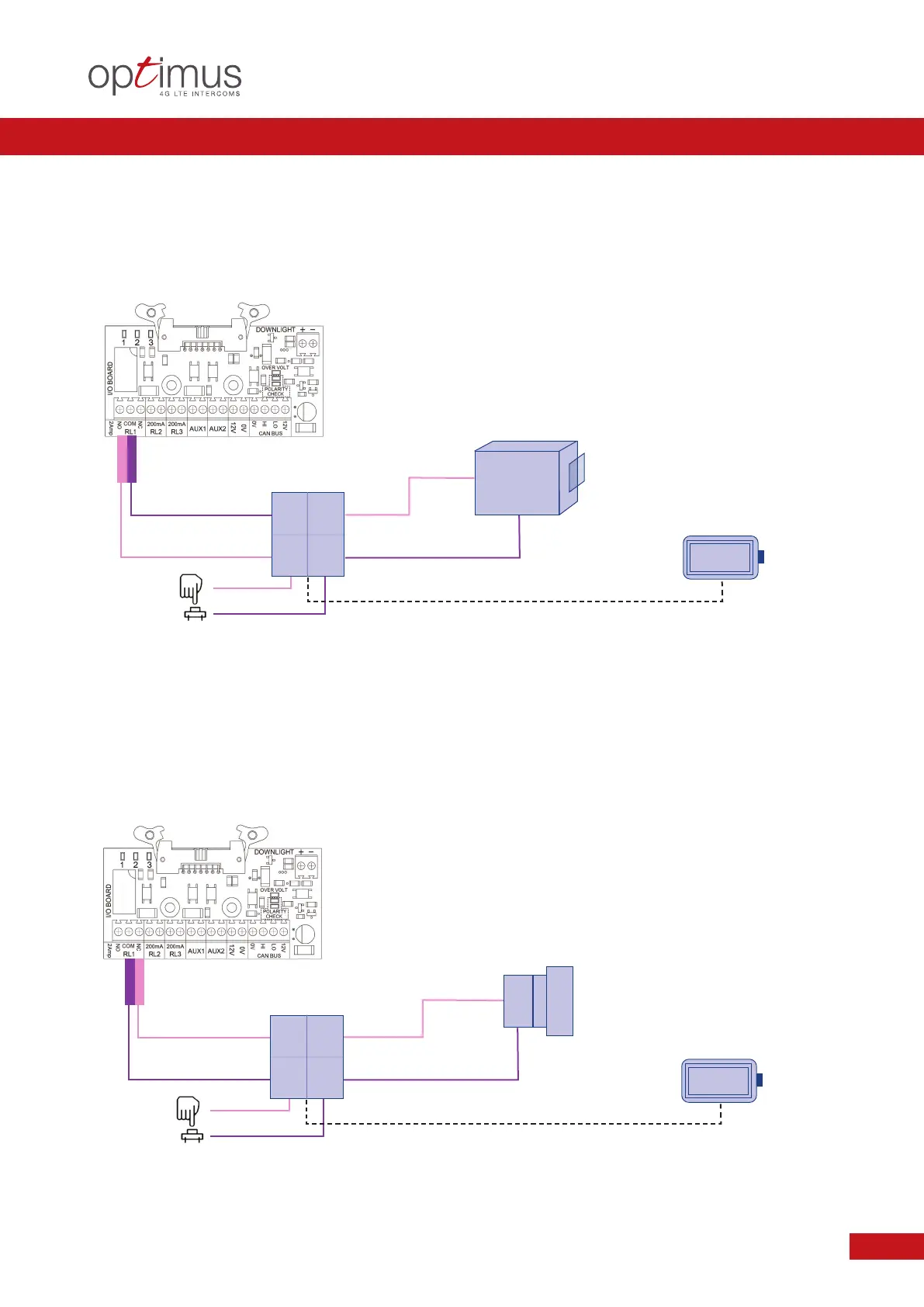
Application: OPTIMUS TO AN ELECTRIC LOCK OR LATCH RELEASE
C
ondition: THE LOCK POWER SUPPLY UNIT REQUIRES A PULSE TO RELEASE OR UNLOCK
RELAY ACTION RESULT
R
L1 NO Pulse Closed Lock Release
z
Protective Diodes are recommended when using Powered Locks.
z
The Pulse Time may need adjusting to suit.
z
Only use CE Approved Power Supplies, Locks and Accessories.
z
Methods of Relay Operation can include: DTMF Tone / Facia PINS / Authorisation Recognition.
z
Typical examples not common to all systems. Please follow the DHF Code of Practice Guide accordingly.
E
xit Button
or similar
L
ock or Latch
Release
W
ith or Without
B
attery Back Up
Application: OPTIMUS TO A MAGNETIC LOCK OR PERMANENTLY ENERGISED LOCK
Condition: THE LOCK POWER UNIT REQUIRES TO BE UN-SWITCHED TO RELEASE THE LOCK - SUBJECT TO TYPE
AND FAILURE STATUS
RELAY ACTION RESULT
RL1 NC Pulse Open Open Release
z
Protective Diodes are recommended when using Powered Locks.
z
The Pulse Time may need adjusting to suit.
z
Only use CE Approved Power Supplies, Locks and Accessories.
z
Methods of Relay Operation can include: DTMF Tone / Facia PINS / Authorisation Recognition.
z
Typical examples not common to all systems. Please follow the DHF Code of Practice Guide accordingly.
Exit Button
or similar
EXAMPLE 4.0
EXAMPLE 5.0
L
ock Power
S
upply Unit
Lock Power
Supply Unit
With or Without
Battery Back Up


 To Next Page