EasyManua.ls Logo

Optimus XL-200 - User Manual

Optimus XL-200
18 pages
Print Icon
To Next Page IconTo Next Page
Loading...
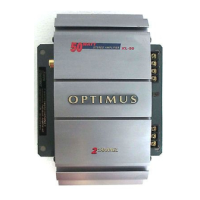
XL-200 Bridgeable Amplifier
(120-2016) Features Faxback Doc. # 44449
Your Optimus XL-200 High Power 2/1 Channel Bridgeable Amplifier produces a
total of 200 watts to give added punch and power to your vehicle's existing
autosound system.
The amplifier produces up to 100 watts per channel of clean, powerful sound
at all audio frequencies with minimum distortion. You can connect your
autosound system's low-level or speaker-level outputs to this amplifier.
Its features include:
14K Gold-Plated Noise-Isolated Low-Level Input Jacks - let you connect low-
level (preamplifier) signal inputs to match your
autosound system's output for the best high-fidelity
performance.
14K Gold-Plated Speaker Terminals - designed for low impedance, high
conductivity, and minimum corrosion, to provide
the highest signal transfer and lowest sound
distortion.
Input Level Control - lets you adjust the level of the audio signals that
enter the amplifier.
Automatic Power Switching - can automatically turn the amplifier on or off
when you turn your autosound system on or off
depending on how you hook up the amplifier).
Bridging Capability - lets you combine the amplifier's two 100-watt
channels
so you can use the amplifier with only one channel
that produces a total of 200 watts.
Mute Turn On Circuit - eliminates the thump you hear when you turn on some
amplifiers.
Power Indicator - lights when power is supplied to the amplifier.
Protection Indicator - lights if the amplifier shuts itself down.
Crossover Frequency Circuit - lets you adjust the crossover frequency from
45-400 Hz. This lets you set up the
Question and Answer IconNeed help?

Do you have a question about the Optimus XL-200 and is the answer not in the manual?

Summary

Features

14 K Gold-Plated Noise-Isolated Low-Level Input Jacks

Connects low-level (preamplifier) signal inputs for high-fidelity performance.

14 K Gold-Plated Speaker Terminals

Designed for low impedance, high conductivity, and minimum corrosion for signal transfer.

Input Level Control

Adjusts the level of audio signals entering the amplifier.

Automatic Power Switching

Automatically turns the amplifier on or off with the autosound system.

Bridging Capability

Combines two 100-watt channels into one 200-watt channel.

Mute Turn On Circuit

Eliminates the thump sound when turning the amplifier on.

Power Indicator

Illuminates when power is supplied to the amplifier.

Protection Indicator

Lights up if the amplifier shuts itself down.

Crossover Frequency Circuit

Allows adjustment of the crossover frequency from 45-400 Hz for subwoofer setup.

Preparation

Supplied Hardware

Lists all items included with the amplifier for installation.

Before You Begin the Installation

Advises reading instructions and understanding vehicle systems before installation.

Choosing a Mounting Location

Provides guidance on selecting a suitable and safe place to mount the amplifier.

Preparing the Mounting Area

Routing Cables and Wires

Installation Order

Connecting Ground and Switched;Primary Power

Connections

Low-Level Inputs

Explains how to connect the amplifier using low-level audio outputs from the autosound system.

High-Level (Speaker Wire) Inputs

Details connecting the amplifier using speaker-level outputs from the autosound system.

Connecting Speakers

Connecting Two Speakers (Unbridged Connection)

Instructs on connecting a pair of speakers for stereo output.

Connecting a Subwoofer (Bridged Connection)

Completing the Installation

Mounting the Amplifier

Operation

Turning On the Amplifier

Explains the automatic power-on sequence and the POWER indicator.

Adjusting the Audio Level

Details how to set the amplifier's input level for optimal performance.

Adjusting Frequency Crossover

Care and Maintenance

The FCC Wants You to Know

Informs users about potential TV/radio interference and how to identify/mitigate it.

Replacing a Fuse

Provides instructions for replacing the amplifier's internal and external fuses.

Specifications

Overview

The Optimus XL-200 High Power 2/1 Channel Bridgeable Amplifier is designed to enhance your vehicle's existing autosound system by providing additional power and punch. It delivers up to 100 watts per channel of clean, powerful sound across all audio frequencies with minimal distortion, for a total of 200 watts. This amplifier can be connected to your autosound system's low-level or speaker-level outputs.

Important Technical Specifications:

  • Output Power:
    • 65 Watts x 2 @ 4 Ohms, 20-20 kHz, 0.5% THD
    • 100 Watts x 2 @ 4 Ohms, 20-20 kHz, 10% THD
    • 75 Watts x 2 @ 2 Ohms, 20-20 kHz, 1% THD
    • 80 Watts x 2 @ 2 Ohms, 20-20 kHz, 10% THD
  • Frequency Response: 20-20,000 Hz (+/-3 dB)
  • Power Supply Voltage: 14.4 VDC Negative Ground
  • Maximum Current Draw: 30 A
  • Dimensions (HWD): 2 3/8 x 10 7/16 x 13 1/4 Inches (6.0 x 26.0 x 33.6 cm)
  • Net Weight: 6.3 lbs (2.86 kg)

Usage Features:

  • 14K Gold-Plated Noise-Isolated Low-Level Input Jacks: These jacks allow you to connect low-level (preamplifier) signal inputs, matching your autosound system's output for optimal high-fidelity performance.
  • 14K Gold-Plated Speaker Terminals: Designed for low impedance, high conductivity, and minimal corrosion, these terminals ensure the highest signal transfer and lowest sound distortion.
  • Input Level Control: This feature allows you to adjust the level of the audio signals entering the amplifier.
  • Automatic Power Switching: The amplifier automatically turns on or off with your autosound system, depending on how it's wired, preventing battery drain.
  • Bridging Capability: You can combine the amplifier's two 100-watt channels to create a single channel that produces a total of 200 watts, ideal for connecting a subwoofer.
  • Mute Turn On Circuit: This circuit eliminates the "thump" sound often heard when some amplifiers are turned on.
  • Power Indicator: A light that illuminates when power is supplied to the amplifier.
  • Protection Indicator: A light that illuminates if the amplifier shuts itself down due to a problem.
  • Crossover Frequency Circuit: This circuit allows you to adjust the crossover frequency from 45-400 Hz, enabling you to set up the amplifier for a subwoofer. The X-OVER FREQ setting determines the limit at which the amplifier will pass frequencies (from 45-400 Hz) and should not be used to adjust the sound through your main speakers.
  • Short Circuit Protection: If any output channel shorts, the amplifier's sound will distort, alerting you to turn off the autosound system.
  • Auto-Off: This feature protects the amplifier by temporarily shutting down if it overheats or detects an input overload. The amplifier automatically restarts once it cools down or the problem is corrected.

Installation and Connections:

The amplifier comes with supplied hardware including a 30A fuse, power wire (red), ground wire (black), remote wire (blue/white), a 4-pin connector with wire, flat washers, sheet metal screws, lock washers, and twist-on terminal connectors.

Before installation, it is crucial to read all instructions and ensure you understand your vehicle's electrical and autosound systems. Key considerations include:

  • Whether your vehicle has an existing autosound system (car stereo or CD player).
  • How to connect a wire to the fuse box.
  • Identifying the power wire of your autosound system.
  • Distinguishing between low-level (line out) and high-level (speaker) outputs on your autosound system.

Installation may require cutting or modifying your vehicle. A good mounting location is typically the vehicle's trunk, ensuring it does not interfere with vehicle operation, allows for drilling without damaging components, provides adequate space for cooling fins, and allows easy visibility of the POWER and PROTECTION indicators. The amplifier requires a 3 3/8-inch high by 10 7/16-inch wide by 14 1/4-inch deep (8.5 x 26.5 x 36.1 cm) mounting area with adequate ventilation space.

When routing cables and wires, avoid moving parts or sharp edges. Wires can often be routed along the wiring channel beneath the vehicle's door facings.

The installation order is critical for trouble-free setup:

  1. Temporarily connect the amplifier to ground and power.
  2. Connect to your autosound system's outputs.
  3. Connect to your speakers.
  4. Test the connections.
  5. If everything works, disconnect, mount the amplifier, and then reconnect.

Cautions during installation:

  • Do not cut the supplied wires, as this may void warranty service for non-defective products.
  • If connectors are incompatible, an adapter harness may be needed.
  • Disconnect the vehicle's negative (-) battery terminal before starting for safety.
  • Ensure speakers can handle up to 200 watts of power (100 watts per channel or 200 watts bridged for a subwoofer) and have an impedance of at least 4 ohms.
  • Temporarily place the amplifier close to the mounting location to gauge wire length.
  • Connect the red power cable's fused end directly to the vehicle's positive (+) battery terminal due to high current requirements; failure to do so could damage vehicle wiring.
  • Do not reconnect the negative (-) battery cable until all connections are made.

Connecting Speakers:

  • Ensure the BRG/ST switch on the amplifier is set to ST for unbridged connections.
  • Use 16- or 18-gauge marked or color-coded wires.
  • Maintain proper phasing (+ to + and - to -) for maximum bass response.
  • Run one wire from each speaker to the amplifier (or two wires from each subwoofer terminal if connecting a subwoofer).
  • Separate conductors at both ends for about 4 inches and strip 1/4 inch of insulation, twisting ends to secure loose strands.
  • For two speakers (unbridged): Connect the left speaker's positive (+) wire to SPEAKER L (+) terminal, negative (-) wire to SPEAKER L (-) terminal. Repeat for the right speaker to SPEAKER R (+) and SPEAKER R (-) terminals.
  • For a subwoofer (bridged): Connect the subwoofer's positive (+) wire to SPEAKER L (+) terminal, negative (-) wire to SPEAKER R (-) terminal.

Completing the Installation:

  • After all connections are secure, reconnect the vehicle's negative (-) battery terminal.
  • Set the LEVEL (MIN/MAX) on the amplifier to its mid position.
  • Turn on the vehicle's ignition and autosound system; the amplifier should turn on after a few seconds.
  • If issues arise, turn off the ignition, disconnect the negative (-) battery terminal, and recheck connections.

Mounting the Amplifier:

  1. Disconnect the negative (-) battery terminal.
  2. Temporarily disconnect amplifier connections (ground, primary power, remote power, autosound system input, speakers), marking each wire.
  3. Use the amplifier's mounting holes as a guide to mark drilling positions.
  4. Drill 9/64-inch (3.57 mm) holes, being careful not to damage anything behind the surface.
  5. Secure the amplifier with supplied sheet metal screws and washers.
  6. Reconnect all wiring.
  7. Reconnect the negative (-) battery terminal.
  8. Reset vehicle's clock, autosound system's tuner memory, and other timer/memory devices.

Adjusting the Audio Level:

  1. Turn LEVEL (MIN/MAX) fully counterclockwise to MIN.
  2. Set autosound system volume to about one-third of its full range.
  3. Adjust LEVEL (MIN/MAX) to a comfortable listening level.
  4. Increase autosound system volume until distortion begins, then reduce it slightly.
  5. Adjust LEVEL (MIN/MAX) to the desired maximum output.
  6. Set autosound system volume to a comfortable listening level.
    • Caution: Do not exceed two-thirds of the autosound system's maximum volume.

Maintenance Features:

  • Care and Handling:
    • Keep the amplifier dry; liquids can corrode circuits.
    • Keep it away from dust and dirt to prevent premature wear.
    • Handle gently to avoid damaging circuit boards or cases.
    • Wipe with a damp cloth; avoid harsh chemicals or strong detergents.
  • Troubleshooting: A troubleshooting chart is provided for common issues such as no power, no sound, or distorted sound, with possible causes and suggestions.
  • Fuse Replacement: If the amplifier does not operate, check and replace the 30-amp SFE-type fuse on the red power cable (Cat. No. 270-1074) or the 30-amp blade-type fuse on the amplifier's back panel (Cat. No. 270-1085). Always allow the amplifier to cool down before assuming a fuse needs replacement.
    • Caution: Use only fuses with specified ratings to avoid damage.
  • FCC Compliance: The amplifier may cause TV or radio interference. If interference occurs, try moving the amplifier away from the receiver or contacting RadioShack for assistance.
  • Warranty: Modifying or tampering with internal components may invalidate the warranty and FCC authorization. For issues, contact a local RadioShack store.

Optimus XL-200 Specifications

General IconGeneral
BrandOptimus
ModelXL-200
CategoryAmplifier
LanguageEnglish

Related product manuals