10
Making the Connections
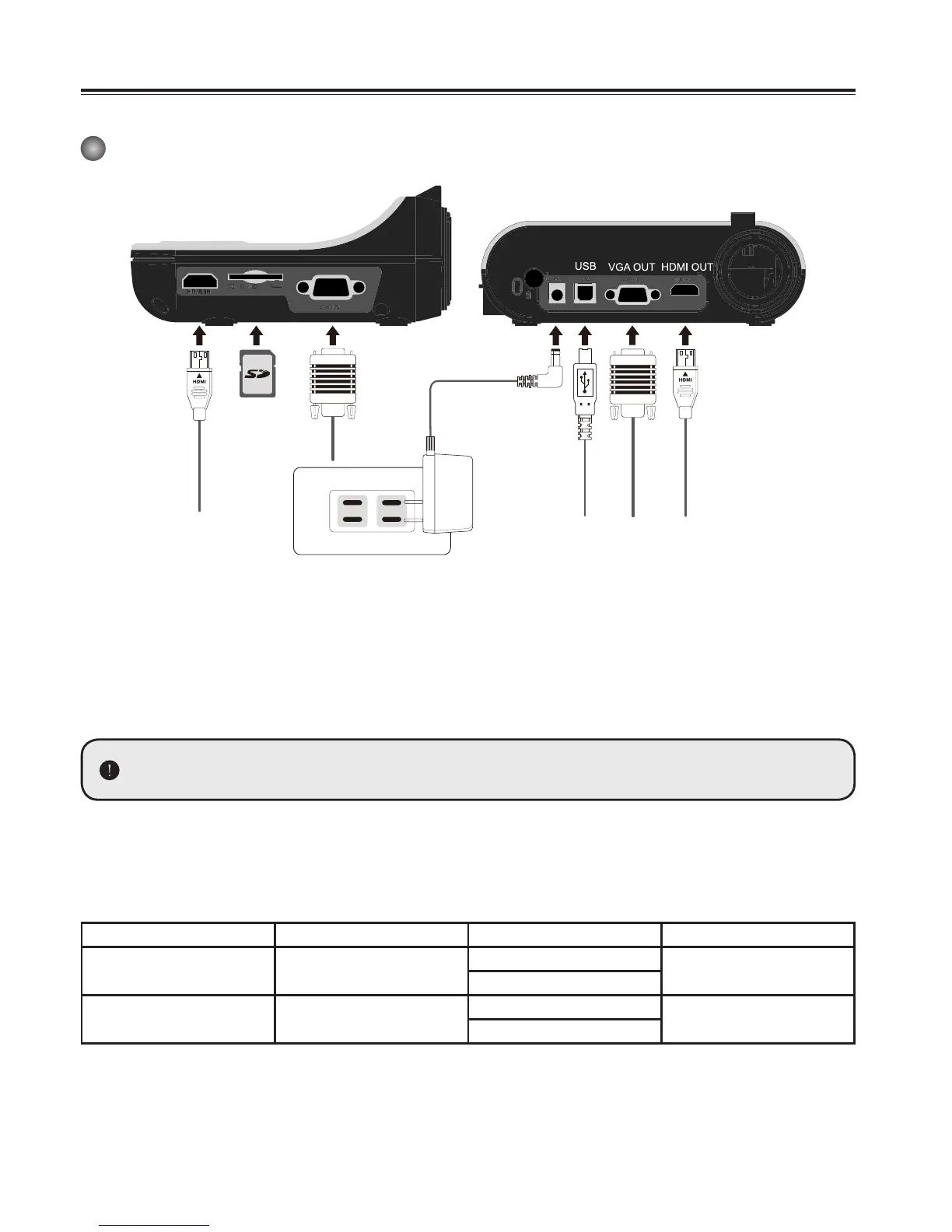
System Diagram
Step 1 / Plugging in the Power Outlet
Use power adapter to connect DC IN connector on the product to a standard 100V~240V AC
power outlet.
The type of power adapter is depending on your countries / regions.
Step 2 / Output Resolution and Aspect Ratio.
Various output resolutions are available depending on the output and aspect ratio setting.
Please refer to the table listed below :
Out put Aspect-Ratio Resolution Vertical Frequency
VGA 4:3
1024 x 768
50 / 60 Hz
1600 x 1200
HDMI 16:9
1280 x 720
50 / 60 Hz
1920 x 1080
*Document camera will downgrade the output resolution automatically when the connected display
device doesn’t support highest resolution.Idet vesse ipicta tusa L. Sere con vividi, caesseniu moru-
mus est C. Ediem, Patilin denihice condam interei pes consign onveraes mente patu sentr
HDMI IN SD Card
VGA IN
DC



 To Next Page