EasyManua.ls Logo

Optoma Pico PK120 - Playback Mode; Ideo S Ettings

Optoma Pico PK120
19 pages
Print Icon
To Next Page IconTo Next Page
To Previous Page IconTo Previous Page
Loading...
77
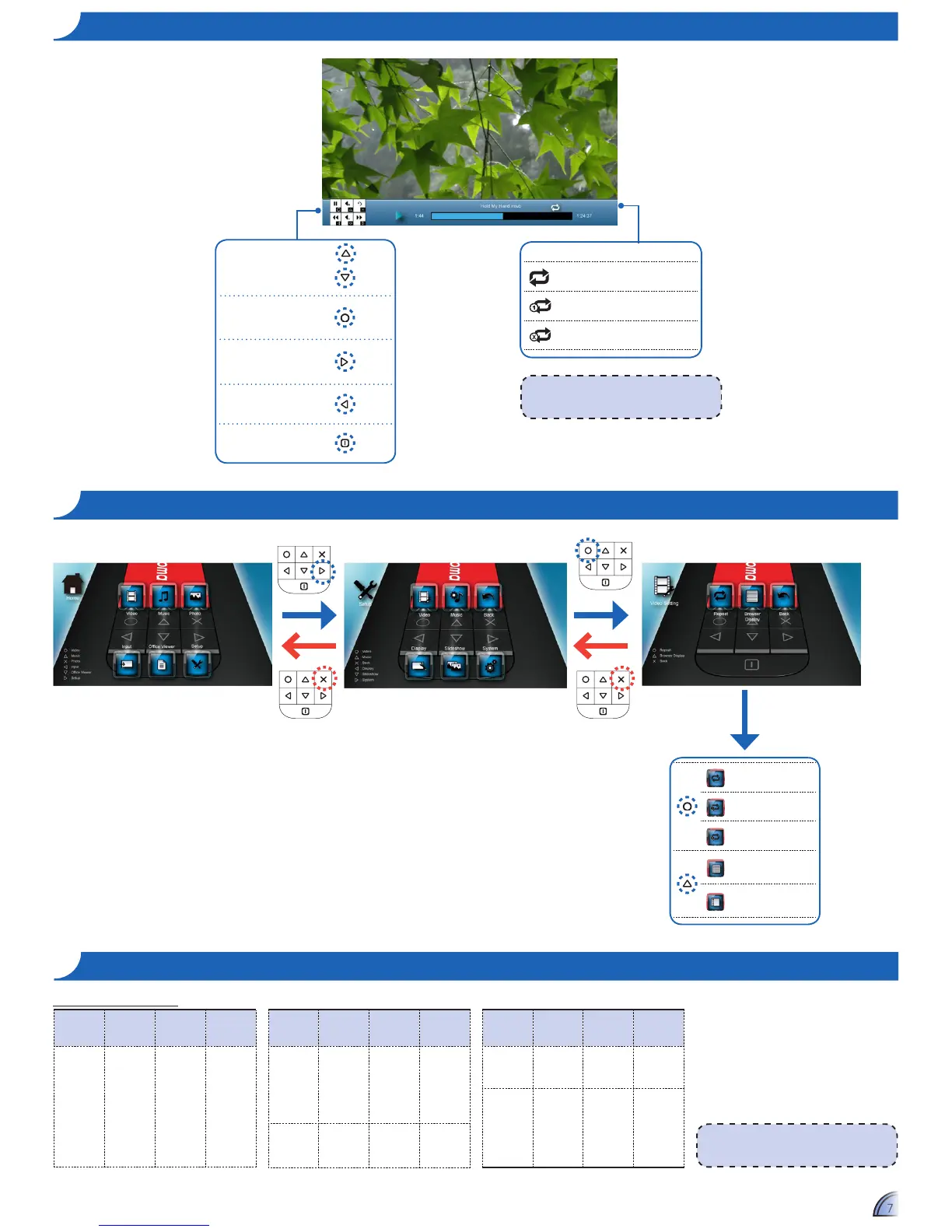
Repeat Icons
Repeat all
Repeat one current video
Repeat off
Adjust volume
Pause/Play
Fast forward
Rewind
Return to Home menu
<Note>
To change repeat settings, see Video
Settings below.
<Note>
Video format does not support content with
B-Frame function.
File Format
Video
Format
Max Res. Prole
AVI
MOV
MP4
3GP
H.264
MJPEG
H.263-
D1 30fps Baseline
co m p a t I B I l I t y : vI D e o S
File Format
Video
Format
Max Res. Prole
AVI
3GP
MOV
WMV
MPEG4 D1 30fps
Simple
Prole
AVI
WMV
Xvid D1 30fps Baseline
File Format
Video
Format
Max Res. Prole
AVI
MOV
MJPEG
800x480
30fps
Baseline
FLV
Sorenson
Spark
800x600
30fps
Baseline
Compatible Video Format
ho W t o pl a y vI D e o S - pl a y B a c k mo D e
vI D e o Se t t I n g S
Repeat all
Repeat one
Repeat disabled
Browser display
small icon
Browser display
large icon

Related product manuals