EasyManua.ls Logo

Oral-B iO 10 - User Manual

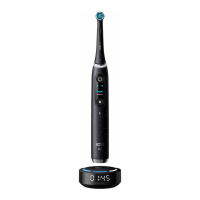
Oral-B iO 10
144 pages
Print Icon
To Next Page IconTo Next Page
Loading...
90149422_UI_booklet_120x170_iO10_CEUAIL_2D.indd 190149422_UI_booklet_120x170_iO10_CEUAIL_2D.indd 1 18.03.22 11:1718.03.22 11:17
Stapled booklet, 120 x 170 mm, 144 pages (incl. 8 pages cover),
Cover 4c, Inhalt = black + PMS 288 C

Questions and Answers

Summary

Product Description and Components

Toothbrush Handle Components

Details on the main toothbrush body, controls, and interactive display elements.

Brushing Modes and Settings

Explanation of various brushing modes and available settings for customization.

Indicators and Feedback Features

Description of pressure sensors, light rings, and feedback mechanisms on the toothbrush.

iOsense Charger and Accessories

Information on the charger, its features, and included accessories like travel cases.

Important Safety Information

General Safety Precautions

Essential safety guidelines for product usage, including warnings about objects and children.

Specific Usage Warnings

Warnings related to intended use, attachments, and supervision requirements.

Electrical and Water Safety

Critical safety instructions regarding water exposure, cords, and electrical hazards.

Getting Started and Operation

First Time Setup

Instructions for the initial setup and activation of the iO toothbrush.

Charging the Toothbrush

Guidance on how to properly charge the toothbrush using the iOsense™ charger.

Beginning Your Brushing Session

Steps to start brushing, including handle activation and toothpaste application.

Important Usage Considerations

Notes on magnetic fields and disabling Bluetooth for specific environments.

Toothbrush Functionality

Brushing Modes Explained

Detailed descriptions of each available brushing mode for optimal cleaning.

Smart Pressure Sensor System

How the pressure sensor indicates brushing intensity and its effect on the brush head.

Toothbrush Timer and Light Ring

Information on the built-in timer for brushing duration and the functions of the light ring.

Interactive Display and App Connectivity

Navigating the Interactive Display

How to activate and use the interactive display for settings, modes, and feedback.

Oral-B App Integration and Features

Connecting the toothbrush to the Oral-B App for personalization and tracking brushing habits.

Brush Head Maintenance

Guidelines for brush head replacement and the reminder system.

iOsense Charger Usage and Maintenance

Charger Features and Operation

Details on the charger's live coaching, pressure sensing, and app requirements.

Bluetooth and Wi-Fi Connectivity

How the charger connects to the toothbrush, app, and the internet.

Charger Button Functions

Explanation of the button's functions for low power mode and factory reset.

Cleaning the Charger and Accessories

Instructions for cleaning the charger, travel case, and other accessories.

Accessories, Warranty, and Information

Storage Accessories

Information on storing the toothbrush and brush heads in travel cases and holders.

Product Guarantee and Exclusions

Details on the warranty period, coverage, and conditions that void the guarantee.

Bluetooth;Wi-Fi Module Information

Notes on the reliability and compatibility of Bluetooth and Wi-Fi modules.

Warranty and Troubleshooting

Replacement Brush Head Warranty

Conditions under which the warranty is voided concerning non-Oral-B brush heads.

Troubleshooting Oral-B App Issues

Solutions for problems related to the Oral-B App not operating correctly with the toothbrush.

Troubleshooting Toothbrush Operation

Guidance for resolving issues like unwanted behavior or the toothbrush not operating.

Toothbrush and Charger Troubleshooting

Addressing Toothbrush Timer and Charging Problems

Solutions for issues with the stutter timer, brush head noise, and charging failures.

Resolving Charger Display and Connectivity Issues

Steps to fix problems with the charger's clock display or responsiveness.

Technical Specifications and Date Codes

Radio Module Specifications

Technical details on the radio modules used in the toothbrush and charger.

Product Manufacturing Date Code Interpretation

How to interpret the production codes for determining the manufacturing date.

Summary

Product Description and Components

Toothbrush Handle Components

Details on the main toothbrush body, controls, and interactive display elements.

Brushing Modes and Settings

Explanation of various brushing modes and available settings for customization.

Indicators and Feedback Features

Description of pressure sensors, light rings, and feedback mechanisms on the toothbrush.

iOsense Charger and Accessories

Information on the charger, its features, and included accessories like travel cases.

Important Safety Information

General Safety Precautions

Essential safety guidelines for product usage, including warnings about objects and children.

Specific Usage Warnings

Warnings related to intended use, attachments, and supervision requirements.

Electrical and Water Safety

Critical safety instructions regarding water exposure, cords, and electrical hazards.

Getting Started and Operation

First Time Setup

Instructions for the initial setup and activation of the iO toothbrush.

Charging the Toothbrush

Guidance on how to properly charge the toothbrush using the iOsense™ charger.

Beginning Your Brushing Session

Steps to start brushing, including handle activation and toothpaste application.

Important Usage Considerations

Notes on magnetic fields and disabling Bluetooth for specific environments.

Toothbrush Functionality

Brushing Modes Explained

Detailed descriptions of each available brushing mode for optimal cleaning.

Smart Pressure Sensor System

How the pressure sensor indicates brushing intensity and its effect on the brush head.

Toothbrush Timer and Light Ring

Information on the built-in timer for brushing duration and the functions of the light ring.

Interactive Display and App Connectivity

Navigating the Interactive Display

How to activate and use the interactive display for settings, modes, and feedback.

Oral-B App Integration and Features

Connecting the toothbrush to the Oral-B App for personalization and tracking brushing habits.

Brush Head Maintenance

Guidelines for brush head replacement and the reminder system.

iOsense Charger Usage and Maintenance

Charger Features and Operation

Details on the charger's live coaching, pressure sensing, and app requirements.

Bluetooth and Wi-Fi Connectivity

How the charger connects to the toothbrush, app, and the internet.

Charger Button Functions

Explanation of the button's functions for low power mode and factory reset.

Cleaning the Charger and Accessories

Instructions for cleaning the charger, travel case, and other accessories.

Accessories, Warranty, and Information

Storage Accessories

Information on storing the toothbrush and brush heads in travel cases and holders.

Product Guarantee and Exclusions

Details on the warranty period, coverage, and conditions that void the guarantee.

Bluetooth;Wi-Fi Module Information

Notes on the reliability and compatibility of Bluetooth and Wi-Fi modules.

Warranty and Troubleshooting

Replacement Brush Head Warranty

Conditions under which the warranty is voided concerning non-Oral-B brush heads.

Troubleshooting Oral-B App Issues

Solutions for problems related to the Oral-B App not operating correctly with the toothbrush.

Troubleshooting Toothbrush Operation

Guidance for resolving issues like unwanted behavior or the toothbrush not operating.

Toothbrush and Charger Troubleshooting

Addressing Toothbrush Timer and Charging Problems

Solutions for issues with the stutter timer, brush head noise, and charging failures.

Resolving Charger Display and Connectivity Issues

Steps to fix problems with the charger's clock display or responsiveness.

Technical Specifications and Date Codes

Radio Module Specifications

Technical details on the radio modules used in the toothbrush and charger.

Product Manufacturing Date Code Interpretation

How to interpret the production codes for determining the manufacturing date.

Oral-B iO 10 Specifications

General IconGeneral
Pressure SensorYes
Bluetooth ConnectivityYes
Charging Time3 hours
TypeElectric Toothbrush
Power SourceRechargeable Battery
ModeliO 10
CategoryElectric Toothbrush
Smart Pressure SensorYes
Interactive DisplayYes
Charging MethodMagnetic Charger
WaterproofYes
Warranty2 years
Battery LifeUp to 2 weeks
Smart Modes7 Smart Modes
FeaturesAI recognition
Brushing ModesDaily Clean, Sensitive, Gum Care, Intense, Super Sensitive, Tongue Clean, Whitening
CompatibilityOral-B app
App CompatibilityYes
DisplayInteractive color display

Related product manuals