EasyManua.ls Logo

Oral-B iO6 - User Manual

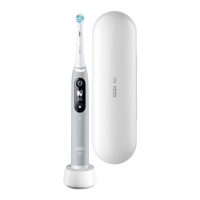
Oral-B iO6
162 pages
Print Icon
To Next Page IconTo Next Page
Loading...
91451398 _iO6_EE_75x155.indd 191451398 _iO6_EE_75x155.indd 1 23.11.20 10:0923.11.20 10:09
Stapled booklet, 75 x 155 mm, 162 pages (incl. 6 pages
cover), Cover 4c, Inhalt = black + PMS 288 C

Questions and Answers

Summary

Description

Smart Pressure Sensor (Light Ring)

Describes the Smart Pressure Sensor and its Light Ring indicator on the toothbrush handle.

Interactive Display

Details the features and functions of the toothbrush's interactive display.

Charger

Provides information about the charging unit for the Oral-B iO toothbrush.

Manage Bluetooth settings

Guides users on how to manage Bluetooth connectivity for the toothbrush.

Download Oral-B App and connect to Bluetooth

Instructions for downloading the Oral-B app and connecting the toothbrush via Bluetooth.

WARNING

Important Information

Specifications

First use

Charging and Operating

Using your toothbrush

Start Brushing

Guides on how to begin brushing with the Oral-B iO toothbrush.

Timer

Smart Pressure Sensor features (a)

Brushing modes (depending on model)

Mode setting

Interactive Display

Brush heads

Connecting your toothbrush to your Smartphone

Cleaning recommendations

Accessories (depending on model)

Travel Case (g)

Instructions for storing the toothbrush and brush heads in the travel case.

Guarantee

Environmental Notice

Information regarding proper disposal of electronic waste and batteries.

Warranty - Exclusions and Limitations

Details of the product's warranty policy, including exclusions and limitations.

LIMITATION OF LIABILITY

Legal disclaimer outlining P&G's liability regarding product use and accessories.

Warranty replacement brush heads

Conditions and recommendations regarding the use of non-Oral-B replacement brush heads.

Information

Bluetooth radio module

Technical details about the Bluetooth radio module and its reliability.

Trouble Shooting

Handle does not operate (properly) with Oral-B App.

Steps to resolve issues when the toothbrush does not operate correctly with the Oral-B App.

Handle is not operating (during first use).

Troubleshooting steps for a toothbrush that is not operating upon initial use.

Short stuttering sounds after 2 minutes or handle does not operate any timer.

Resolving issues with stuttering sounds or the timer not functioning on the toothbrush.

Handle does not charge.

Troubleshooting steps for when the toothbrush handle fails to charge properly.

Rattling;loud noise during brushing or turning on.

Addressing rattling or loud noises emanating from the toothbrush during operation.

Oral-B iO6 Specifications

General IconGeneral
BrandOral-B
ModeliO6
CategoryElectric Toothbrush
Pressure SensorYes
DisplayInteractive Display
Bluetooth ConnectivityYes
Battery LifeUp to 2 weeks
Smart ModesYes
Timer2-minute timer with 30-second intervals
Battery TypeLithium-Ion
Charging TypeMagnetic Charger
WaterproofYes
Warranty2 years
Charging Time3 hours
Brush Heads Included1
CompatibilityOral-B iO Brush Heads
Smart FeaturesAI Brushing Recognition, Real-time Feedback
TechnologyiO Magnetic Technology

Related product manuals