Manual for Tire Pressure Monitoring Systems, TPMS
16/22
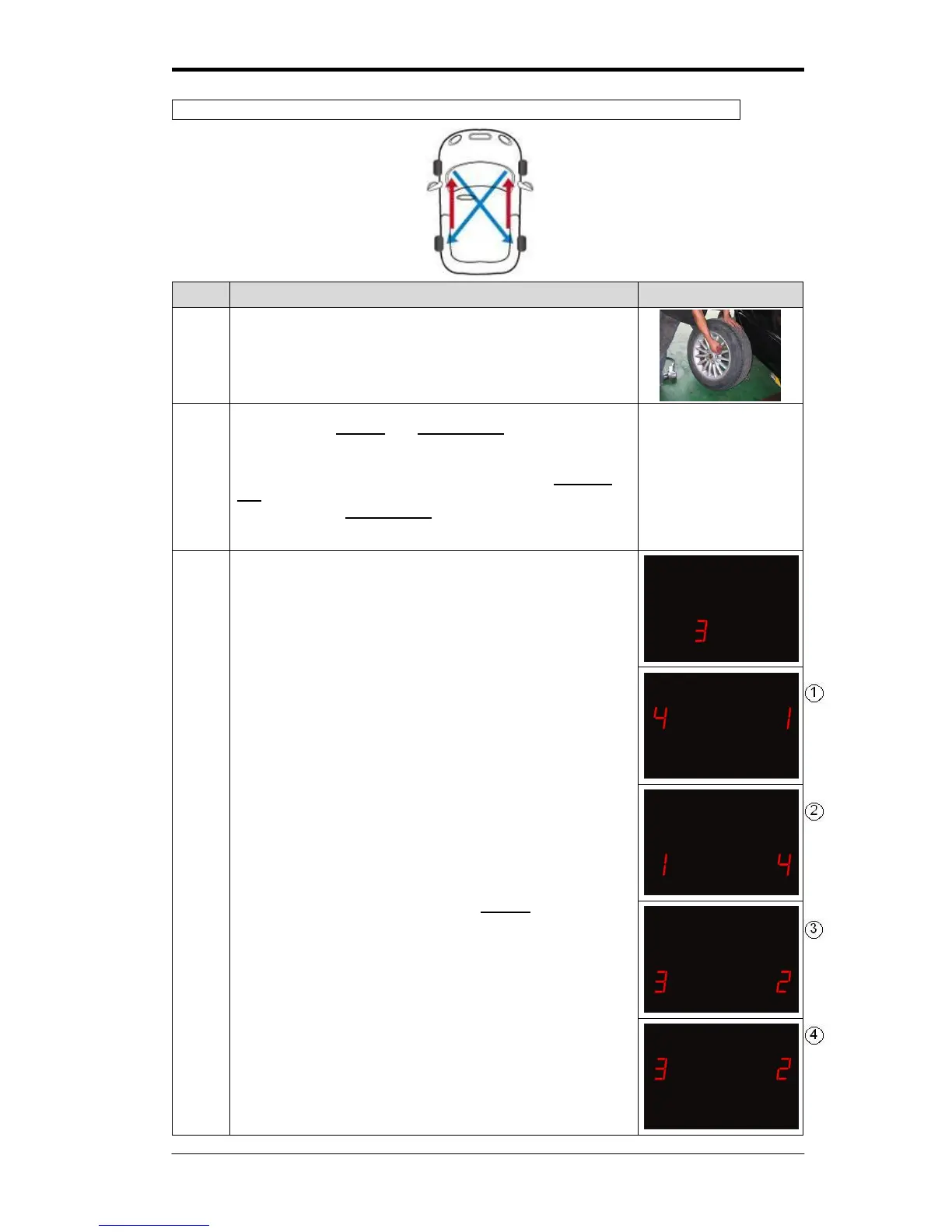
Mode 3:Front tires diagonal exchanged, and Rear tires parallel changed to Front
Rotate the front tires diagonally to the rear, and the rear tires
parallel to the front. To prevent incorrect positioning, mark
the tires.
Press both the set key and function key simultaneously for
5 seconds. The display will flash red light, and a “beep”
sound will be heard. You can release the buttons, and the
system will have entered into mode 1. Re-press function
key for 1 second and wait for “beep” then the LED will show
“2”, re-press the function key you will then see “3”, the
system will have entered into mode 3.
3-1
After entering mode 3, the display will show “3”
3-2
Numbers show in LED lights stands for tires’ ID, photograph
○
1 and
○
3 means tires position before changing,
photograph
○
2 and
○
4 means after changing.
3-3
The operator only needs to press the set key for 3 second
and listen for the “beep”. This means that mode 3 has been
chosen and will exchange all four sensors ID positions and
will automatically return the monitoring status to normal.



 To Next Page