Manual for Tire Pressure Monitoring Systems, TPMS
17/22
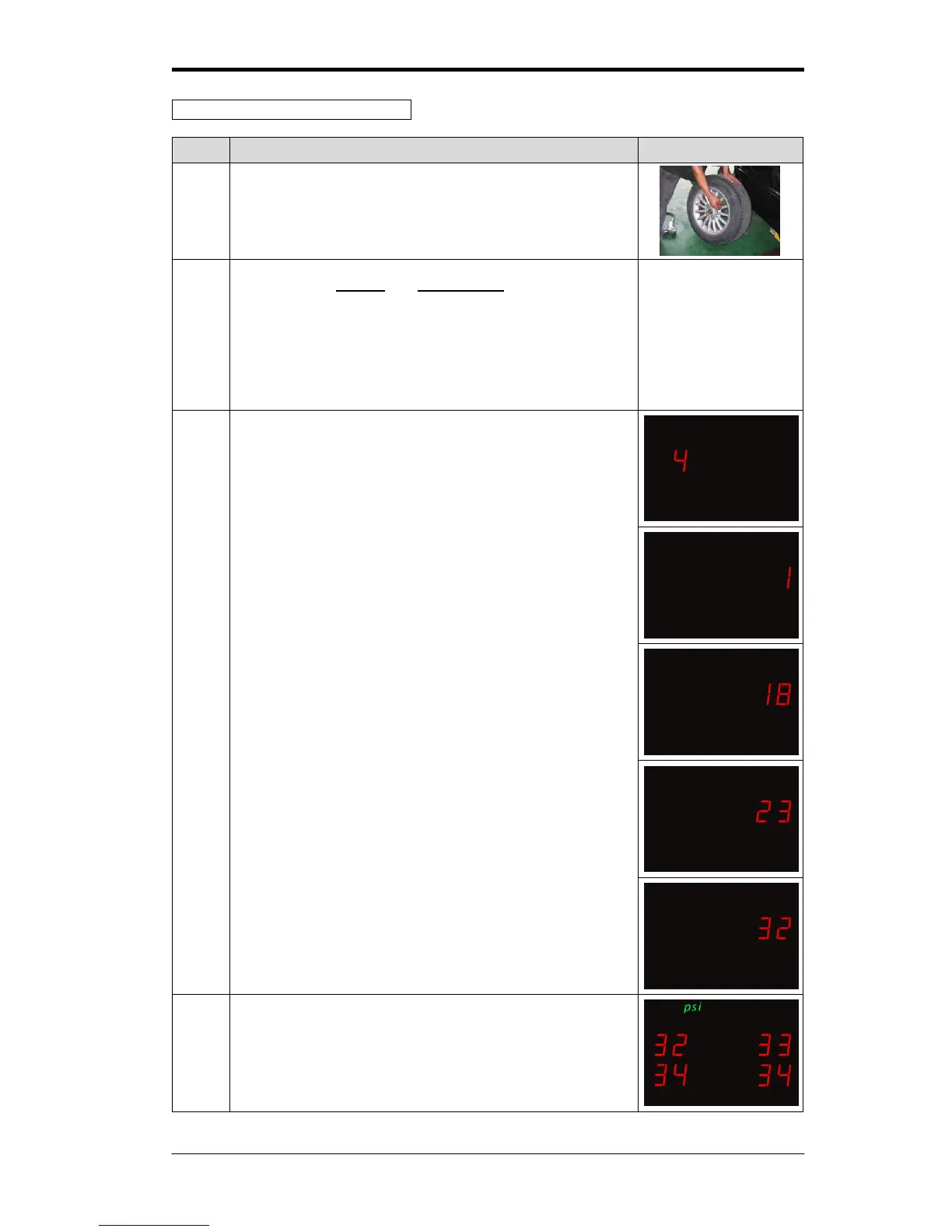
Mode 4:Random re-position tires
The tire shop will check the tire for abrasion and rotate tires
into the appropriate position.
Press both the set key and function key simultaneously for
5 seconds. The display will flash red, and a “beep” sound
will be heard. You can release the buttons the system will
have entered into mode 1. Continue to press the function
key, each time for one second and each time wait for the
beep until the display shows”4”., After entering into mode 4
the LED will show “4”.
3-1
It will take about two second after entering mode 4, and the
display will show “4”.
3-2
When Tire No.1 needs to be reconfigured, deflate Tire No.1
once below 27 psi (tire low pressure default), and wait for
the receiver to receive the signal. When tire No. 1 receives
the signal, you will hear alarm “beep”. Then, start inflate the
tire No.1, it will keep on “beep” till Tire No. 1 is completely
inflated to normal pressure.
3-3
After finishing all the steps above. In the mode 4, the
numbers will show “1” and turn to “2” automatically.
Repeat the 3-2 step above for tire No.2, No.3 and No.4
System will be back to monitoring condition automatically, and
receiver start to receive signals of tire pressure & tire
temperature.



 To Next Page