6 7
GETTING STARTED
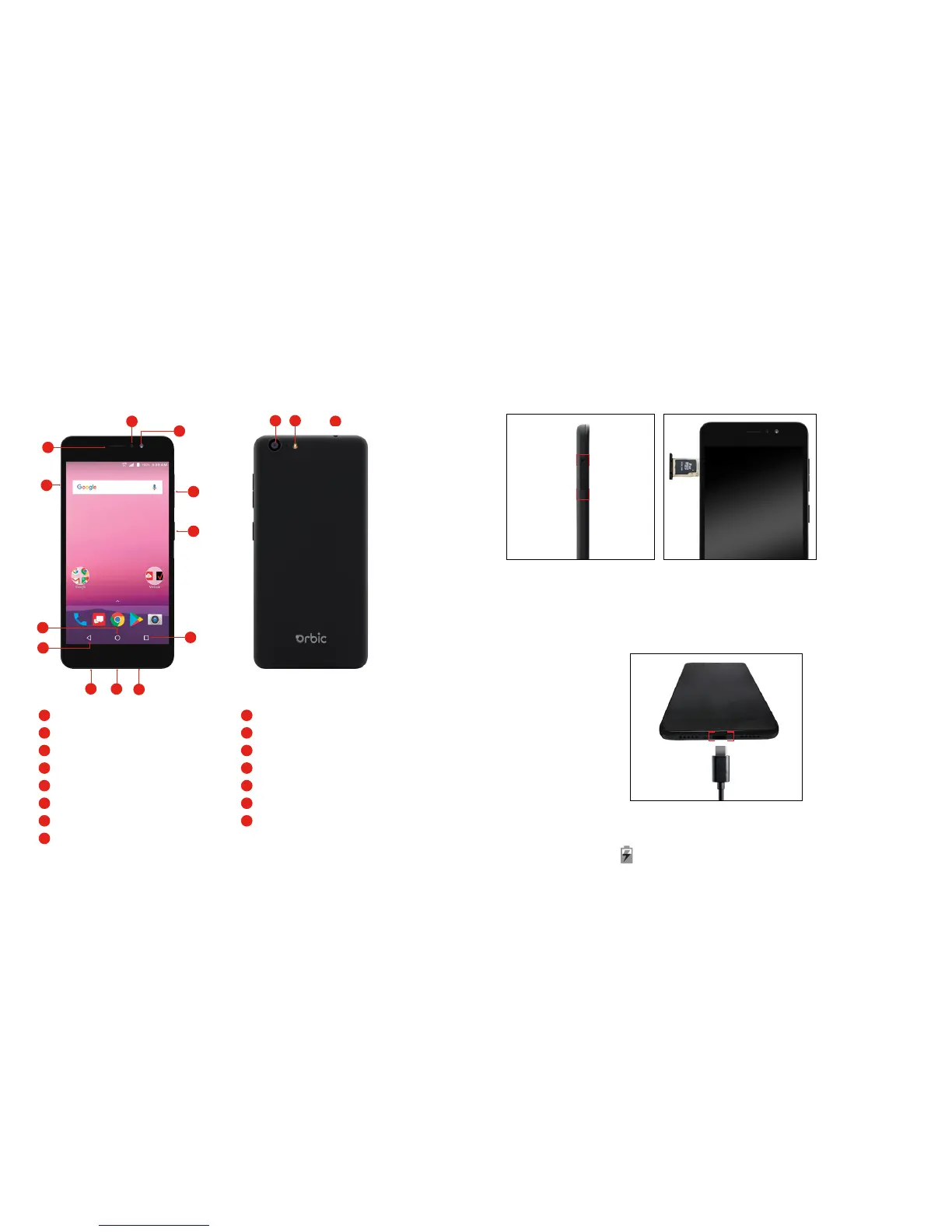
Buttons and Ports
1
Home Button
2
Back Button
3
3.5 mm Headset Jack
4
USB/Charging Port
5
Microphone
6
Recent Apps Button
7
Front Camera
8
Front Flash
9
Earpiece
10
Flash
11
Back Camera
12
Power/Lock Key
13
Speaker
14
Volume Keys
15
SIM/Micro SD card slot
1
2
4
5
6
7 3
8
9
1011
12
14
13
15
Installing the SIM Card and micro SD Card
Phone should be powered off before installing or removing SIM or micro
SD card.
Charging the Battery
While your phone’s battery should have enough juice out-of-the box to
power on, find a signal and even make a few calls, you should fully charge
the battery as soon as possible.
Connect the included USB cable to both the phone and wall charger. Plug
the wall charger into a standard electrical outlet. If the phone is on, you will
see a charging icon in the status bar.



 To Next Page