14 15
PIN/Password to unpin a screen.
THE BASICS
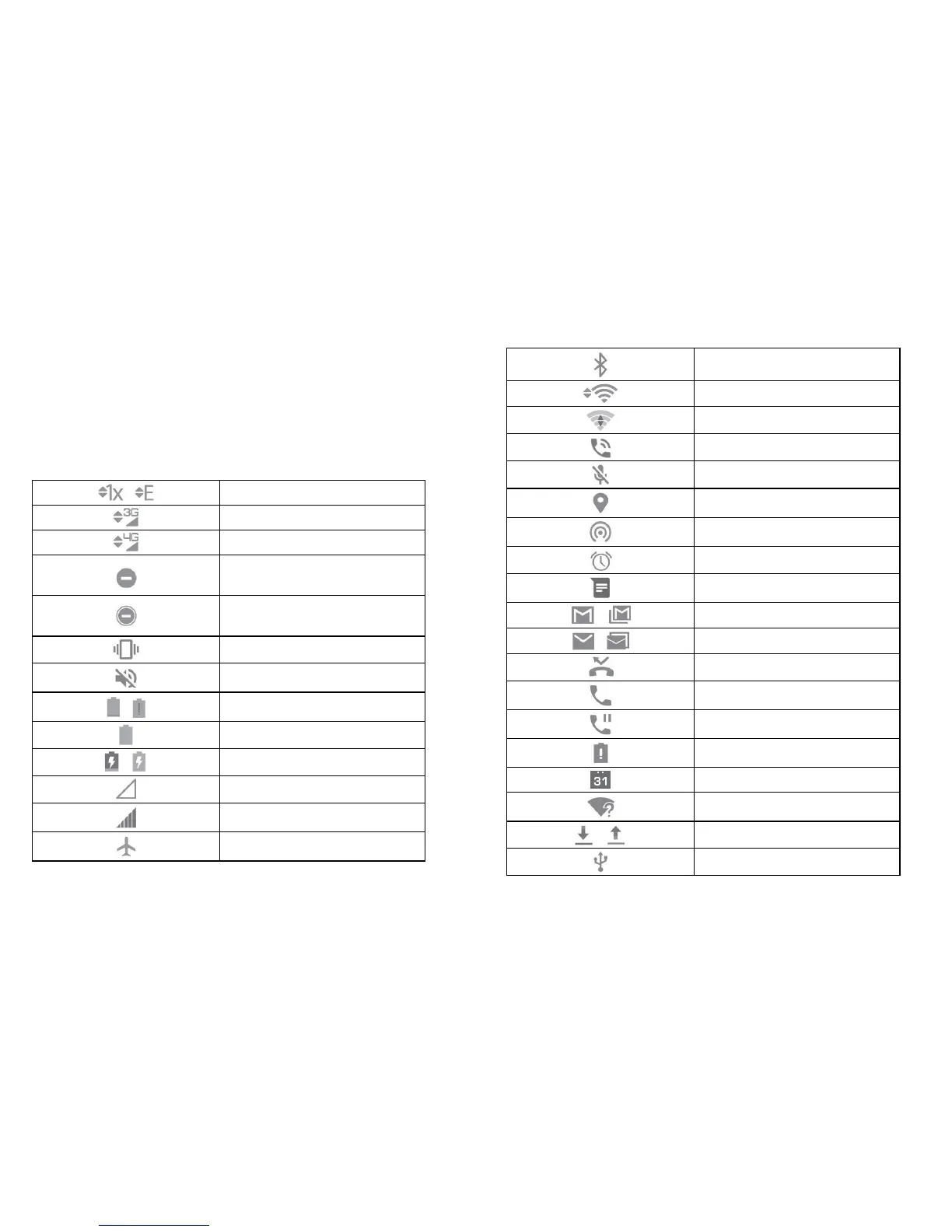
Status Bar
The Status Bar on the top of the screen provides both phone and service
status icons.
/
2G Service
3G Service
LTE Service
Do Not Disturb mode (Alarms or
Priority Only)
Do Not Disturb mode (Total
Silence)
Vibration Mode
Silent Mode
/
Battery Low
Battery Full
/
Battery Charging
No Signal
Signal Strength
Airplane Mode
Bluetooth On
Connected to Wi-Fi Network
Wi-Fi In Use
Speaker On
Phone Mic Off
GPS on
Portable Wi-Fi Hotspot Active
Alarm Set
New SMS/MMS
/
New Gmail Message
/
New Email Message
Missed Call
Call in Progress
Call On Hold
Low Battery
Upcoming Event
New Wi-Fi Network Detected
/
Downloading/Sending data
USB Connected



 To Next Page