12 13
Section 4: Additional Features
Rain Delay
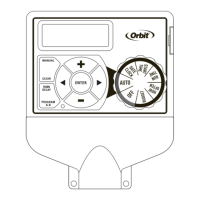
[RAIN DELAY] allows you to delay your sprinkler timer
from watering for a set period of time. Delay settings are
24, 48, and 72 hours.
• Turn dial to [AUTO]
• Press the [RAIN DELAY] button to automatically
delay watering for 24 hours.
• If a longer Rain Delay is desired, press the or [+/–]
buttons to increase or decrease the setting.
• Press [ENTER] or wait 10 seconds and the
selected rain delay will begin.
• [CLEAR] button stops the rain delay and
scheduled watering will resume.
• At the end of the selected rain delay amount of
time, automatic watering resumes.
• While in rain delay mode, the timer display
will switch between the actual time and the
remaining hours of the delay, every 2 seconds.
Water Budgeting
[BUDGET] is a simple way to adjust your watering
duration to match seasonal watering needs. Water
Budgeting works by increasing or decreasing watering
duration for all stations in each program. Adjustment
range is from 10% to 200% by increments of 10%. The
default value is 100%. The budgeting will remain on the
adjusted range until you change it.
To set budgeting:
• Turn dial to [BUDGETING].
• If using multiple programs (A or B), press the
[PROGRAM] button to move to the desired program
and make the needed adjustment.
• To adjust, press the [+/–] buttons; press [ENTER].
Manual Watering
Your timer has the ability to allow you to manually
water without disturbing the preset program.
• Turn the dial to [AUTO].
• Press the [MANUAL] button. Display will show
A B and ALL. After a few seconds or by pressing
[ENTER] the timer will begin manual watering.
• All stations will water consecutively for their
programmed duration.
Note: If the run times have not been set, the timer will not
initiate manual watering and the screen will return to the
current time.
• To specify a specific program or stations,
Press the [ ] buttons to select A or B.
• Press [ENTER] to activate.
• To select a specific station, continue pressing
the [ ]buttons until desired station number
appears.
• Press the [+/–] to enter the desired duration from
1 to 240 minutes.
• Wait 5 seconds and your station will begin.
• To stop Manual Watering press [CLEAR].
• The timer will go back to your original automatic
watering schedule.
Example: To manually water on station 3 for five
minutes, press the [MANUAL] button then press
the [ ] buttons until you see station 3; using
the [+/–] buttons, set duration to five minutes;
press [ENTER].
Note: After the [MANUAL] button has been pushed, if a
selection is not made within 5 seconds all stations and
programs will begin watering using the programmed
RUN TIMES. If no RUN TIMES have been set, nothing will
happen and the display will return to the time of day.
Connecting a Rain Sensor
• Connect the rain sensor wires to the wiring
terminal ports (yellow in color) labeled “Sensor”
(see figure 6).
Note: Refer to your rain sensor manual for specific wiring
instructions.
• Place the sensor on/off switch to the “on”
position to begin operation.
SENSOR COM
24VAC
1234
TIMER
Figure 6:
Connecting a
Rain Sensor


 To Next Page