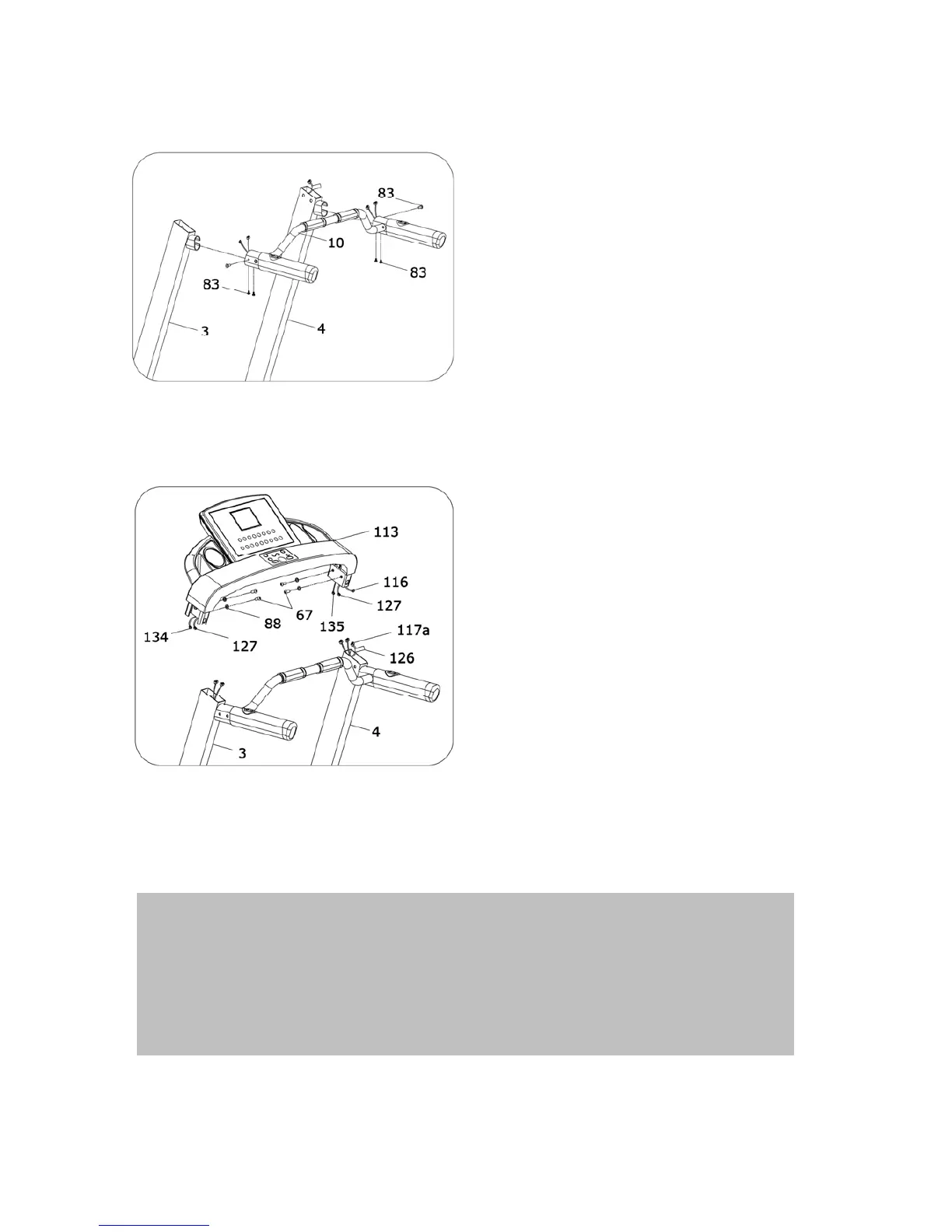
ASSEMBLY STEP 4:
1、Pull through the computer middle
wire of Handle bar tube(10) from
the left and right Upright(3,4).
Then insert the handle bar tube into
left and right upright;
2、Fix the handle bar tube(10) and
left/right upright with screw driver
and M6*16 sheet metal screw(83)
ASSEMBLY STEP 5:
1.Connect the computer upper
wire(116,127,134,135) with
computer middle wire(117a) out of
the Left/Right Upright(3,4).
Warning: Please make sure note
not to damage the wires. The
connect method is shown on
lable(126)
2.Use wrench, M10*20 screw(67)
and washer(88) to fix the computer
(113) to the left/Right Upright(3,4)
ATTENTION : Please complete all assembly instruction before
tightening and checking all bolts. Do the following operation after
checking everything is OK. Before you use the treadmill, pls read the
instruction carefully.
5



 To Next Page