Battery replacement
If the LED indication on the remote control ashes orange
once, or does nor react when you operate one of the
control buttons, the cause is probably a low battery. You do
not need to contact your installer to replace this battery.
It is a task you can easily do yourself. The battery can be
ordered from www.orcon.nl. To replace the battery, click in
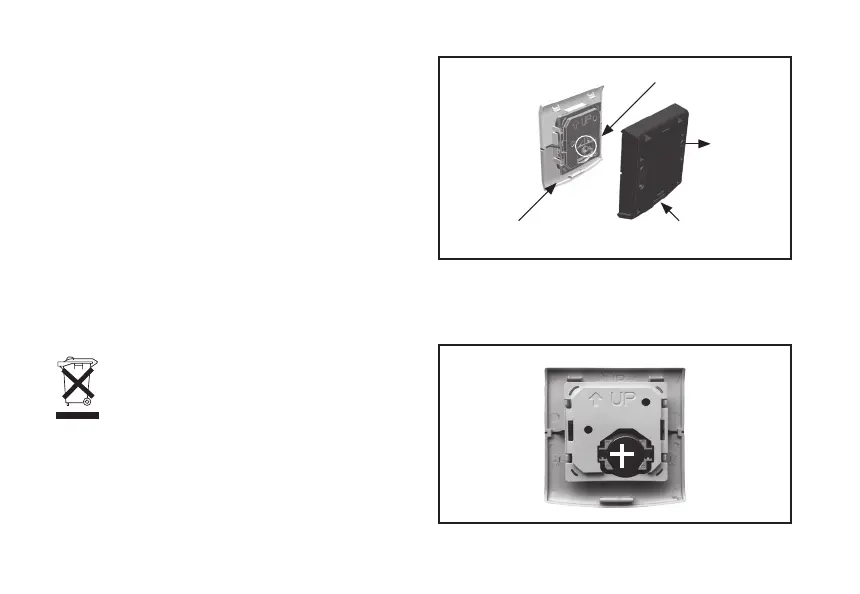
the push button on the wall frame (gure 3) of the remote
control in order to remove the upper part of the wall frame
of the remote control. Remove the old battery from the
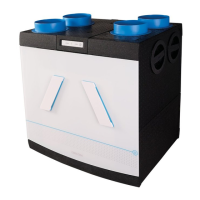
remote control. Insert the new battery with the positive
side facing you (see gure 4). Replace the protective cover
and click the upper side shut on the wall frame with
a hinge movement.
Please note: Do not throw batteries away with
household waste, instead take them to a collec-
tion point for domestic chemical waste.
Maintenance CO
2
room sensor
A CO
2
room sensor needs no maintenance during its
service life. However, operation can be affected by dirt in
the air vents. To prevent this, regularly remove dust from
the housing with a dry cloth.
7
Fig. 3 Exploded view RF remote control
Fig. 4 - Battery in remote control
Upper part
Battery position
Wall frame
Push button to open control


 To Next Page