4
PRODUCT VIEW / KEY FEATURES
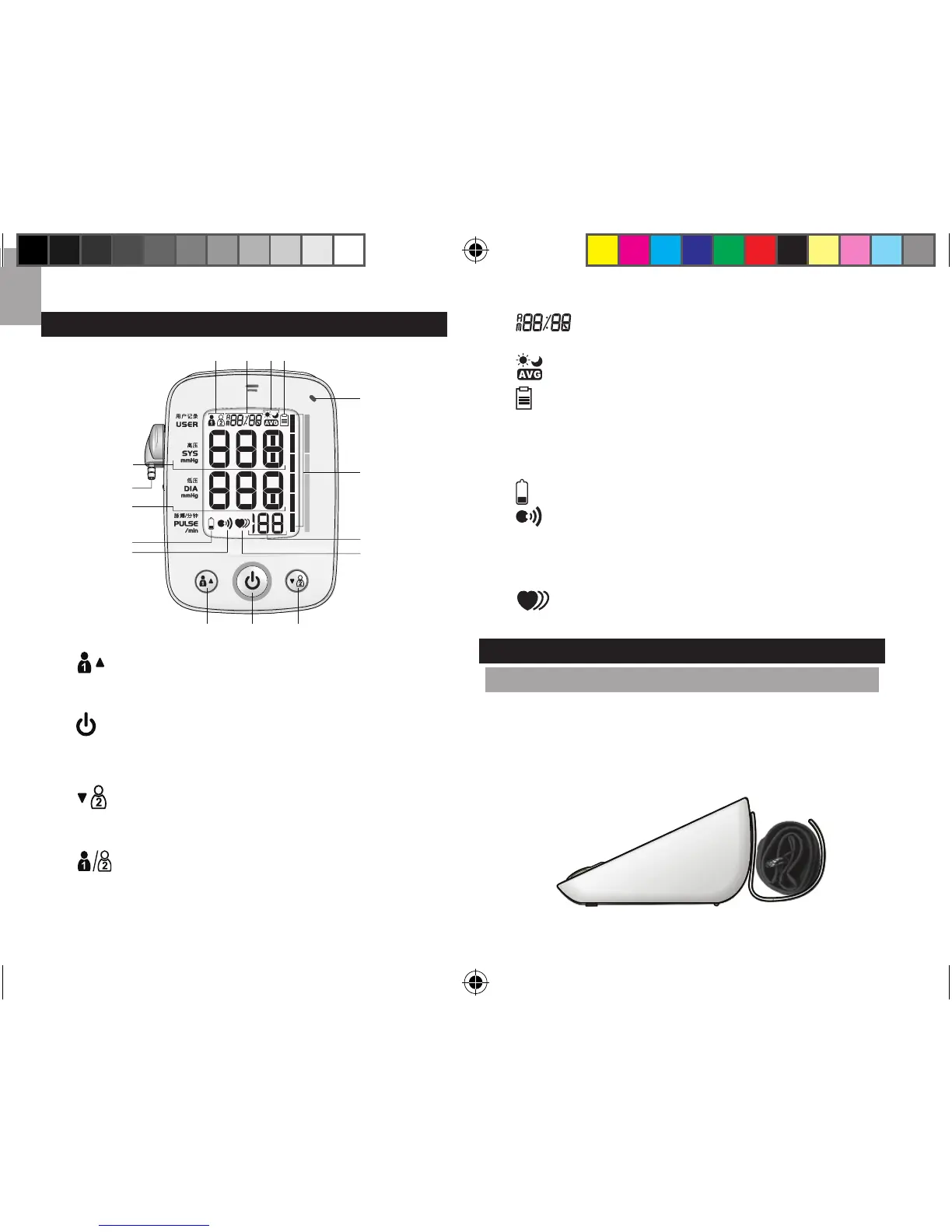
A.:starttakingbloodpressureforuser1;viewuser1
measurementrecords,viewadditional/olderrecords;
increasevalueofthesetting;togglesettingoptions
B.:turnmonitoron/off;entersettingmode;
conrm
settings;starttakingmeasurementforguest(norecord
stored); cancel measurement; conrm deletion of
individualoralldataforuser(1or2).
C.:starttakingbloodpressureforuser2;viewuser2
measurementrecords,viewadditional/olderrecords;
decreasevalueofthesetting;togglesettingoptions.
1.:indicateswhichuser(1or2)hasbeenselected
(noiconappearsforguest).
2.Pairingstatus(bLE/Err /donE);Clock;calendar;
dateandtimestamp.
3.:Averagemorning/eveningbloodpressure
4.:memoryisfull;memorymodeselected.
5. Systolicpressure
6. Airoutlet
7. Diastolicpressure
8.:monitorbatterylow
9.:voiceactivation
10.Synchronizingstatusindicatorlight
11.Bloodpressureclassicationbar
12.Heartratecounter
13.:irregularheartbeatdetected
SETTING UP THE MONITOR
ASSEMBLE THE UNIT
1. Insertthesmallendoftheairtubeintotheairoutlet
onthemonitor.
2.
Snapcuffholderintoplaceatthebackofthemonitor.
3. Placecuffintoholder.
43
6
8
7
5
9
10
11
12
13
BCA
21
BPU321OS_UM_EN_R20.indd 4 13-12-5 ��1:46



 To Next Page
 Loading...