EasyManua.ls Logo

Oricom Secure 710 - User Manual

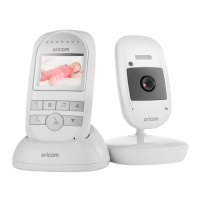
Oricom Secure 710
22 pages
To Next Page IconTo Next Page
Loading...
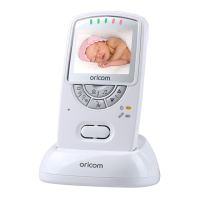
Baby Monitor
Secure 710
User Guide
KEEP THIS USER GUIDE FOR FUTURE REFERENCE
Always retain your proof of purchase in case of warranty service and register your product on line at:
AUSTRALIA: www.oricom.com.au NEW ZEALAND: www.oricom.co.nz

Questions and Answers

Oricom Secure 710 Specifications

General IconGeneral
Infrared Night VisionYes
Talk-Back FunctionYes
Temperature MonitoringYes
LullabiesYes
Zoom FunctionYes
Power Source (Monitor)Rechargeable Battery
Sound ActivationYes
Screen Size2.4 inches
Power Source (Camera)AC Adapter
Range300 meters
Display TypeLCD

Summary

SAFETY INFORMATION

Important Safety Information

Crucial safety advice for using the Oricom baby monitor, including handling and placement.

Battery and AC Adapter Safety

Details battery safety, disposal guidelines, and warnings regarding AC adaptor cables and product usage.

GETTING STARTED

Baby Unit Power Supply and Batteries

Instructions for powering the baby unit via AC adapter and battery backup, including warnings.

Connecting and Aligning the Baby Unit

Guidance on positioning the baby unit for optimal monitoring and range, maintaining distance from other devices.

Parent Unit Battery Installation

Steps for installing the rechargeable battery pack into the parent unit.

Charging the Parent Unit

Instructions for charging the parent unit, including initial charging duration and status indicators.

USING THE BABY MONITOR

Multi-Camera Registration

Procedure for registering up to four baby units (cameras) to a single parent unit.

Switching On and Basic Operation

Steps to switch on the parent unit and view the camera feed, including troubleshooting feedback.

Parent Talk Functionality

How to use the talk-back feature to communicate with the baby through the baby unit's speaker.

TROUBLE SHOOTING

Equipment Functionality Issues

Common issues like equipment not functioning or 'Out of Range' display and their solutions.

Reception and Feedback Problems

Solutions for reception interference and high-pitched noise (feedback) from the parent unit.

EXPRESS WARRANTY

Making an Express Warranty Claim

Step-by-step guide on how to make a warranty claim, including required documentation and return process.

Related product manuals