8
2-5 Battery Replacement
NOTICE: This UPS is equipped with internal batteries and user can replace the batteries without
shutting down the UPS or connected loads.(hot-swappable battery design) Replacement is a safe
procedure, isolated from electrical hazards.
CAUTION!! Consider all warnings, cautions, and notes before replacing batteries.
Note: Upon battery disconnection, equipment is not protected from power outages.
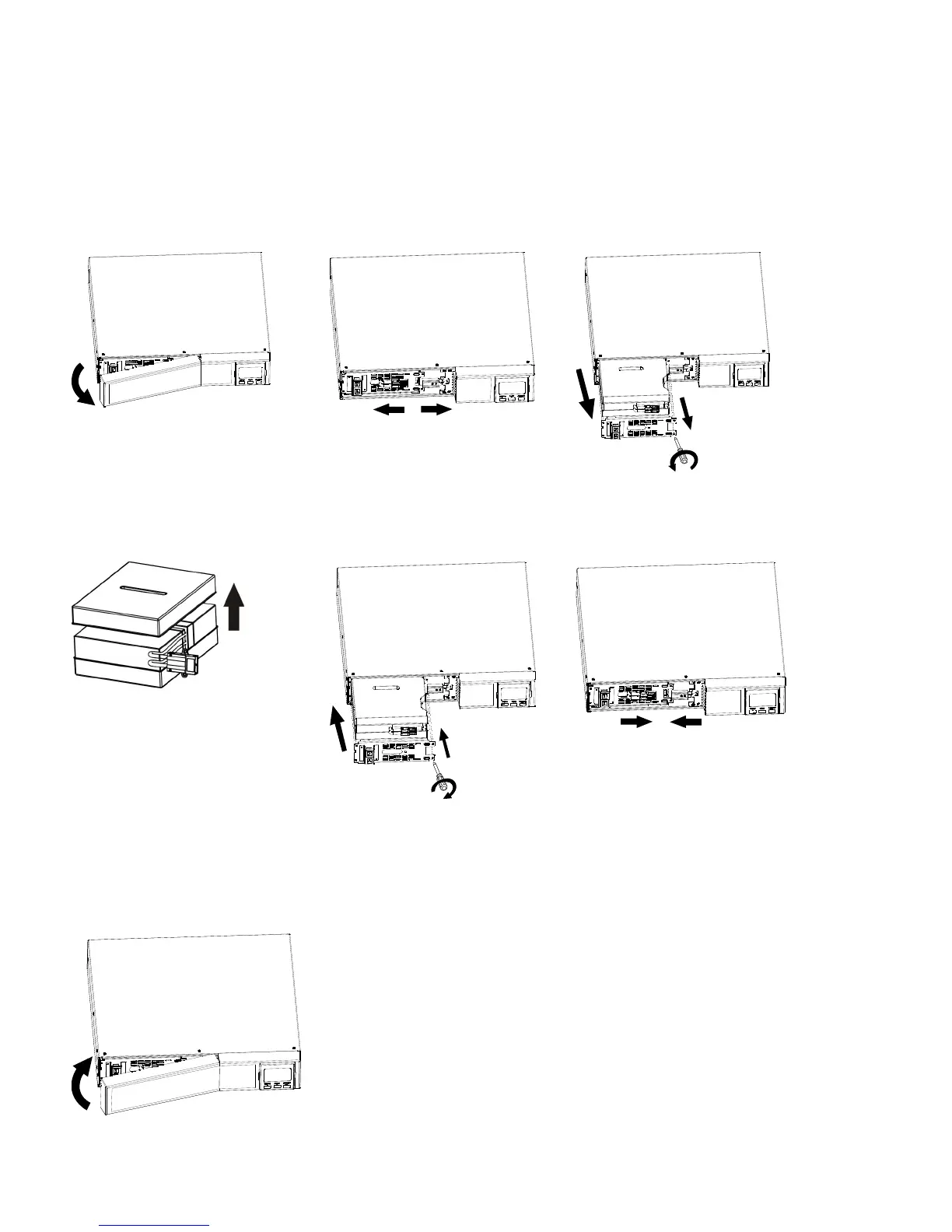
Step 1 Step 2 Step 3
Remove front panel. Disconnect battery wires. Pull out the battery box by
removing two screws on the
front panel.
Step 4 Step 5 Step 6
Remove the top cover of
battery box and replace the
inside batteries.
After replacing the
batteries, put the battery
box back to original location
and screw it tightly.
Re-connect the battery wires.
Step 7
Put the front panel back to the unit.


 To Next Page