
 Need help?
Do you have a question about the Orion XTR500.4 and is the answer not in the manual?
Lists items included: amplifier, wrenches, hardware kit, owner's manual, window decal, and birth certificate.
Warns about potential permanent hearing loss from prolonged exposure to high sound pressure levels.
Explains the input section: gain controls, crossovers, RCA connections for system integration.
Describes adjusting input sensitivity (200mV-8V) for seamless integration with any source unit.
Details using RCA line outputs for system expansion by connecting to other amplifiers.
Covers flexible, variable crossover settings to optimize audio frequencies for different speaker types.
Explains the crossover switch modes: Full, High-pass, and Low-pass, for various speaker setups.
Describes the adjustment of the low-pass crossover from 50Hz to 400Hz for subwoofer frequency control.
Details variable adjustment of the high-pass crossover from 50Hz to 5kHz (or 1.5kHz/15kHz with x10).
Explains bass boost adjustment (0dB-18dB at 45Hz) to enhance subwoofer performance.
Describes adjusting phase shift (0° to 180°) to compensate for timing differences between drivers.
Explains the function and use of the remote gain control for adjusting amplifier gain from the driver's seat.
Guides on connecting power supply wires, including gauge, fusing, and battery connections.
Details connecting speakers to amplifier outputs, noting stability to 2Ω per channel.
Illustrates and explains wiring for a four-channel stereo setup, including impedance and input configuration.
Shows and explains wiring for bridging two channels for higher power, including impedance considerations.
Illustrates and explains wiring for a three-channel setup, combining stereo and bridged outputs.
Provides guidance on selecting optimal amplifier mounting locations, considering ventilation and stability.
Offers advice for installing in the passenger compartment, emphasizing ventilation and clearance.
Recommends trunk mounting for performance, stressing adequate airflow around the heatsink.
Lists essential safety precautions: avoid vehicle wiring, secure mounting, proper fusing.
Outlines the procedure for testing the installed system to ensure proper operation and identify issues.
Guides on setting amplifier level controls and fine-tuning crossovers for optimal audio performance.
Explains amplifier indicator lights (LEDs) for diagnosing operational status and potential problems.
Provides a table of common symptoms, probable causes, and recommended actions for fixing amplifier issues.
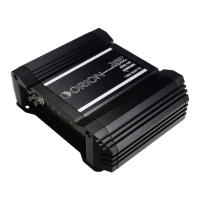
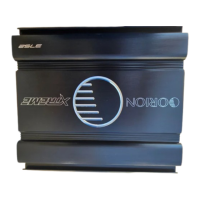
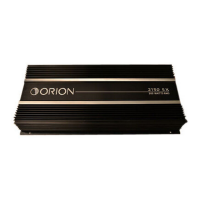
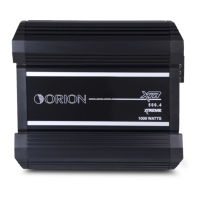
The Orion XTR amplifier series represents a line of high-performance car audio amplifiers designed to enhance the in-car listening experience. These amplifiers are engineered to provide robust power output and flexible sound customization, catering to a wide range of audio system configurations. The series includes several models: XTR500.4, XTR750.4, XTR1000.4, XTR1700.4, and XTR2500.4, each offering varying levels of power to suit different speaker setups and user preferences.
At its core, the Orion XTR amplifier serves to boost the audio signal from a source unit (like a head unit, preamplifier, or equalizer) to drive loudspeakers with greater power and clarity. The amplifiers are designed with a four-channel configuration, allowing for versatile setups such as stereo, bridged, or tri-mode operation. This flexibility enables users to power a variety of speakers, including full-range speakers, mid-range speakers, tweeters, and subwoofers, within a single amplifier.
A key functional aspect is the integrated crossover system. The XTR amplifiers feature continuously variable high-pass and low-pass crossovers, which allow users to precisely filter frequencies. The high-pass filter (HPF) attenuates low frequencies, making it suitable for mid-range speakers and tweeters, preventing them from attempting to reproduce bass notes they are not designed for. Conversely, the low-pass filter (LPF) attenuates high frequencies, ideal for subwoofers, ensuring they only reproduce the deep bass notes. A "Full" (all pass) setting is also available, bypassing the crossover for full-range speaker systems. This precise frequency management is crucial for optimizing sound quality and protecting speakers from damage due to inappropriate frequency reproduction.
The amplifiers also incorporate a level control, which acts as a gain adjustment. This allows for seamless integration with various source units, accommodating input sensitivities ranging from 200mV to 8V. Proper gain setting is vital to achieve the amplifier's full power output without introducing distortion.
For enhanced bass performance, the XTR series includes a Bass Boost feature. This control allows for continuous adjustment of bass levels, centered at 45Hz, providing an additional punch to low frequencies. Some models also feature a Phase Shift Control, which enables users to adjust the phase of the subwoofer output from 0 to 180 degrees. This is particularly useful for correcting timing differences between the subwoofer and other speakers, ensuring a cohesive and impactful bass response.
Additionally, the XTR amplifiers are equipped with RCA line outputs. These outputs facilitate easy system expansion, allowing the signal to be routed to additional Orion amplifiers in a multi-amplifier setup, creating a more powerful and complex audio system. A remote gain input is also provided, enabling the connection of an optional remote gain control. This allows the user to adjust the bass level conveniently from the driver's seat, offering on-the-fly sound customization.
The Orion XTR amplifiers are designed for user-friendly operation and flexible integration into diverse car audio environments. The end panel layouts clearly label all connections and controls, simplifying the installation and setup process.
For power connections, the amplifiers accept appropriate wire gauges (4 AWG for XTR500.4, XTR750.4, XTR1000.4, and 0 AWG for XTR1700.4, XTR2500.4) for optimal performance. The power connection input includes terminals for negative (GND), remote turn-on (REM), and positive (+BAT) connections. The remote turn-on terminal ensures the amplifier powers on and off with the source unit, while the positive terminal requires a fuse or circuit breaker for protection, installed within 12 inches of the battery.
Speaker connections are straightforward, with four positive and four negative output terminals. The amplifiers are stable to 2Ω per channel, allowing for various speaker wiring configurations, including stereo, bridged, and tri-mode. Diagrams are provided in the manual to illustrate these possible configurations, guiding users through connecting their speakers for optimal performance and impedance matching.
The crossover switch offers three modes: LPF (low pass), Full (all pass), and HPF (high pass). This allows users to quickly select the appropriate filtering for their speakers. The continuously variable nature of the low-pass and high-pass crossover frequencies (e.g., 50Hz-400Hz for LPF, 50Hz-5kHz for HPF on some models) provides fine-tuning capabilities to match the specific characteristics of the installed speakers and the acoustic environment of the vehicle.
The level controls for each channel (1 & 2 / 3 & 4) are continuous adjustments, enabling users to match the amplifier's output to the source unit's signal level, ensuring full power output without distortion. The Bass Boost and Phase Shift controls further enhance the user's ability to tailor the sound, particularly for subwoofer performance, allowing for a more integrated and impactful bass response.
The Orion XTR amplifiers are built with several features to ensure reliable operation and facilitate troubleshooting, contributing to their overall longevity.
The amplifier's top plate features three indicator lights (LEDs): Power (Green), Thermal (Red), and Protection (Red). These LEDs provide immediate visual feedback on the amplifier's status:
The manual provides a comprehensive troubleshooting guide, listing common symptoms (e.g., no output, audio cycling on and off, distorted output, fuse blowing) along with probable causes and recommended actions. This guide empowers users to diagnose and resolve minor issues without professional assistance, promoting self-maintenance.
For installation, the manual emphasizes precautions such as disconnecting the vehicle's battery ground terminal before making connections and avoiding drilling into critical vehicle components. It also recommends using appropriate tools and ensuring secure, clean connections for all wiring. The importance of proper fuse sizing is highlighted, with warnings against using higher current fuses than recommended, as this can void the warranty and damage the amplifier.
The design of the XTR amplifiers, with their robust construction and protective circuits, aims to minimize the need for frequent maintenance. However, adherence to installation guidelines, proper gain setting, and regular checks of wiring and ventilation are key to ensuring long-term, trouble-free performance.
 General
| Channels | 4 |
|---|---|
| RMS Power @ 4 Ohms | 125W x 4 |
| RMS Power @ 2 Ohms | 250W x 4 |
| RMS Power @ 4 Ohms Bridged | 500W x 2 |
| Minimum Impedance Unbridged | 2 Ohms |
| Minimum Impedance Bridged | 4 Ohms |
| THD at Rated Power | <0.05% |
| Damping Factor | >200 |
| Input Sensitivity | 200mV - 6V |
| Crossover Type | Variable High-Pass/Low-Pass |
| Crossover Frequency | 50Hz - 500Hz |
| Crossover | Yes |
| Frequency Response | 10Hz - 40kHz |
| Bass Boost | 0-12dB @ 45Hz |
| Fuse Rating | 2 x 40A |


 To Next Page