07
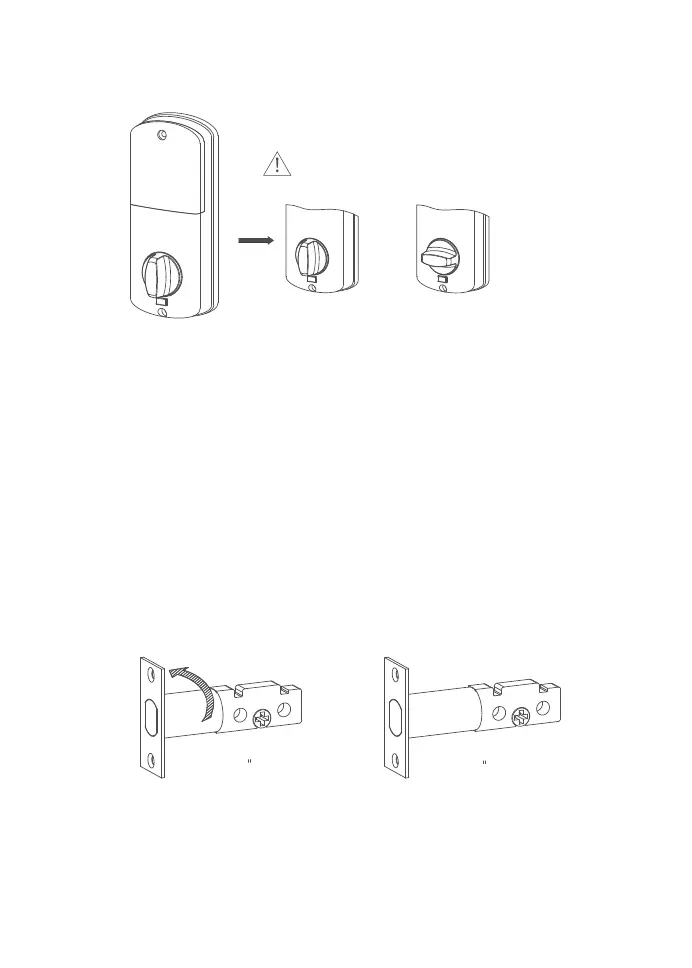
① Measure whether your door's backset is 2.36
"
[60mm] or
2.76
"
[70mm].
② Adjust the length of the deadbolt. Rotate it 180° to adjustable
to 2.36
"
[60mm] or 2.76
"
[70mm] (fit for distance of 2.36
"
[60mm] or 2.76
"
[70mm] between lock hole and door side).
③ Insert the deadbolt into the door frame and make sure the
word “TOP” faces up as indicated on the deadbolt. Screw
into the door frame with a screwdriver (not provided).
③ Turn the thumb knob to Left/Right direction
Right Open Left Open
Step 1: Install the deadbolt.
5. Installing The Smart Lock
Note: the thumb knob to Left/Right direction
180°
2
3
/
8
[60mm]
2
3
/
4
[70mm]


 To Next Page