ID: 1614 / ver. 210
4.11 Audiogram ID
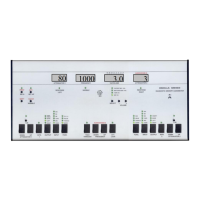
Use the SHIFT + ID
DOWN/UP buttons, to go
through the audiograms
to find one specific test.
The number is shown in the ID
display, which is the same as the
channel 2 attenuator.
4.12 Shift
All function written in red on the front panel is
ac
tivated by using the SHIFT button.
In addition you have the following possibilities:
- Shows actual ID number when held down.
- Changes “direction” of the various features, as they are so called wrap-around. If you hold down the SHIFT and
press SELECT, you will go back-wards instead of forwards, which is practical instead of having to go through all
functions to get the one you want. This options goes for the INPUT selectors as well as the FUNCTION selector and the
channel 2 OUTPUT selector.
4.13 Print
Use the SHIFT + PRINT buttons
to print the active audiogram
to a connected printer.
The light above the button will light up during the printing, and the
program automatically selects the correct symbols. If the printer is not
connected or shows an error
(e.g. out of paper), the light turns off
a couple of seconds.
For selection of printer type see special paragraph in setup.
4.14 Data
A push on the DATA button causes the device to transmit the test
results stored in the active audiogram to a connecte
d PC.
Transmission time is 0.2 seconds.
4.15 Automatic hearing tests
The program contains three different automatic tests. To choose between the three types of test, enter the SETUP
function, and change mode 5. See the SETUP section for more information.
Use the SHIFT + AUT. buttons to start 1 of 3
possible tests
The three automatic tests
20 dB test
This performs a quick automatic screening test with fixed sound pressure of 20 dB. The test chooses 1000 Hz, the
sound pressure will be set to 20 dB and increase in steps of 5 dB until the patient responds. Immediately hereafter,
the frequency changes and the sound pressure starts at 20 dB again.
20 dB RANDOM test
This is an extremely useful automatic test. It starts by selecting 1000 Hz, first at the left, then the right ear. It then
randomly selects frequency and channel in the rest of the test until all frequencies has been tested at both channels,
and thereby makes it hard for the patient to ‘cheat’. In both the 20 dB and the 20 dB random test there is a slight
variation in the duration of the tones presented, and the pause between the tones. These variations are also chosen
randomly.
When a 20 dB test is finished


 To Next Page