ID: 1614 / ver. 210
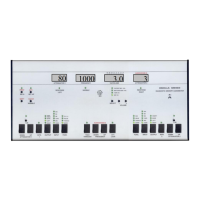
2 Description of front panel
Attenuator 1 - The actual sound pressure in dB
Frequency - The actual frequency in Hz
Vu/Volume - VU meter and volume indicator for
speech section
Audiogram Identification - The active audiogram
Attenuator 2 - The sound pressure for channel 2
Print - Prints the active audiogram
Data - Transmits the test results to a connected PC
Aut. - Starts 1 of 3 possible tests
Setup - Enters the setup function
Shift - Select the “RED” functions
Warble - This adds a frequency modulation to the
tone, at a modulation frequency of 5 Hz
- Select the volume or sensitivity to adjust
Volume - Adjust the selected volume or sensitivity
-
Change channel 1 attenuator to 1dB steps
- Push the DOWN/UP to change
Intr. 1 - Sends channel 1 signal to the patient
Output - Selects the output for channel 1
Input - Selects the input for channel 1
Func. - Selects the interrupter mode for channel 1
Talk through - Communicate with the patient
Frequency - Pushing one of the buttons changes the
frequency to the next fixed value
Audiogram Identification - Push one of the buttons
to select which audiogram to be active
- Makes attenuator 2 follow channel 1
Func. - Selects the interrupter mode for channel 2
Input - Selects the input for channel 2
- Selects the output for channel 2
- Sends channel 2 signal to the patient
Attenuator 2 - Push the DOWN/UP to change
channel 2 sound pressure
1 dB - Change channel 2 attenuator to 1dB steps


 To Next Page